02
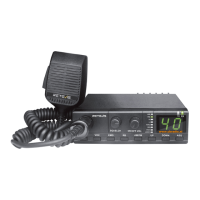
HOW TO USE THIS RADIO
1. ON/OFF-Volume
a) To turn the set on, turn the knob (1) clockwise.
b) To increase the sound level, turn the same knob fuher clockwise.
2. Squelch
Turn the SQUELCH knob (2) clockwise to the exact point where all back ground noise disappears. Please note
that this control is ne regulation,
if you set this SQ control to the maximum (fully clockwise), the radio can only receive the strongest signal.
3A. ASQ
The automatic squelch (ASQ) uses a preset average value. It can be
turned on by sho press key (3) [ ASQ ]
B. Scan function
Long press key (3) [ASQ] to sta scan, long press again to stop scan.
4. Channel selection
All channels can be selected by sho press channel selector keys (4) [UP] or [DOWN]. Long press keys (4)
[UP] or [DOWN] fast change channel. The selected channel is displayed on the LED.
5. AM/FM modulation
The key (5) [AM/FM] allows selecting the AM or FM modulation.
6. RB setting
Press the key (6) [RB] to select RB o or 1-6 group.
7. Priority Channel 9 /19
Press the key (7) [EMG] to switch among CH9,CH19 and normal channel.
8. VOX setting
Sho press (8) [VOX] to switch VOX on , and then long press to enter VOX level setting, the LED display the
level like L3, press UP or DOWN to change VOX level. and then long press VOX key again to enter VOX
setting, LED display current level like D4, press UP or DOWN to change delay level, and then long press to
return to VOX level setting, press PTT to store and quit.
9A. Key lock
Sho press(9) LOCK Key to lock all keys. press it again to unlock keys.
B. Band Select
In the power-o state, long press key (9) and turn knob (1) clockwise to enter band selection. All bands can
be selected via the channel selector keys (4) [UP] or [DOWN]. The selected band is displayed on the LED.
10.Transmitting
To transmit, press and hold the microphone PTT key and the (10) TX indicator will light on.
11.Receiving
During receiving, the RX indicator (11) will light on.
12.External speaker jack
The radio is equipped with a 3.5 mm jack socket (D) at the rear panel to connect an external speaker of 4 - 8
ohm impedance.
When the external speaker is connected, the internal speaker will switched o.



 To Next Page