4
SETTING UP THEC64 MINI
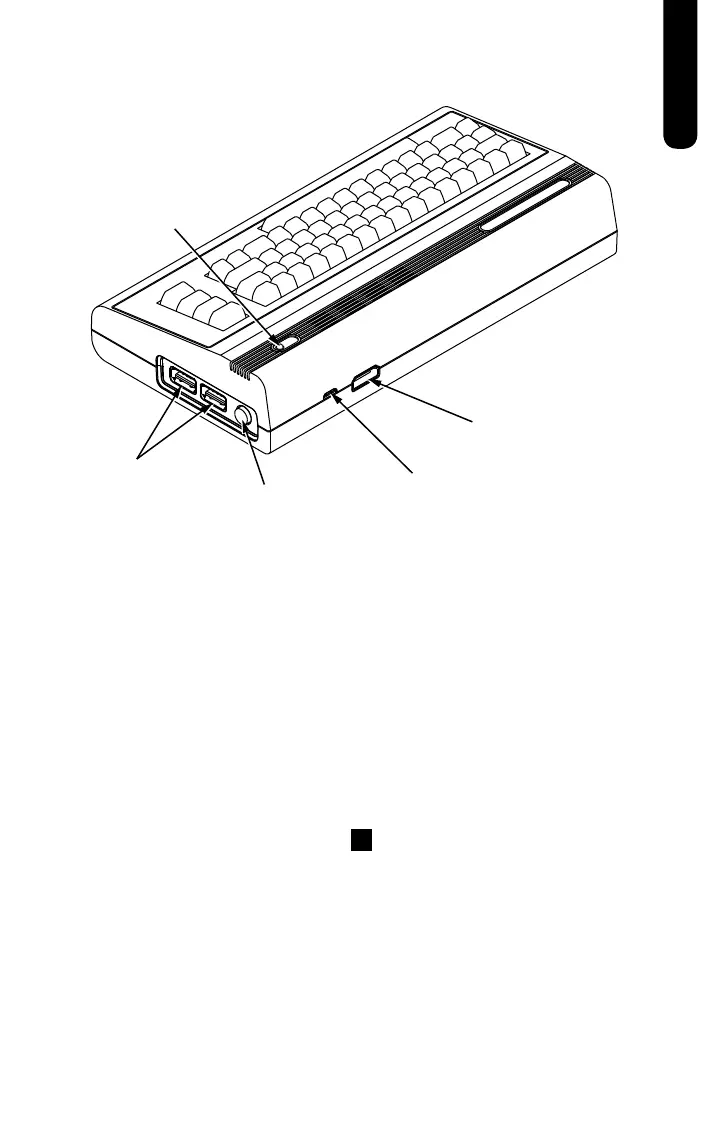
1. Ensure that your TV or Monitor is switched off before you connect
THEC64Mini
2. Connect one end of the HDMI cable into THEC64Mini, and then
connect the other end to your TV or Monitor
3. Connect THEC64 Joystick to either of THEC64Mini’s USB ports
4. Connect the supplied USB power cable into a suitable USB power
source, and then connect the other end to the Micro-USB port on
THEC64Mini
5. THEC64Mini automatically turns on and the Power LED glows red
6. Switch on your TV or Monitor and choose the appropriate HDMI
input source. You will see THEC64Mini’s Region screen*
7. Now choose your preferred language for THEC64 Mini. Having
made a selection, press the
☰
button on THEC64 Joystick to
confirm your choice
8. From THEC64Mini HOME screen, choose a game to play from the
Games Carousel
9. To turn THEC64 Mini off, press the power switch. This places
THEC64Mini into a shutdown state
10. To turn THEC64Mini back on from shutdown, press and hold the
power switch for a few seconds until the Power LED glows red
again
* THEC64Mini will remember your region choice and use it automatically from
now on. To change it later, see the OPTIONS below the Games Carousel
POWER LED
USB PORTS
POWER ON / OFF
MICRO-USB
HDMI
ENGLISH



 To Next Page
 Loading...
