
 Need help?
Do you have a question about the REV 800 and is the answer not in the manual?
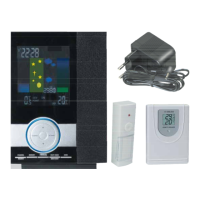
Thank you for purchasing the REV radio door chime with weather station.
Crucial safety precautions and warnings for correct and safe operation of the device.
Detailed explanation of all elements and indicators visible on the device's display.
Instructions for powering and setting up the main receiver unit.
Steps to connect and install the outdoor thermo-hygrometer sensor.
How the device automatically synchronizes time and date via radio signal.
Guide for manually adjusting the time and date if automatic synchronization fails.
Information and illustration of the moon phase display on the device.
Instructions on setting, activating, and deactivating the alarm function.
Guide to setting different time zones for world time display.
How to view historical minimum and maximum temperature and humidity readings.
Explanation of the comfort zone indicators based on temperature and humidity.
How to interpret temperature and humidity trend indicators on the display.
Steps to switch the temperature display between Celsius and Fahrenheit.
Functions for alarm repetition (snooze) and backlight activation.
Explanation of heat index and dew point measurements and their display.
Information on how the device indicates low battery levels.
How to adjust and view barometric pressure readings and units.
Explanation of the weather forecast feature and its associated symbols.
How to choose between different melodies for the chime function.
Steps to change the transmitter code to resolve interference issues.
Procedure to reset the device and clear all stored values.
Detailed technical specifications for the main station unit.
Technical specifications for the outdoor temperature and humidity sensor.
Information regarding the environmentally responsible disposal of electronic devices.
Statement of compliance with relevant European directives (CE marking).
Details on the product warranty period, terms, and conditions.
 General
| Measurement Parameters | Wind speed, wind direction, temperature, humidity, barometric pressure, rainfall |
|---|---|
| Rainfall Resolution | 0.2 mm |
| IP Rating | IP65 |
| Wind Direction Range | 0 to 360° |
| Temperature Range | -40 to +60°C |
| Humidity Range | 0 to 100% RH |
| Barometric Pressure Range | 300 to 1100 hPa |
| Power Supply | Solar panel |
| Data Logging | Internal memory |

 To Next Page