Operating Instructions 1-2
How to use the Reviber Plus 3-5
Product Specifications 6
Guarantee 6
Operating Instructions
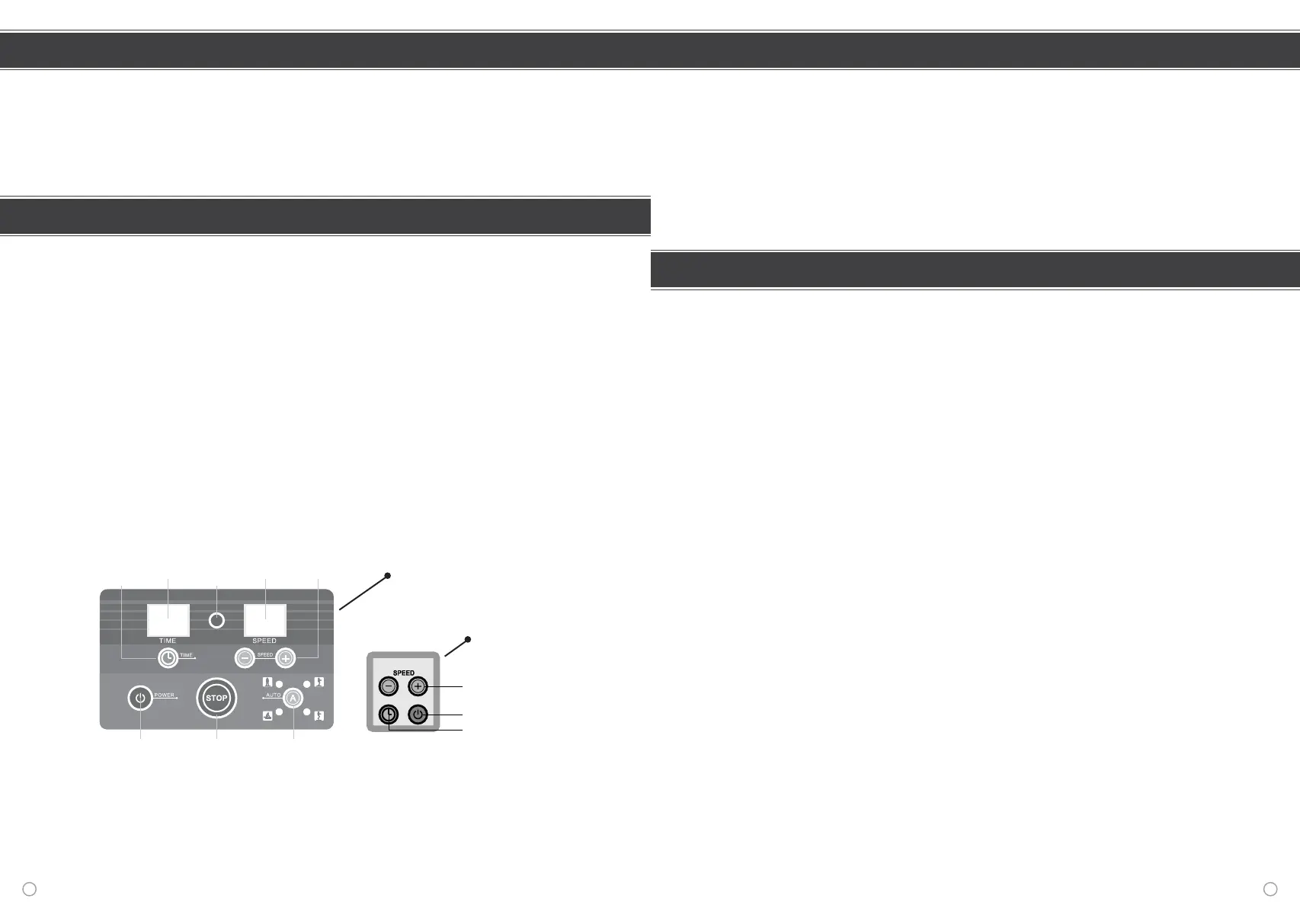
Control panel
Setting up your machine
1. Place the Reviber Plus on a flat surface. On hard surfaces this is especially important as
the motion of the machine will make a noise on an uneven surface.
2. For at least the first time of use you should ideally place the machine next to
something that you can use to help you balance, such as a chair.
3. Make sure that you place the machine so that you will be facing the control panel
when using the machine.
4. Attach the two resistance bands – one to clip on each side.
5. Attach the power lead.
6. Turn the power on at the back of the machine.
We recommend before stepping onto the machine that you familiarise yourself with the
running of the machine, the remote control and the control panel. Practise using both the
remote control and the large control panel to stop and start the machine using the following
steps:
7. To start the machine press the Power button on the large control pad or the remote
control. To stop the machine press the Stop button on the control pad or the Power
on/off button on the remote control.
8.
To increase or decrease the length of time of the exercise session press the Timing
button on the control pad or the remote control. To increase or decrease the speed of the
machine press the Speed increase/decrease button on the control panel or on the remote control.
Remote control
This product meets the highest quality standards and is CE marked. This guarantees the
Reviber Plus to be free from defects in material and workmanship, covering both parts and
labour from the date of purchase. The owner must show proof of purchase.
Conditions of Guarantee:
1. This guarantee only applies providing the product has been used in accordance with
the manufacturer's recommendations.
2. The product has been used under recommendation of the manufacturer and all
reasonable care taken, in agreement with the company.
3. Does not cover damage, malfunction or failure, resulting from misuse, neglect, abuse or
use other than that for which it was designed.
4. No repairs, alterations or modifications have been attempted, other than by an
authorised service agent, dealer or the company.
5. No additional liability is taken pursuant to this guarantee for the cost of travel or
transportation of the product or parts to or from the service agent, dealer or
company.
Dimensions: 62cm x 50cm x 18cm (h).
Voltage: 240V
Amplitude: 0 - 12mm
Frequency: 0 - 30Hz
Rated Power: 500W
Weight: 27kgs.
Maximum Load: 200Kgs / 31.5 Stone
Guarantee
Product Specifications
6 1
Contents
Speed
ON/OFF Stop Auto
Speed Buttons
ON/OFF Button
Timing Button
Remote
Control
Sensor
Speed
Display
Increase/
Decrease
Time
Time
Display


 To Next Page
 Loading...