EasyManua.ls Logo

REVV G8 Noise Gate - User Manual

REVV G8 Noise Gate
2 pages
Print Icon
To Next Page IconTo Next Page
Loading...
hear
the
silence.
Question and Answer IconNeed help?

Do you have a question about the REVV G8 Noise Gate and is the answer not in the manual?

Summary

Getting Started with the REVV G8 Noise Gate

Simple Setup Guide

Basic connection diagram for the REVV G8 noise gate pedal.

Four Cable Method Setup

Explains connecting the G8 using a four-cable method via an FX loop.

Signal Chain and FX Loop Integration

Optimizing Pedal Placement

Guidance on where to place the G8 in your guitar signal chain for best results.

Using the FX Loop

Instructions for routing the G8 through an amplifier's FX loop to minimize noise.

Advanced Noise Gating Techniques

Taming Noisy Pedals

Strategy for managing noise from specific pedals using the G8's send/return.

Two Cable Method Setup

Alternative connection diagram for FX loop usage.

Power Requirements

Overview

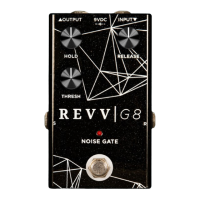
The Revv G8 Noise Gate is a guitar pedal designed to eliminate unwanted background noise and hum from your signal chain, providing a cleaner and more focused sound. It achieves this by "gating" the signal, meaning it cuts off the sound when it falls below a certain threshold, effectively silencing noise during pauses in playing.

Function Description:

The G8 Noise Gate features several controls to fine-tune its operation:

  • Input (1): Connect your guitar or the output of other pedals here.
  • Output (2): Connect this to your amplifier's input or the next pedal in your chain.
  • Hold (3): This knob controls how long the gate remains open after the signal drops below the threshold. A longer hold time can prevent choppy cut-offs during sustained notes or chords.
  • Release (4): This knob determines how quickly the gate closes once the signal falls below the threshold. A faster release can create a more immediate cut-off, while a slower release can sound more natural.
  • Thresh (5): The "Threshold" knob sets the level at which the gate opens. When your signal exceeds this level, the gate opens, allowing sound to pass. When it falls below, the gate closes. This is the primary control for eliminating noise.
  • Return (6): Used in conjunction with the "Send" jack for FX loop integration or gating noisy pedals.
  • Send (7): Used in conjunction with the "Return" jack for FX loop integration or gating noisy pedals.

Important Technical Specifications:

  • Voltage: 9VDC (isolated center negative power supply).
  • Maximum Voltage: 12VDC.
  • Current Requirement: 50mA.

Usage Features:

The G8 Noise Gate offers versatile setup options to accommodate various signal chain configurations:

  1. Simple Setup:

    • Guitar -> G8 Input
    • G8 Output -> Amplifier Input
    • This is the most basic setup, placing the G8 first in the signal chain to clean up the guitar's direct signal.
  2. Four Cable Setup (Preferred for FX Loop Required):

    • Guitar -> G8 Input
    • G8 Send -> Amplifier FX Loop Return
    • Amplifier FX Loop Send -> G8 Return
    • G8 Output -> Amplifier Input
    • This advanced setup utilizes the amplifier's FX loop to gate noise generated by the amplifier itself, as well as the guitar. It's often preferred for comprehensive noise reduction.
  3. Gate Noisy Pedals:

    • Guitar -> G8 Input
    • G8 Send -> Noisy Pedal Input
    • Noisy Pedal Output -> G8 Return
    • G8 Output -> Amplifier Input
    • This configuration is ideal for isolating and gating noise from specific noisy pedals (e.g., high-gain distortion pedals) without affecting the overall signal chain. The G8 "sees" the guitar signal and responds accurately while taming the pedal's noise.
  4. Two Cable Setup (Preferred for FX Loop Required):

    • Guitar -> G8 Input
    • G8 Output -> Amplifier Input
    • This setup is similar to the simple setup but implies the use of an FX loop for other effects, with the G8 placed before them.

Getting Started & Fine-Tuning:

  • Power: Always use an isolated 9V center negative power supply.
  • Initial Setup: Start by engaging the G8 and slowly turning up "Thresh" until background noise is eliminated. Set "Release" to where your guitar's sustain feels natural, and "Hold" at minimum. This provides a good starting point.
  • Signal Chain Placement: While often placed first, the G8 can be placed after noisy pedals (compressors, overdrives) if they are the primary source of noise. However, avoid placing it after modulation or time-based effects (delay, reverb, tremolo) to maintain their fidelity. This also applies when using the G8 in an amplifier's FX loop.
  • FX Loop Integration: If your amplifier has an FX loop, routing the G8's send and return through it (using the four-cable method) can effectively remove noise generated by the amp itself. Ensure the G8 is inserted before any time-based effects in the loop.
  • Gating Noisy Pedals: For particularly noisy pedals, placing them within the G8's send/return loop (as described in setup #3) allows the gate to respond accurately to your guitar signal while taming the pedal's inherent noise.

Maintenance Features:

  • Warranty: Revv Amplification offers a one-year warranty on all new products purchased directly or through authorized dealers. This covers defective workmanship or materials.
  • Warranty Claim: To claim your warranty, you must fill out the form on the Revv Amplification website (WWW.REVVAMPLIFICATION.COM/WARRANTY) within 30 days of purchase.
  • Exclusions: The warranty does not cover shipping costs, product appearance, or damages caused by accident, abuse, alteration, or misuse.

REVV G8 Noise Gate Specifications

General IconGeneral
BrandREVV
ModelG8 Noise Gate
CategoryMusic Pedal
LanguageEnglish