8
9
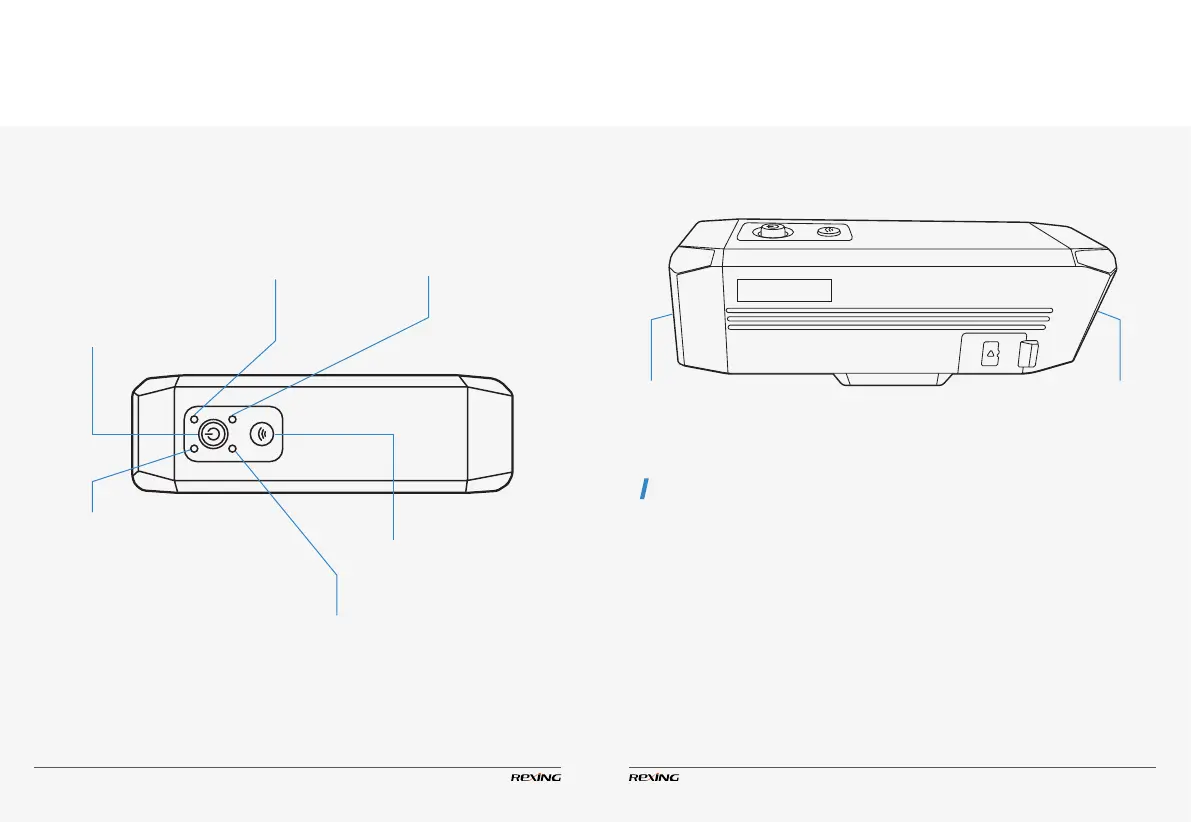
Denition of Indicator Lights, Keys
and Camera Vibration
White Indicator
Slow ashing - Under duplex or simplex recording
Quick ashing twice - Remote shooting and lock
Quick ashing for 5 times - Formatting
ON - Standby
Green Indicator
Quick Flashing - Battery level lower than 30%
Slow Flashing - Battery level at 30% - 49%
ON - Battery level over 50%
Red Indicator
OFF - Fully charged
ON - In charging
Front Camera Rear Camera
Blue Indicator
OFF - Wi-Fi is o
Slow Flashing - Waiting to be connected
ON - Wi-Fi is connected.
Wi-Fi Key
Press - Turn on Wi-Fi
Press & Hold - Turn o Wi-Fi
Power Key
Press - Start/stop video recording
Press & Hold - Turn on/o the device
2CH FHD
1 The device turns on. To turn on the
action camera, release the key once it
vibrates.
2 The valid operation: starting/stopping
video recording, Wi-Fi, etc. (excluded shut-
down and formatting)
3 Remote operation
1
Memory card formatted.
2 Device error.
Power o (including manual, automatic,
and low battery shutdown)
Camera Vibration
Vibrating once
Vibrating for 5 times
Long vibration for 2 times


 To Next Page