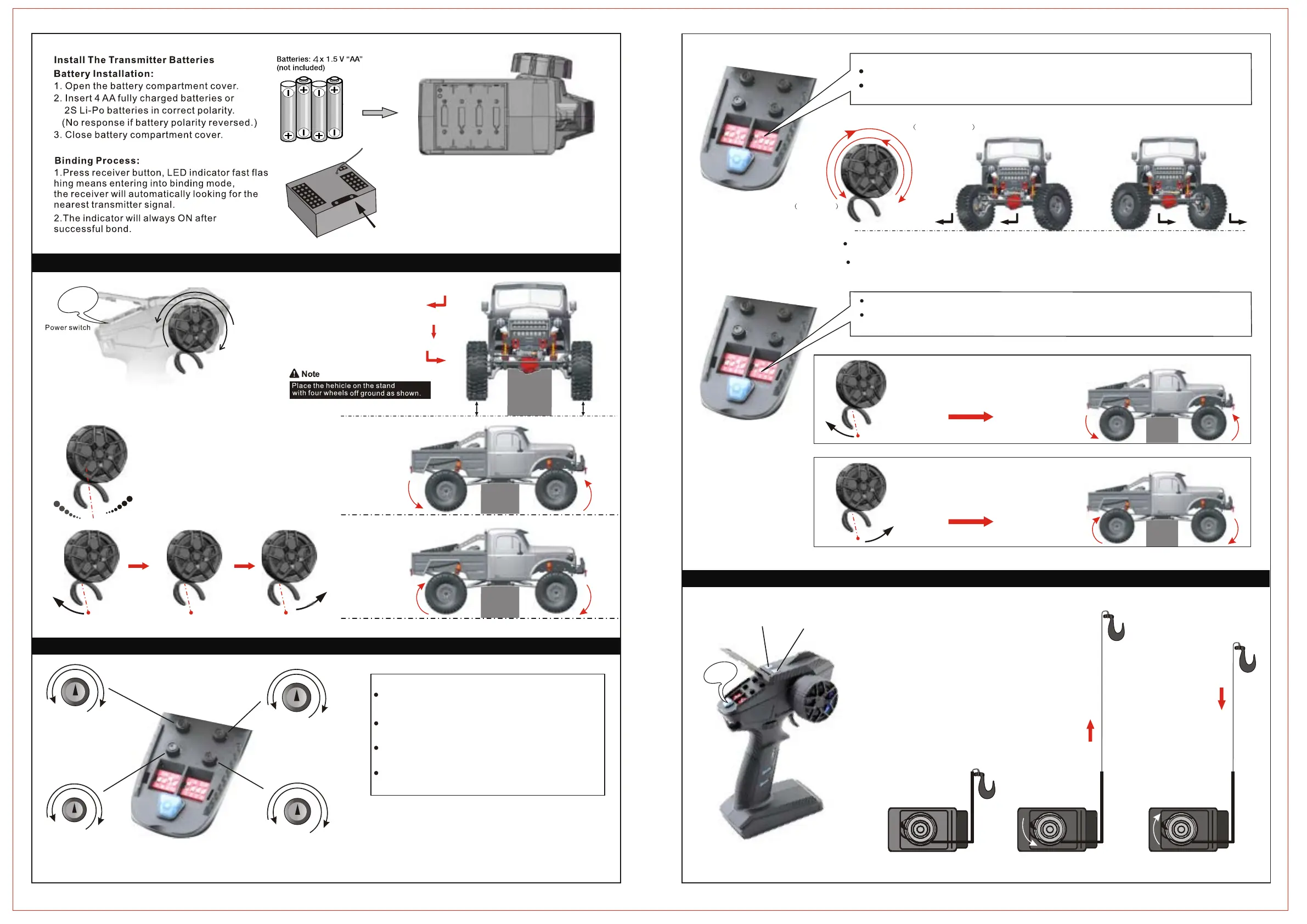
(Steering D/R)
(ST.TRIM) (TH.TRIM)
1.Move the control wheel to the left,
vehicle turns left.
2.Do not move the control wheel,
the front wheels are aligned and
the vehicle goes straight in line.
3.Move the control wheel to the
right, vehicle turns right.
0
1
1
2
2
3
3
0
1
1
2
2
3
3
0
50
75
25
100
0
50
75
25
100
The ST.TRIM is the trims for Ch1(steering),You can trim the
ST.TRIM / R :
ST.TRIM / L :
Steering Trim until it fulfills your desired steering angles.
ST.D / Ris for servo travel adjustment,which can be
multiplexed as CH2 (throttle).
ST.D / R +: increase ser vo travel.
ST.D / R -: decrease ser vo travel.
(Throttle D/R)
TH.D / R +: increase throttle travel.
TH.D / R -: decrease throttle travel.
TH.TRIM / R:
TH.TRIM / L:
Note:
Please trim the Throttle Trim (TH. Trim) until the vehicle
stops in case the vehicle goes forwards or backwards
itself just after it is turned on.
If the front wheels are not aligned,please trim"steering
trim" (ST.TRIM) until they are aligned.
09
08
Forward Reverse
Brake
Neutral /
Throttle trigger,
has a total throw of 12 degrees,
12.5 degrees forward,
Forward
Reverse
Forward
Reverse
Neutral
and 12.5 degrees backward
TH.REV
Channel Reverse
The heavier you pull or push the trigger,
the faster acceleration will be.
Vehicle going forward
(Throttle Rev. at Normal position)
Vehicle going backwards
(Throttle Rev. at Reverse position)
The ST.REV switches are the reverse buttons for Ch1.
If the switch is up it indicates reverse,
and the down Indicates normal.
Left Anti-clockwise
Steering Trim(ST. Rev) is used to reverse the direciton of servo movement.
Vehicle turning left when the control wheel is turned to the left
(Steering Rev. At Normal position)
Vehicle turning right when the control wheel is turned to the right (Steering Rev. at Reverse position)
The TH.REV switches are the reverse buttons for CH2. If the switch is up it indicates reverse, and the down
indicates normal.
The Throttle Rev. is used to reverse the direction of motor rotation.
ST.REV
5-2. Transmitter Steering Trim and Throttle Trim
5-3. Transmitter Steering and Throttle Instruction
Note: Release the throttle trigger button,
activate the brake mode automatically.
(Only for Crawler)
08
Bine
ON
ON
Left
Right
Wheel Angle
Steering wheel is
35 degrees From center to left or right
the maximum rotation of the
Increase adjustment step Increase adjustment step
Decrease adjustment step Decrease adjustment step
CH1
CH2
CH3
CH3
CH4
CH4
Right clockwise
1. Press and hold CH3 button (LED is on), the winch turns
in anticlockwise, the hook stretches, release the button,
the stretch action stops.
Note: the hook requires external force to stretch.
2. Press and hold CH4 button (LED is on), the winch turns
in clockwise, the hook contracts. Release the button, the
contract action stops.
Warning: The hook contracts 15kg in maximum
(flat surface), if surpass, the winch servo and wire
will be damaged.
5-4 Servo Winch Hook Function
Winch Servo


 To Next Page
 Loading...