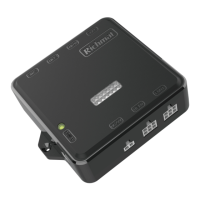
This document describes the Richmat HJC56 Ble control box, designed for adjustable bed systems.
Function Description
The HJC56 Ble control box is capable of controlling up to four motors, offering BLE (Bluetooth Low Energy) control and a memory function. It facilitates various bed positions and massage functions through a remote control.
Motor Control:
The control box enables the movement of bed motors to predefined positions such as TV, LOUNGE, ZG (Zero Gravity), and SNORE. It also allows for independent extension and retraction of the back and leg motors.
Memory Function:
The system supports memory positions (M1 and M2). Users can save their preferred bed positions by pressing and holding the FLAT button while simultaneously pressing the desired memory button (TV, LOUNGE, ZG, M1, or M2). The buzzer will sound, and the backlight will flash to confirm the position has been recorded. These memory positions are retained even after a power failure.
Massage Functions:
The control box supports both head and foot massage motors.
- Head Massage: Pressing the head massage button activates the head massage motor in "CONSTANT" mode. Subsequent presses increase the vibration intensity through three levels. After reaching the maximum intensity, pressing the button again turns off the massager. The default operation time is 30 minutes.
- Foot Massage: Similar to the head massage, pressing the foot massage button activates the foot massage motor in "CONSTANT" mode. Subsequent presses increase the vibration intensity through three levels. After reaching the maximum intensity, pressing the button again turns off the massager. The default operation time is 30 minutes.
- Massage Mode Adjustment: After a massager is turned on, the massage motor mode can be adjusted by pressing the dedicated button. It cycles through "PULSE," "WAVE," and "CONSTANT" modes.
- Reuse Function Button: If any massager is active, pressing this button turns off all massagers. If no massager is active, it sets the working time for the next massage motor operation to 10, 20, or 30 minutes, indicated by two lights. The maximum timing is 30 minutes.
Additional Features:
- Bed Bottom Lamp: The control box can turn the bed bottom lamp on or off, with a default off time of 5 minutes.
- Flashlight: A dedicated button on the remote control activates a flashlight when pressed and turns it off when released.
- Motor Reset: A "FLAT" button on the remote restores the motor to its reset position. The control box automatically performs a reset operation upon power-on.
- Partner Control: The "Partner Control" key offers three options for controlling different beds or sections:
- Press once: The -10min light on the left side of the decorative strip lights up, allowing control of bed A.
- Press again: The -20min light on the right side of the decorative strip lights up, allowing control of bed B.
- Press again: Both -10min and -20min lights light up, allowing control of both bed A and bed B.
Important Technical Specifications
- Motor Support: Up to 4 motors.
- Control: BLE control available.
- Memory Function: Yes.
- Color: Black.
- Dimensions:
- Length: 109.2 mm
- Width: 38 mm
- Height: 136.7 mm
- Overall dimensions (including mounting brackets): 119.2 mm x 83.7 mm
Fixed Position Sizes (mm):
| Position |
Head (mm) |
Foot (mm) |
| ZG |
49 |
125 |
| LOUNGE |
127 |
83 |
| TV |
149 |
94 |
| SNORE |
30 |
0 |
Usage Features
Remote Control Operation:
The remote control features clearly labeled buttons for various functions:
- Position Buttons (TV, LOUNGE, ZG, SNORE): Press to move the bed to the corresponding fixed position.
- Motor Movement Buttons (HEAD UP/DOWN, FOOT UP/DOWN): Press to extend or retract the back and leg motors. Release the button to stop the motor.
- Memory Buttons (M1, M2): Press to move the bed to saved memory positions.
- FLAT Button: Restores the bed to a flat position and is used in conjunction with other buttons to save memory positions.
- Massage Buttons (HEAD MASSAGE, FOOT MASSAGE, MODE): Control the head and foot massage functions and adjust massage modes.
- TIMER/ALL OFF Button: Controls massage timing and turns off all massagers.
- BED BOTTOM LAMP Button: Turns the bed bottom lamp on/off.
- FLASHLIGHT Button: Activates the flashlight.
- PARTNER CONTROL Button: Cycles through control modes for different beds (A, B, or A+B).
Coding Method (Pairing Remote with Control Box):
- Pairing with Control Box A:
- Press the "Partner Control" button until the -10min light on the left side of the decorative strip lights up.
- Then, simultaneously press the "HEAD UP" (button 4), "FOOT UP" (button 8), and the "FLAT" button (control box code key).
- The buzzer will sound, indicating successful pairing with control box A.
- Pairing with Control Box B:
- Press the "Partner Control" button again until the -20min light on the right side of the decorative strip lights up.
- Then, simultaneously press the "HEAD UP" (button 4), "FOOT UP" (button 8), and the "FLAT" button (control box code key).
- The buzzer will sound, indicating successful pairing with control box B.
- Default Mode: When the remote control is powered off, the default mode is A+B.
- Reset Function: The control box has a reset function for the code key.
Installation:
Before powering on, ensure all accessories are properly installed according to the system configuration diagram provided in the manual.
Maintenance Features
FCC Compliance:
This device complies with Part 15 of the FCC Rules, ensuring it operates without causing harmful interference and accepts any interference received.
Troubleshooting Interference:
If the equipment causes harmful interference to radio or television reception, the user is encouraged to try the following measures:
- Reorient or relocate the receiving antenna.
- Increase the separation between the equipment and receiver.
- Connect the equipment into an outlet on a circuit different from that to which the receiver is connected.
- Consult the dealer or an experienced radio/TV technician for help.
Important Note: Any changes or modifications not expressly approved by the party responsible for compliance could void the user's authority to operate the equipment.

 Need help?
 General

 To Next Page