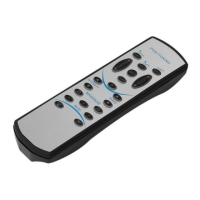
This document describes the Richmat HJH55 Ble Handset, a remote control designed for adjustable beds, offering a variety of functions for positioning, massage, and lighting. The handset is designed for ease of use with clearly labeled buttons and includes features for memory, timing, and different operational modes.
Function Description
The remote control provides comprehensive control over an adjustable bed system. Key functions include:
- Bed Bottom Lamp Control (1): Toggles the bed bottom lamp on or off, providing constant light.
- Flashlight and Reuse Function (2): Activates a flashlight for 15 seconds by default. This button also serves a crucial "reuse" function for memory and reset operations.
- Memory Mode Activation: Press and hold for 5 seconds until the backlight flashes to enter memory mode. Within 2 seconds, pressing ZG, SNORE, TV, M1, or M2 will trigger a "dididi" sound, indicating that the current motor position, massager, and light bar status have been saved to that preset. These settings are retained even after a power failure.
- One-Key Release Mode Reset: Simultaneously press and hold M1 and the flashlight button for 3 seconds. The backlight will flash twice, and all keys on the remote control will enter one-key release mode, resetting all memory positions to factory defaults.
- Continuous Pressing Mode Activation: Simultaneously press and hold FLAT and the flashlight button for 3 seconds. The backlight will flash three times, and all buttons on the remote control will enter continuous pressing mode. Releasing the button stops the motor.
- FLAT One-Key Reset (3): Retracts all motors to their minimum stroke position, turns off the bed light, and stops the massager. Note that the massager state is not reset after a power on.
- Head Motor Control (4, 7):
- Extend (4): Extends the head motor.
- Retract (7): Retracts the head motor.
- ZG Position (5): Moves the bed to the Zero Gravity (ZG) position, which has an initial value.
- Multiplexing Function for ZG: Long press the flashlight for about 5 seconds until the backlight flashes. Within 2 seconds, press ZG. The buzzer will sound 3 times, recording the current motor position, massager, and light bar status to the ZG preset. This memory is not cleared after a power failure.
- Foot Motor Control (6, 9):
- Extend (6): Extends the foot motor.
- Retract (9): Retracts the foot motor.
- SNORE Position (8): Moves the bed to the SNORE position, which has an initial value.
- One-Key Release Mode Timing: When in one-key release mode, if timed for 15 minutes, the bed will level, and the massager will turn off. Pressing any key exits the timing. Continuous pressing mode does not have timing.
- Multiplexing Function for SNORE: Long press the flashlight for about 5 seconds until the backlight flashes. Within 2 seconds, press SNORE. The buzzer will sound 3 times, recording the current motor position, massager, and light bar status to the SNORE preset. This memory is not cleared after a power failure.
- M1 Position (10): Moves the bed to the M1 position, which has an initial value of 0.
- Multiplexing Function for M1: Long press the flashlight for about 5 seconds until the backlight flashes. Within 2 seconds, press M1. The buzzer will sound 3 times, recording the current motor position, massager, and light bar status to the M1 preset. This memory is not cleared after a power failure.
- TV Position (11): Moves the bed to the TV position, which has an initial value.
- Multiplexing Function for TV: Long press the flashlight for about 5 seconds until the backlight flashes. Within 2 seconds, press TV. The buzzer will sound 3 times, recording the current motor position, massager, and light bar status to the TV preset. This memory is not cleared after a power failure.
- M2 Position (12): Moves the bed to the M2 position, which has an initial value of 0.
- Multiplexing Function for M2: Long press the flashlight for about 5 seconds until the backlight flashes. Within 2 seconds, press M2. The buzzer will sound 3 times, recording the current motor position, massager, and light bar status to the M2 preset. This memory is not cleared after a power failure.
- Head Massager Control (13, 16):
- Turn On/Increase Intensity (13): If the head massager is off, pressing this button turns it on. The default strength is the last strength setting when it was turned off. If the massager is on, pressing this button increases its strength. There are 3 intensity levels: Low, Medium, and High. The default run time is 15 minutes, and it continues to run at the highest intensity.
- Decrease Intensity (16): Reduces the intensity of the head massager through 3 levels. When it reaches the lowest intensity, pressing the button again turns the massager off.
- Massager Timer and Switch (14): This button controls the massager's on/off state and timing. Pressing it turns on the massager (default intensity is the last off-state intensity). Timing cycles through 15 minutes, 30 minutes, then off. The timing is indicated by two indicator lights.
- Foot Massager Control (15, 18):
- Turn On/Increase Intensity (15): If the foot massager is off, pressing this button turns it on. The default strength is the last strength setting when it was turned off. If the massager is on, pressing this button increases its strength. There are 3 intensity levels: Low, Medium, and High. The default run time is 15 minutes, and it continues to run at the highest intensity.
- Decrease Intensity (18): Reduces the intensity of the foot massager through 3 levels. When it reaches the lowest intensity, pressing the button again turns the massager off.
- WAVE Button (17): If the massager is not on, pressing this button turns it on. This button cycles the massager through 4 modes: continuous, low-speed wave, medium-speed wave, and high-speed wave.
Usage Features
The remote control incorporates several features to enhance usability:
- Memory Presets: Users can save their preferred bed positions, massager settings, and light bar status to ZG, SNORE, TV, M1, and M2 buttons for quick recall.
- Timed Operations: The SNORE position and massager functions can be set with a timer, automatically leveling the bed or turning off the massager after a set duration.
- Intensity Control: Both head and foot massagers offer three intensity levels (Low, Medium, High) and a wave mode for varied massage experiences.
- Sleep Mode: To conserve battery and prevent accidental activation, the remote control enters sleep mode after 50 seconds of inactivity. Pressing any button will resume its function.
- Code Matching for Control Boxes:
- Single Control Box/Single Remote Control: To pair, first clear existing code matching information by pressing and holding the head up (4) and foot down (9) buttons until the backlight flashes. Then, power on the control box; it will be in code matching state for 60 seconds. During this time, press and hold the head down (7) and foot up (6) buttons on the remote until a buzzer sound and backlight flash confirm successful pairing.
- Single Control Box to Dual Remote Control: Follow the single control box pairing steps for the first remote control. Without pressing any buttons on the first remote, repeat the pairing process for the second remote control (head down (7) and foot up (6) on controller 2). When switching between the two remote controllers, allow time for the previous controller's Bluetooth connection to disconnect before the next can control the bed.
- Dual Control Box to Dual Remote Control: Pair System 1 and System 2 individually using the "single control box/single remote control" instructions. Then, unplug power from both systems and connect them with a synchronization cable. Power on both systems; they will now operate in synchronous mode.
- Code Matching Key (on control box): After the control box is powered on for 60 seconds, pressing the code matching key will cause the buzzer to beep three times, entering the code matching state. This key does not have a reset function.
Maintenance Features
- Automatic Sleep Mode: The remote control's backlight turns off after 10 seconds of inactivity, and it enters sleep mode after 15 seconds, disconnecting Bluetooth. Pressing any button will reconnect Bluetooth and resume function.
- Resetting Control Box: If the control box is powered on for the first time or accidentally cut off, it should be reset before use.
- Synchronized Key Mode Change: For dual control box to dual remote control setups, pressing a switch on one remote control to change its key mode will simultaneously change the key mode of both remote controls. However, continuous pressing mode does not follow this synchronization.

 Need help?
 General

 To Next Page