Asynchronous pulse generator (Ta)
Stairway light switch (Ta) Multiple function switch (Ta)
Stopwatch (Ta)
The value of “T” can be set/modified in parameter mode.
For information about how to modify, refer to chapter
5.2.2, please.
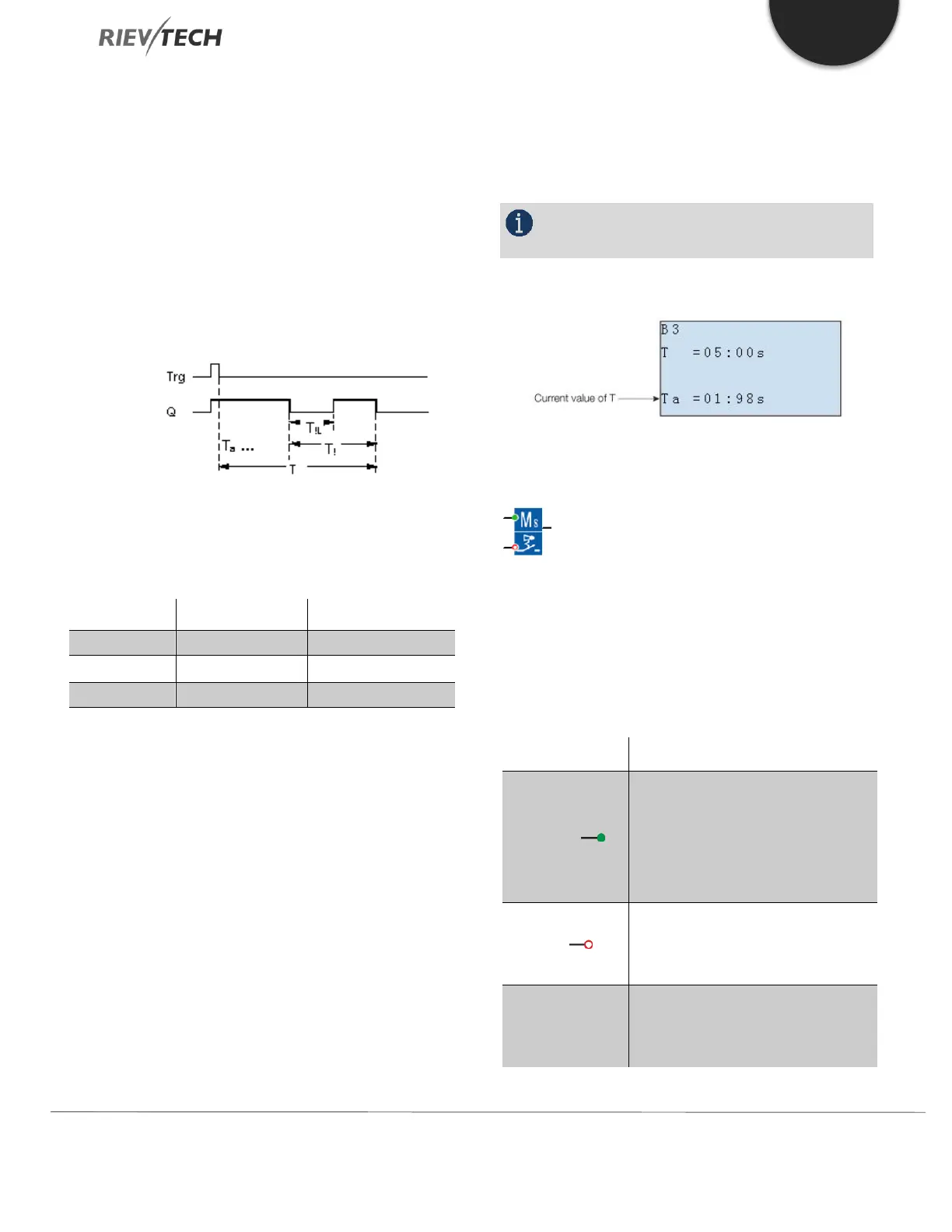
Timing diagram
Changing the time base
You can change the pre-warning time base and the period.
Output Q is set to 1 with a 0 to 1 signal transition at input
Trg. The 1 to 0 transition at input Trg triggers the current
time and output Q remains set.
Output Q is reset to 0 when Ta reaches the time T. Before
the off-delay time (T - T
!
) has expired, you can output a
pre-warning that resets Q for the duration of the off-pre-
warning time T
!L
.
Ta is retriggered (optional) at the next high/low transition
at input Trg and if Ta is expiring.
If retentivity is not set, output Q and the expired time are
reset after a power failure.
Setting the Par parameter
NOTICE:
All times must have the same time base.
View in parameter assignment mode (example):
Multiple Function Switch
Description of function
Switched with two different functions:
1. Pulse switch with off delay
2. Switch (continuous light)
With a signal at input Trg (Trigger),
you set output Q (continuous light),
or reset Q with off delay. Output Q
can be reset with a signal at the Trg
input.
You set the current time T
a
, and
reset the output to 0, with a signal
at input R.


 To Next Page
 Loading...


