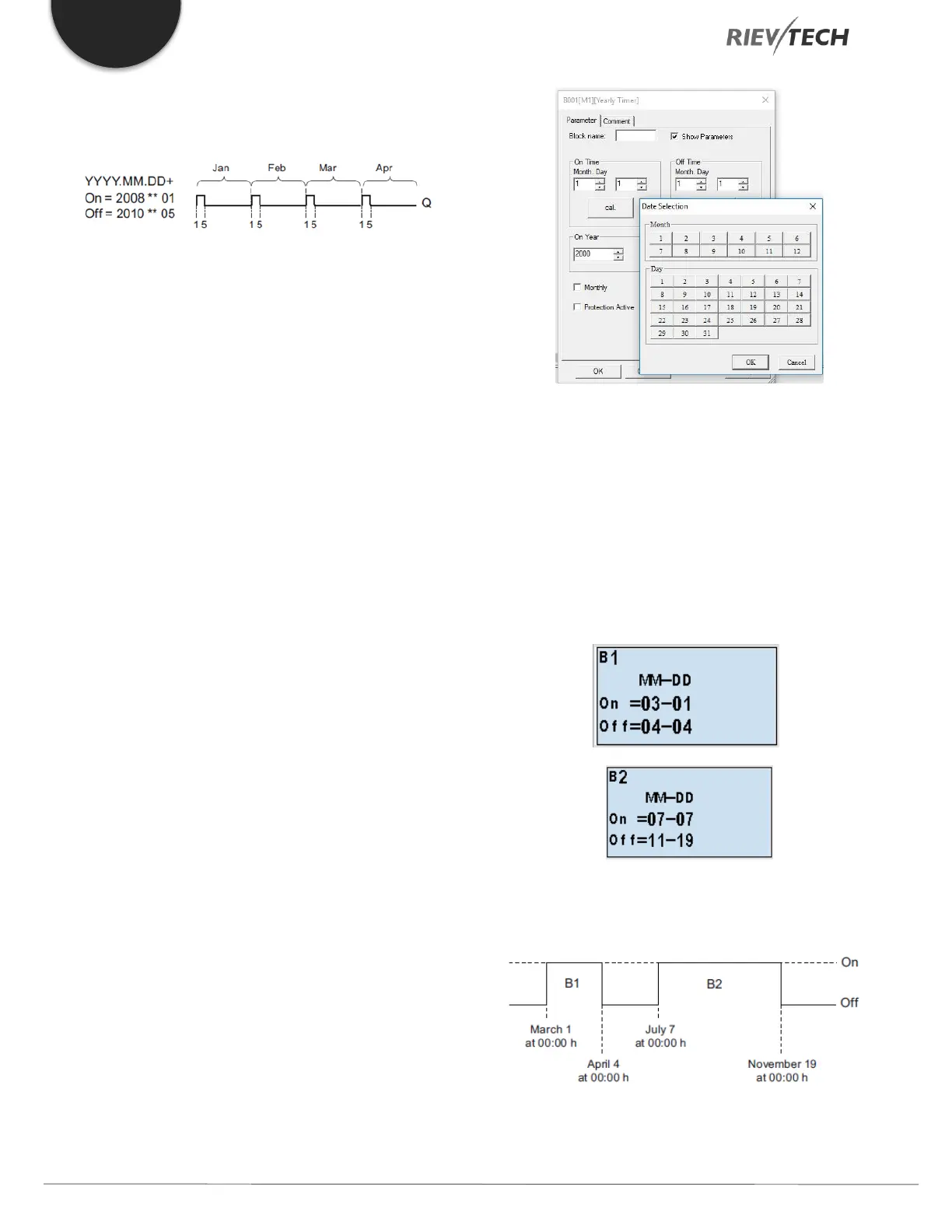
and switches off on the fifth day of the month. The timer
continues in this pattern through the last month of 2010.
Description of the function
The yearly timer sets and resets the output at specific on
and off times. The off date identifies the day on which the
output is reset again. The first value defines the month,
the second the day.
When you select the every month check box, the yearly
clock switches on or off at a certain day of every month.
Backup of the real-time clock
The internal real-time clock of xLogic is buffered against
power failure. The buffering time is influenced by the
ambient temperature and is typically 100 hours at an
ambient temperature of 25°C.
Special characteristics to note when configuring
A click on the dialogue box enables direct keyboard input
of the month and day values. The values entered may not
exceed the logical maximum of the relevant input boxes;
otherwise xLogicsoft returns an error message.
The calendar icon offers you a Rievtech way of setting the
date. It opens a window where you can set the days and
months by clicking the relevant buttons.
Sample configuration
The output of an xLogic is to be set annually on March 1,
reset on April 4, set again on July 7, and reset again on
November 19. You need to configure two yearly timers
with corresponding on-times. Then logically link the
outputs by means of an OR block.
Result


 To Next Page
 Loading...


