Programmable Relay ● User Manual for ELC, EXM and PR Series 230 2020 v6.0 ● © Rievtech Co.,
Ltd. ● www.rievtech.com
MQTT Data Format in xLogicsoft
All MQTT functions use ASCII Decimal values to
represent data to be transmitted/received by the xLogic
PLC.
Example:
The string of characters ‘ABCD’ will be represented as 65
66 67 68, whereas ‘1234’ will be represented as 49 50 51
52. Each character of the ASCII format is 8-bits:
Figure 53 - MQTT Data Table
VB Block
Description of Function
This function provides for storing 8-bits of data, one
character using the Decimal value of the character, which
can be used in MQTT communications.
A maximum of 512 VB blocks can be used per xLogic PLC
program and the number is reduced with every occurrence
of VW or VD blocks used.
This block is used by the Subscribe MQTT function to
determine the start character position of a string.
A high signal at En input will enable
this function block to be activated
Q is set (1) or reset (0) depending
on whether the block is active or
not.
Example:
Figure 54 - Setting MQTT Start Byte
Any characters received by the above block will be stored
starting in block VB10. The maximum number of
characters allowed is 256, i.e. VB265 would store the last
possible character.
NOTICE:
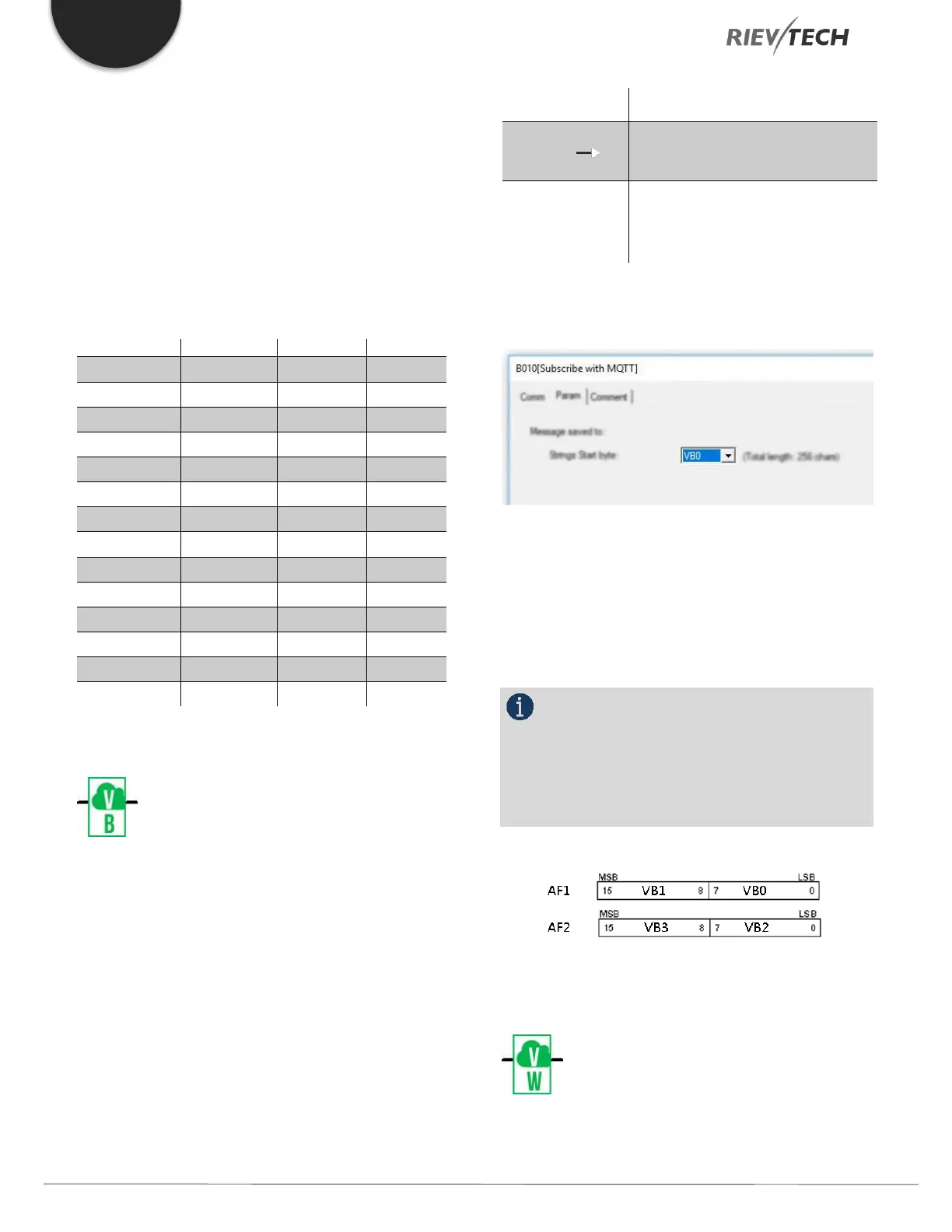
VB Blocks use the same memory area as AF
blocks, so care must be taken if both types of blocks are
used in the same program. You could use AF1 flag to
display the first two characters stored in VB0 and VB1.
Figure 55 - AF and VB Memory
VW Block
Description of Function


 To Next Page
 Loading...


