Page 6 – Rievtech.html
This web page shows the user data as if they were via the
CPU LCD directly. All buttons function via the web page
interface as they would when using the keys on the front
of the PLC itself.
You can change any data using the web page that can be
changed via the LCD and physical buttons on the screen.
NOTICE:
Great care must be used when accessing remotely,
as incorrect changes could disable a connection
completely.
Use your favourite HTML editor software to change the
web pages to your liking.
Downloading Web Pages to CPU
Once you have finished your modifications to the HTML
files, you can download it to your CPU using our HTML
Writer software, which you will find in our Web Server
Page Update Package downloadable from our web site.
NOTICE:
This software uses port 8001 to write your project,
so please ensure the Server Port of your CPU is
configured to 8001.
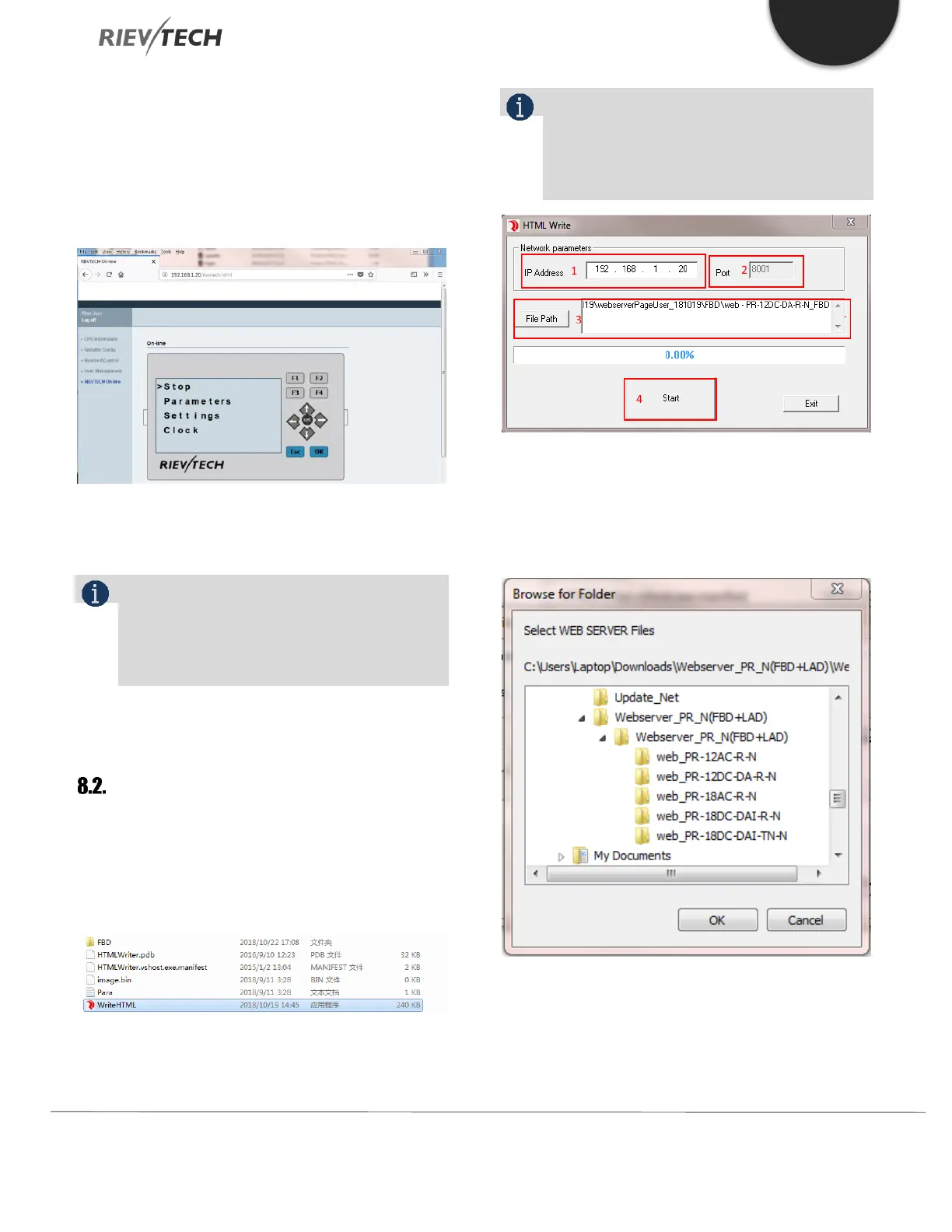
1. Enter the IP address of your CPU
2. Server Port number is 8001
3. Click ‘File Path’ button to browse for the modified
project file directory and select your CPU model
4. Click ‘Start’ button to begin the download
procedure



 To Next Page