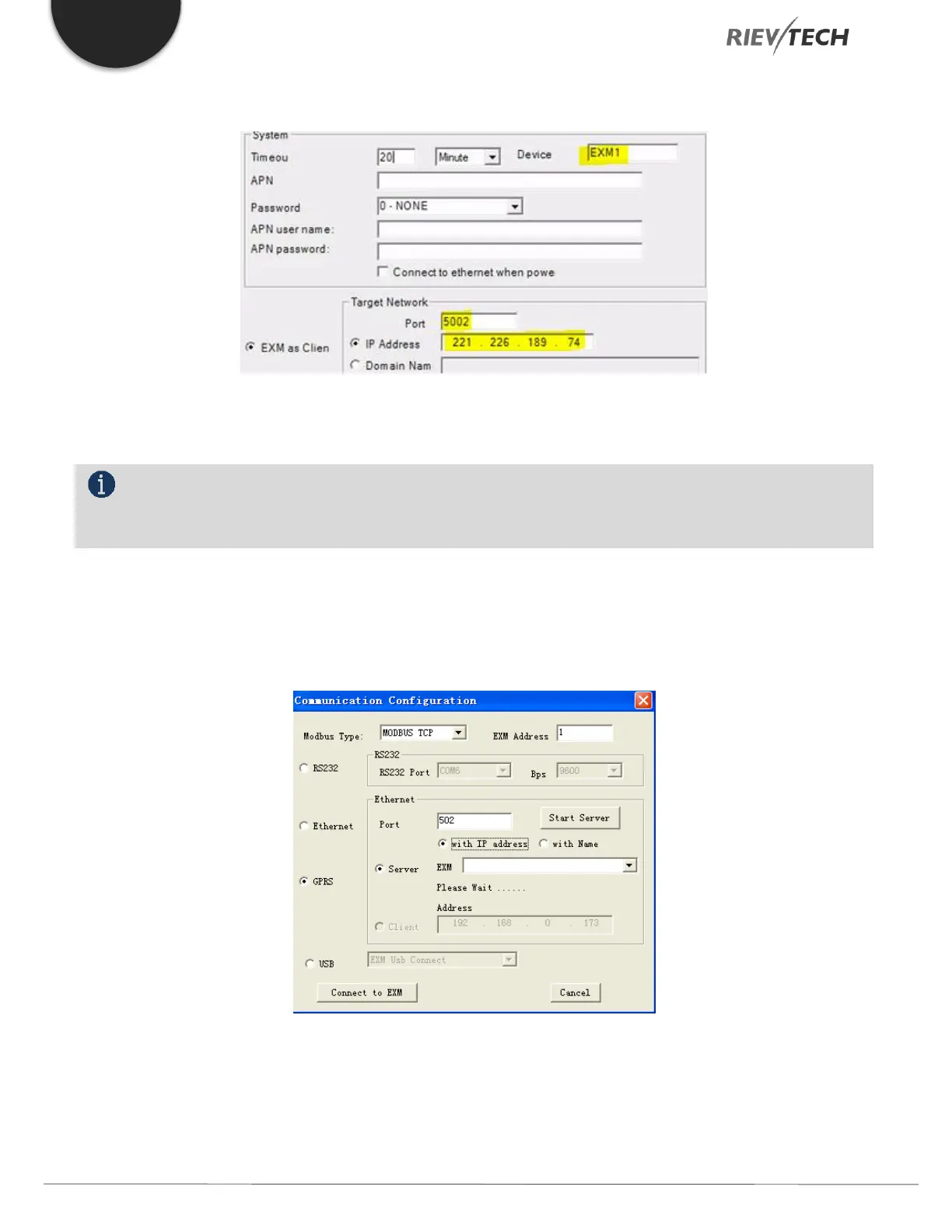
8. Enter the GPRS information in the window that appears. Using our example, the data entered will be as shown below
9. If you know them, you may also enter the mobile providers SIM details here at this time too, otherwise click the
Write button to save your settings to the EXM CPU.
NOTICE:
The router in this example MUST have a fixed Internet IP address and the Port selected MUST allow traffic
through the Router’s firewall.
10. Once a SIM card has been added to the EXM CPU and the providers SIM settings have been entered and saved to
the CPU, you will then be able to communicate with it via GPRS by using xLogicsoft. Close the communication link
you used to configure the EXM CPU via USB cable and re-start the communication and select GPRS rather than
RS232
Ensure the port number is set to 5002 if this was used as in our example and press the ‘Start Server’ button to create a GPRS
connection between the PC and the EXM CPU. After connection is established, you are able to upload/download programs
and remotely monitor the CPU from anywhere in the world!!!



 To Next Page