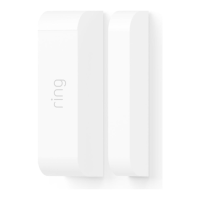
If you have multiple Contact
Sensors to add to your Ring Alarm,
remember to connect, configure
and install Sensors one at a time.
1
2
To connect a Contact Sensor, pull the tab
out of the back.
Using the app, choose the Sensor placement
(Door or Window), give it a unique name
describing the location, and assign it to a
room.
Door and Window Settings: If you’re using
the Contact Sensor on a door, remember to
configure the Placement setting to “Door”,
then decide if it’s a primary or secondary
door. Primary doors have Entry and Exit
Delays to prevent you from accidentally
triggering the alarm.
See page 20 to learn about Entry and Exit Delays.
12345
Contact Sensor
Contact Sensors can be installed on any door
or window. It doesn’t matter which direction
you install them or whether the Sensor or
magnet goes on the trim, as long as the
notches on the Sensor and magnet line up
and are no more than 1.27cm (1/2”) apart.
We recommend installing Contact Sensors on
every door and window that could be used
to gain access to your home. This includes
all first floor windows, and any second floor
windows above a garage, porch, or large tree.
12


 To Next Page
 Loading...