© 1999 – 2022 RingCentral. All rights reserved.
Poly VVX 350 Quick Guide
Desk Phone Features
Feature Description
1. Line keys—enables you to select a phone line, view calls on a line, or quickly call a favorite contact.
2. Back key—enables you to return to the previous screen.
3. Transfer key—transfer an active call to a contact.
4. Voicemail key—enables you to access voicemail messages.
5. Hold key—holds an active call or resumes a held call.
6. Volume keys—adjusts the volume of the handset, headset, and speaker.
7. Soft keys—enables you to select context-sensitive keys that display along the bottom of the screen.
8. Home key—displays the home screen.
9. Navigation keys—scrolls through information and options displayed on the phone screen.
10. Headset key—enables you to place and receive calls through a headset.
11. Speakerphone key—enables you to place and receive calls using the speakerphone.
12. Mute/Unmute key—mutes audio during calls and conferences.

 Need help?
 General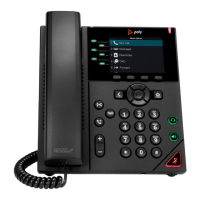

 To Next Page