The device described in the manual is the RIPPTON BITEKEEPER® SMART BITE ALARM SET, which includes a Bitekeeper Alarm (transmitter) and a Bitekeeper Alarm Receiver. This system is designed to notify anglers of fish bites through visual and auditory signals, with advanced features for customization and connectivity.
Function Description
The Bitekeeper Alarm is a smart bite alarm designed to be attached directly to a fishing rod. It detects fish bites and provides alerts through a multicolor run LED and audible beeps. It features a "drop-back function" where a twinkling LED and continuous low sound indicate a drop-back bite, with the LED remaining white for about ten seconds after the sound stops. The alarm automatically enters a low-power consumption standby mode after 10 seconds of inactivity and reactivates upon a bite. All settings are automatically saved and applied for subsequent uses due to its "memory function."
The Bitekeeper Alarm Receiver is a companion device that receives signals from up to four paired Bitekeeper Alarms. It provides alerts through run LEDs, audible beeps, and vibration, depending on the chosen alarm mode. The receiver also features a torch light.
Important Technical Specifications
Bitekeeper Alarm (Multi Color LED):
- Battery type: 250mAh Li-polymer
- Nominal voltage: 3.7V
- Standby current: 510uA
- Peak working current: 100mA
- Radio transmitter operating frequency: 433MHz
- Wireless transmission modulation code: FM
- Max volume: 120dB
- Effective wireless distance: 100m (can be affected by the environment)
- Circuit board sealing: Conformal coating
- IP rating: IP66
Bitekeeper Alarm Receiver (Multi Color LED):
- Battery type: 250mAh Li-polymer
- Nominal voltage: 3.7V
- Standby current: 600uA
- Peak working current: 100mA
- Radio transmitter operating frequency: 433MHz
- Wireless transmission modulation code: FM
- Max volume: 120dB
- Effective wireless distance: 100m (can be affected by the environment)
- Circuit board sealing: Conformal coating
- IP rating: IP66
Usage Features
Bitekeeper Alarm:
- Turning On/Off: Press and hold the Power button for one second. Two LED flashes and two loud beeps indicate it's on; one LED flash and one low beep indicate it's off.
- Volume Adjustment: Briefly press the 'V' button to cycle through 7 volume levels (quietest to loudest).
- Tone Adjustment: Briefly press the 'T' button to cycle through 7 different tones in a diatonic scale (Do, Re, Mi, Fa, Sol, La, Si).
- Sensitivity Adjustment: Briefly press the 'S' button to cycle through 7 sensitivity settings (one beep for lowest, seven for highest).
- Standby Mode: Automatically enters low power consumption mode after 10 seconds of inactivity and reactivates upon a bite.
- Change LED Color: While on, press and hold the 'S' button to cycle through blue, red, green, and yellow LED colors. Release the button when the desired color appears; the LED will remain on for about 10 seconds before going off.
- Attaching to Rod: Designed for direct attachment to a fishing rod.
Bitekeeper Alarm Receiver:
- Turning On/Off: Press and hold the Power button. The torch and run LEDs flash, and two loud beeps sound for on; one LED flash and one beep for off.
- Volume Adjustment: Briefly press the 'V' button to cycle through 7 volume levels.
- Choosing Alarm Mode: Press the 'M' button to select from three modes:
- RING MODE: Receiver beeps only.
- RING&VIBRATION MODE: Receiver beeps and vibrates.
- VIBRATION MODE: Receiver vibrates only.
- Pairing with Alarms:
- Ensure both alarm and receiver are on.
- Press and hold 'M' and 'V' buttons on the receiver for 3 seconds. All run LEDs flash twice and turn off, indicating pairing mode.
- Pull a string through the roller on the alarm. The alarm and receiver will flash and beep together, confirming pairing.
- Up to four alarms can be paired.
- Exit pairing mode by briefly pressing the Power button.
- Canceling Connection to Alarms:
- Press and hold 'M' and 'V' buttons on the receiver for 3 seconds. Run LEDs flash twice and remain on, corresponding to paired alarms.
- Briefly press 'M' to choose an LED (alarm) to un-pair. The LED will periodically dim and brighten, indicating canceling mode.
- Press and hold 'M' to un-pair the corresponding alarm. Repeat for more alarms.
- To cancel all paired alarms, press and hold the 'V' button after entering canceling mode.
- Exit canceling mode by briefly pressing the Power button.
- APP Connection (Only Available for the Bluetooth version BITEKEEPER Pro):
- Download the "Bitekeeper" or "Rippton" app from Google Play Store, Samsung Galaxy Apps (Android) or App Store (iOS). Requires Android System 8.0+ or iOS 9.0+.
- Open the app and tap "Enter" for "Bitekeeper" or navigate to "Device" and select "BITEKEEPER Pro" in the "Rippton" app.
- Enable Bluetooth on your mobile device and grant "Rippton" access.
- After powering on the receiver and alarms, they automatically connect to the app, allowing adjustment of settings via the app interface (e.g., Vibration, Flash Light, Silence, Volume, Sensitivity, Tone, Light color, Reminder by mobile phone).
Maintenance Features
- Charging (Alarm): Turn off the alarm. Attach the magnetic charging cable to the charging port. Two short beeps will sound, and the multi-color run LED will periodically dim and brighten. Once fully charged, the run LED turns green.
- Charging (Receiver): Turn off the receiver. Attach the magnetic charging cable to the charging port. Two short beeps will sound, and the first run LED will periodically dim and brighten. Once fully charged, the run LED turns green.
- Warranty: 24-month guarantee covering defects in the drive unit, electrical/electronic parts, faulty material, or workmanship.
- The guarantee does not cover batteries, damage from improper use, breakage, or normal wear.
- The guarantee is invalidated by unauthorized repairs or modifications.
- Rechargeable battery and LI-ION batteries have a 6-month guarantee period.
- Support: For complaints or app bugs, contact support@rippton.com.
- Kind Reminder: Only the paired transmitter can activate and receive responses from each receiver.

 Need help?
 General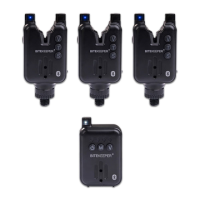

 To Next Page