EasyManua.ls Logo

Risco RVDBA701000A - User Manual

Risco RVDBA701000A
4 pages
Print Icon
To Next Page IconTo Next Page
Loading...
1
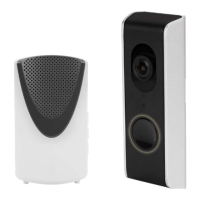
Wi-Fi Video Doorbell Camera and
Wireless Chime
Installation Guide
Model: RVDBA701000A/RVDBA701009A
For additional languages, use a QR scanner to scan
the QR code
1. Whats in the Box
2. Product Overview
2.1 Lens
2.2 Microphone
2.3 Day/night sensor (automatically)
2.4 Push button
2.5 Loudspeaker
2.6 Micro SD card slot (inside housing)
2.7 Rubber cover for wiring
2.8 Release pin for bracket and doorbell
2.9 Chime Loudspeaker
2.10 Volume Settings
2.11 Melody Settings
2.12 No function when bundle using with Wi-Fi Doorbell
2.13 Wall mount holes
2.14 Battery compartment (3x AA batteries, excluded)
3. Wi-Fi Doorbell Connections
Reset button
1. Reset button (Hold for 10 seconds)
2. Connection for electrical lock (B1, B2 / 0V)
3. RJ45 internet cable connection (TD-, TD+, RD-, RD+)
TD- = Internet cable, Orange color wire
TD+ = Internet cable, Orange / White color wire
RD- = Internet cable, Green color wire
RD+ = Internet cable, Green / White color wire
Note: Wired internet works only when you first connect the internet
cable to the Wi-Fi doorbell and router. After that, insert the
adapter in the socket.
4. Adapter connection (V+, V- / 12V 1A)
V+ = Red Wire V- = Black wire
Note: Pay attention to connect correctly.
5. Wired Chime indoor connection (C1, C2 / 0V): the mechanical Chime must
be powered by an 8V AC transformer. The separate power supply is AC,
so it makes no difference which wire goes to C1 and C2 (see APPENDIX).
4. Preparation Before Installation using your
Smart Device
To install the Wi-Fi doorbell, you need to prepare the following information.
Your Wi-Fi Username and Password: the Wi-Fi doorbell must be
registered on your own Wi-Fi network during this installation.
During the installation keep your phone close to the Wi-Fi Doorbell
(max. 1 meter)
Connection of the Smart Phone to the Doorbell is established
through Bluetooth Communication.
Note: This procedure can take up to 3 minutes.
First perform the setup as explained in these instructions and then
install the Wi-Fi doorbell on your front door.
5. Installation
1. Remove the rubber cover (2.7) on the rear of the Wi-Fi doorbell.
2. Connect the adaptor with the extension cord.
3. Use a screwdriver to punch a hole into the rubber cover.
4. Insert the extensions cord through the rubber cord.
5. Connect the extension cord to the Wi-Fi doorbell (V+ red wire, V- black
wire).
6. Insert the adaptor into the power socket.
7. Close the rubber cover (2.7).
Note: Do not connect an internet cable during the installation.
6. Connecting the Wi-Fi Doorbell to your Wi-Fi Network
1. Open the RISCO HandyApp on your smart phone.
2. Enter the Configurator and then click Video Doorbell Settings.
3. Identify the new Video Doorbell and then select one of the following
two options:
Smart Setup – proceed to step 4 below.
Wired Connection
a. Connect the Video Doorbell to the Wi-Fi network as described
below.
b. Unplug the Video Doorbell from the electrical outlet.
c.
Connect the
Video Doorbell
according to the Wiring Diagram
(see APPENDIX).
d. Plug the Video Doorbell back into the electrical outlet.
4. Power up the Video Doorbell and wait for the announcement that the
Video Doorbell is ready.
Note: Make sure the LED is flashing on the Video Doorbell.
A list of Wi-Fi networks that the doorbell “sees” is displayed.
5. Select the Wi-Fi network that you want the Video Doorbell to connect to.
6. Enter the password for the selected Wi-Fi network.
The doorbell has now been successfully connected to the Wi-Fi
network.
7. Click Additional Settings.
8. Enter a name for the Video Doorbell and then click Done.
9. Assign the Video Doorbell to a Site on the RISCO Cloud by following the
straightforward instructions on the screen that opens.
Once the video doorbell is registered in the site and ready for use,
continue below.
10. Click Perform Video Test.
The Video Doorbell now presents a livestream of what the Video Doorbell
“sees”.
Adding Chime
Note: The Chime that arrives in the Video Doorbell kit is already
registered in the Video Doorbell. Perform this section to register
an additional Chime.
1. Click Add Chime.
2. With the batteries not installed in the Chime, click
Start Chime Pairing.
3. Enter the batteries.
Note: You will have 30 seconds to enter the batteries for successful
pairing.
Question and Answer IconNeed help?

Do you have a question about the Risco RVDBA701000A and is the answer not in the manual?

Overview

The RISCO Group Wi-Fi Video Doorbell Camera and Wireless Chime is a smart home security device designed to enhance the safety and convenience of your home. This comprehensive system includes a video doorbell camera and a wireless chime, offering a range of features for monitoring and communication.

Function Description

The Wi-Fi Video Doorbell Camera allows you to see, hear, and speak to visitors from anywhere using your smartphone. When someone presses the doorbell, you receive an instant notification on your RISCO App, enabling two-way audio communication and live video streaming. The camera features a wide-angle lens, ensuring a broad view of your doorstep, and supports motion detection, alerting you to any activity around your entrance. It can record video clips, which are stored on an SD card (up to 128GB) or in the cloud, providing a historical record of events. The device supports both Wi-Fi and Ethernet connectivity, offering flexible installation options.

The Wireless Chime is a plug-and-play device that pairs with the video doorbell, providing an audible alert inside your home when the doorbell is pressed. It offers multiple melodies and volume levels, allowing for customization to suit your preferences. The chime can be placed anywhere within your home, ensuring you never miss a visitor, even if your smartphone is not nearby.

The system integrates with the RISCO Cloud, enabling remote access and management of your doorbell settings. You can adjust motion detection sensitivity, recording preferences, and notification settings directly from the app. The doorbell also supports integration with an electronic lock, allowing for remote unlocking of your door through the RISCO App.

Important Technical Specifications

Video Doorbell Camera:

  • Image Sensor: 2 Megapixel, 1/2.7 inch CMOS
  • Resolution: 1080p (1920x1080)
  • Lens: 2.8mm fixed focal length, 120° horizontal view angle
  • Video Compression: H.264
  • Frame Rate: 15FPS
  • Day & Night Mode: IR cut filter with auto switch, IR LEDs for night vision (up to 5m)
  • Audio: Two-way audio with built-in microphone and speaker
  • Wi-Fi: 2.4GHz (802.11b/g/n)
  • Ethernet: 10/100Mbps
  • Storage: Micro SD card up to 128GB, Cloud storage
  • Power Supply: 12-24V AC/DC, 0.5A
  • Operating Temperature: -10°C to 50°C
  • Dimensions: 133x48x24 mm
  • IP Rating: IP55 (weatherproof)

Wireless Chime:

  • Power Supply: 100-240V AC
  • Melodies: 10 selectable melodies
  • Volume: Adjustable
  • Dimensions: 84x84x27 mm
  • Battery: CR2032 (for battery backup)

Usage Features

Installation and Setup:

The device offers flexible installation options, including direct connection to an existing doorbell wiring (12-24V AC/DC), connection with a DC adapter, or connection with an electrical lock. The setup process is guided through the RISCO App, which allows for easy pairing of the doorbell and chime, as well as configuration of network settings. The app provides clear instructions for connecting to your home Wi-Fi network or via Ethernet.

Remote Monitoring and Communication:

Through the RISCO App, you can:

  • Receive instant push notifications when the doorbell is pressed or motion is detected.
  • View live video stream from the doorbell camera.
  • Engage in two-way audio communication with visitors.
  • Review recorded video clips stored on the SD card or in the cloud.
  • Remotely unlock your door if integrated with an electronic lock.

Customization:

  • Motion Detection: Adjust sensitivity levels (low, medium, high) and define specific areas of interest to minimize false alarms.
  • Recording Settings: Configure continuous recording, event-triggered recording, or scheduled recording.
  • Chime Melodies: Select from 10 different melodies for the wireless chime.
  • Volume Control: Adjust the volume of the wireless chime.
  • Day & Night Mode: Automatic switching between day and night vision modes.

Connectivity:

The doorbell supports both Wi-Fi and Ethernet connections, providing reliable network connectivity. For optimal performance, a strong Wi-Fi signal is recommended. If Wi-Fi is unstable, an Ethernet connection can be used.

Security Features:

  • Tamper Detection: Alerts if the doorbell is tampered with.
  • Secure Communication: Encrypted communication between the doorbell and the RISCO Cloud.

Maintenance Features

Firmware Updates:

The device supports over-the-air (OTA) firmware updates, ensuring that your doorbell always has the latest features and security enhancements. Updates are typically managed through the RISCO App.

Storage Management:

If using an SD card for local storage, it is recommended to periodically check the card's health and capacity. The RISCO App provides tools to manage recorded videos and free up space. Cloud storage offers automatic backup and eliminates the need for manual storage management.

Cleaning:

The doorbell camera is designed for outdoor use with an IP55 rating, making it resistant to dust and water splashes. For cleaning, gently wipe the lens and housing with a soft, damp cloth. Avoid using harsh chemicals or abrasive materials that could damage the device.

Troubleshooting:

The manual provides a comprehensive troubleshooting guide for common issues such as network connectivity problems, video quality issues, and chime pairing difficulties. The RISCO App also offers diagnostic tools to help identify and resolve problems. For more complex issues, RISCO Group customer support is available.

Power Management:

The doorbell operates on low voltage (12-24V AC/DC). Ensure a stable power supply for continuous operation. The wireless chime requires a standard AC outlet. The chime also includes a battery for backup, which should be replaced periodically as indicated by the device.

By combining advanced video capabilities, smart notifications, and remote control, the RISCO Group Wi-Fi Video Doorbell Camera and Wireless Chime offers a modern and effective solution for home security and visitor management.

Risco RVDBA701000A Specifications

General IconGeneral
BrandRisco
ModelRVDBA701000A
CategoryIntercom System
LanguageEnglish