EasyManua.ls Logo

RiteAid deluxe automatic - 5.4. Performing the Blood Pressure Reading; Measurement Execution Steps and Averaged Data

RiteAid deluxe automatic
60 pages
Print Icon
To Next Page IconTo Next Page
To Previous Page IconTo Previous Page
Loading...
5.4
Measuring
procedure
.7:
,
-
.
After
the
cuff
has
been
appropriately
positioned
on
the
arm
and
connected
to
the
blood
pressure
monitor
the
measurement
can
begin.
Remain
still
during
your
measurement
do
not
flex
muscles.
7
.
.
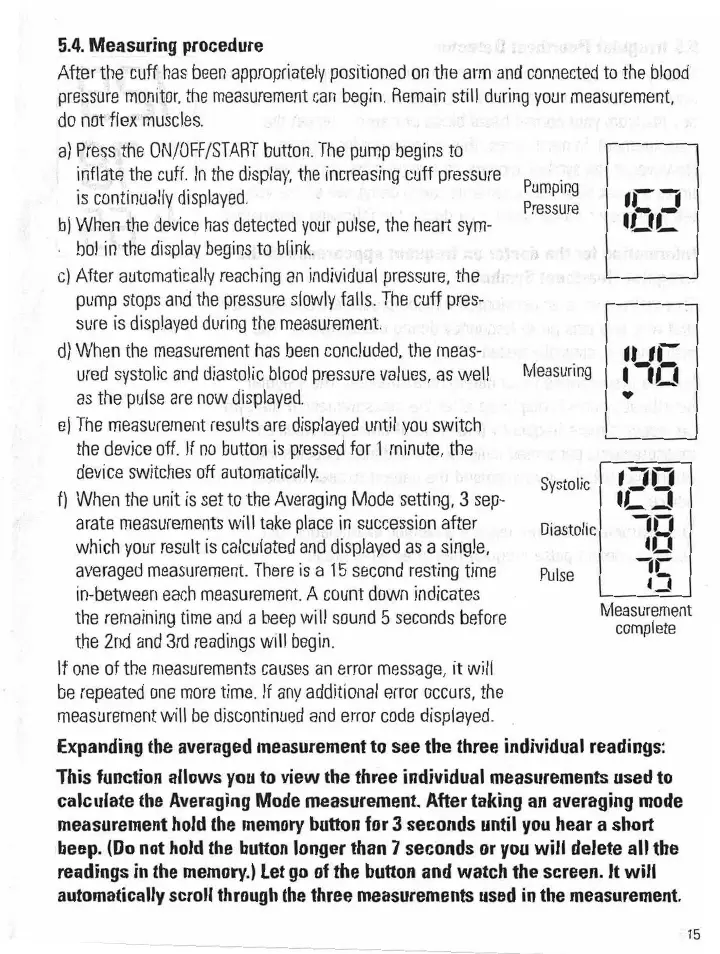
a)
Press
the
0N/0FF/START
button.
The
pump
begins
to
inflate
the
cuff.
In
the
display,
the
Increasing
cuff
press-tire
Pumping
‘r.
j
is
continually
displayed
.
Pressure
b)
When
the
device
has
detected
your
pulse
the
heart
sym-
'
'
‘L-'L
bol
in
the
display
begins
to
blink
«
.
d
_
.v
f
.
-
cl
After
automatically
reaching
an
individual
pressure
the
-...
pump
stops
and
the
pressure
slowly
falls
The.
cuff
pres.-
sure
is
displayed
during
the
measurement.
-
d)
When
the
measurement
has
been
concluded,
the
meas-
_
-
.
ured
systolic
and
diastolic
blood
pressure
values,
as
well
Measuring
l
1!:
.
as
the
pulse
are
now
displayed.
".
.
e)
The
measurement
results
are
displayed
until
you
switch
,
the
device
off.
If
no
button
is
pressed
for
1
minute,
the.
.
device
switches
off
automatically.
Systolic
‘11.:
,
f)
When
the
unit
is
set
to
the
Averaging
Mode
setting
3
sep-
ll:
.1
arate
measurements
will
take
place
In
succession
after
Diastolic
'l
which
your
result
is
calculated
and
displayed
as
a
single.
.
,
L
'
_
‘L. '
averaged
measurement.
There
is
a
15
second
resting
time
PUlse
7‘5
in-between
each
measurement.
A
count
down
indicates
-
the
remaining
time
and
a
beep
will
sound
5
seconds
bet-ere
Measurement
complete
the
2nd
and
3rd
readings
will
begin.
If
one
of
the
measurements
causes
an
error
message.
it will
be
repeated
one
more
time.
If
any
additional
error
occurs,
the
measurement
will
be
discontinued
and
error
code
displayed.
Expanding
the
averaged
measurement
to
see
the
three
individual
readings:
This function allows you to view the three
individual
measurements used to
calculate
the Averaging Mode measurement. After taking an averaging mode
measurement hold the
memory
button for 3 seconds
until
you hear a short
beep.
(Do
not
hold
the
button
longer
than
1
seconds
or
you
will
delete
all
the
readings in the
memory.)
Let
go
of the button and watch the screen. It
will
automatically scroll through
the
three
measurements
used
in the
measurement.
A
I5