•
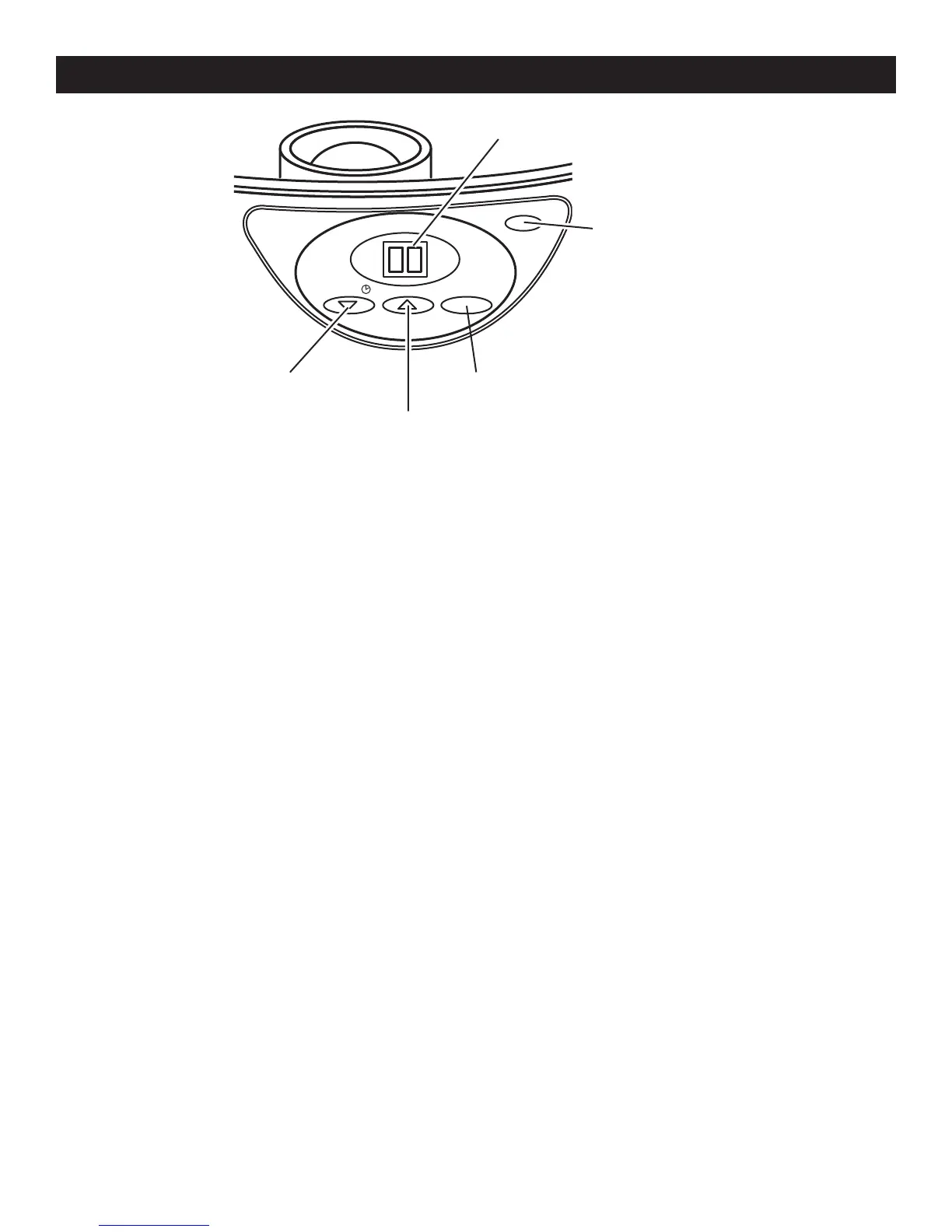
When plugging in the Food Steamer, the time “00” will flash on
the display.
•
The cooking time can be set by pressing the COUNT UP/DOWN
BUTTON and it will display in 1 minute intervals. In the adjusting
status, the digits will keep flashing until the operation has started.
•
After setting your desired time, press the ON/OFF BUTTON to start
operation. Then it will start counting down 1 minute at a time.
•
To stop the unit from operating, press the ON/OFF BUTTON and the
time “00” will flash on the display.
•
To adjust the time when operating, press the COUNT UP/DOWN
BUTTON to set. Then the digits begin to flash until the adjustment
has finished and without pressing any button in 5 seconds, the time
display will stop flashing and continue to count down from the time
which had been set.
•
After finishing to count down, the time “00” will flash again on the
display and it will stop operating and a bell will sound.
•
If not enough water is in the RESERVOIR when operating, the time
operation will automatically stop with a continuous tone and the time
“00” will flash on the display. It cannot operate again unless the water
reservoir is refilled.
-E8-
DIGITAL TIMER SETTING
COUNT DOWN BUTTON ON/OFF BUTTON
COUNT UP BUTTON
POWER INDICATOR LIGHT
LCD DISPLAY


 To Next Page