EasyManua.ls Logo

Roav F2 - User Manual

Roav F2
12 pages
Print Icon
To Next Page IconTo Next Page
Loading...
Roav Smart Car Charger F2
Model: R5111-JP
51005000972 V01
Safety
Instructions
Please read and understand all instructions before using this
product. If damage is caused by failure to follow the instructions,
the warranty does not apply.
Keep these instructions.
Do not drop, puncture or disassemble this product.
This product shall not be exposed to dripping or splashing.
Avoid long exposure to direct sunlight, which may cause
damage.
Exposing this product to open flames may cause explosion.
Do not use the product in strong magnetic field.
Use clean, soft cloth to clean. Do not use any corrosive
cleaner/oil to clean.
Keep your attention on the road. Do not operate the controls
of this product while driving.
Introduction
Features
Hands-free call
Stream music to car audio via FM transmitter
AUX line out
Dual USB charging ports
PowerIQ with quick charge technology
Companion Roav App with FM frequency modulation and car
locator
What’s Included
Owner’s Manual
Roav Smart Car Charger F2
Roav Smart Car
Charger F2
Manual
At a Glance
USB charging port
USB charging port/
USB flash drive port
Microphone LED display
/
Multifunction button
AUX line out
/
Car charger adapter
LED indicators Status
/ FM frequency
flashes alternately
No Bluetooth connected and no flash
drive detected
FM frequency is
displayed
Bluetooth connected or flash drive
detected
FM frequency flashes
Enter FM mode
Incoming call
In a call with hands-free
In a call through smartphone
Get Started
Plug Roav smart car charger into your vehicle’s cigarette
lighter socket.
Start your vehicle’s engine and the LED display will light
on. / FM frequency will flash alternatively. In case you
have completed step , you would hear a voice prompt
“waiting to pair”.
Enable Bluetooth on your smartphone and search for Bluetooth
devices available. Select “Roav F2_xxxx” and connect. Once
successfully connected, FM frequency will be displayed and a
voice prompt “successfully paired” will be heard.
Roav F2_XXXX
Turn on the FM radio on your car audio deck and tune to
an unoccupied frequency (white noise). Press and hold
the multifunction button on Roav smart car charger until
FM frequency flashes. Press or hold / until the
transmitting frequency matches the frequency selected on
your car audio.
FM
Roav Charger
App
With the Roav Charger app, you can set FM frequencies, locate
your car, upgrade software, and learn more about Roav smart car
charger.
To download Roav Charger app, search “Roav Charger” in App
Store or Google Play.
ROAV Charger
Apple and the Apple logo are trademarks of Apple Inc.,
registered in the U.S. and other countries. App Store is a service
mark of Apple Inc., registered in the U.S. and other countries.
Google Play and the Google Play logo are trademarks of Google
Inc.
Play Music
When the Roav smart car charger is successfully connected with
your smartphone, you can play music from your phone. Music can
then be streamed to your car audio via FM transmitter.
You can
also enjoy music that are stored on a USB flash drive.
USB
Play / Pause
Press
Previous / Next track
Press /
To further reduce echo and cabin noise on your calls, you can
connect a 3.5 mm AUX cable (not provided) to AUX line out
socket of the Roav smart car charger and AUX IN socket of your
car audio system.
FM
AUX IN
Hands-free Call
When the Roav smart car charger is successfully connected with
your smartphone, you can enjoy convenient hands-free call.
Answer / End a call
Press
Reject a call
Press and hold for 1 second
Charge Your
Devices
The Roav smart car charger contains dual USB
charging ports. You can charge two devices at the
same time with maximum output of 5V/3.9A.
T
2.4A
1.5A
1 2 3 4 5
Specifications
Specifications are subject to change without notice.
DC input: 12V - 24V
Power output: 5V 3.9A Max
Bluetooth version: V4.2
Bluetooth transmission distance: 10 m / 393.7 in
Audio format: .mp3 .wma .flac .wav
FM frequency range: 87.5-108 MHz
FM transmission range: 2 m / 78.7 in
USB file system: FAT, FAT32, exFAT
Operating temperature range: -4°F to 104°F / -20°C to 40°C
Storage temperature range: -40°F to 185°F / -40°C to 85°C
Notice
FCC Statement
This device complies with Part 15 of the FCC Rules. Operation is subject
to the following two conditions: (1) this device may not cause harmful
interference, and (2) this device must accept any interference received,
including interference that may cause undesired operation.
Warning:
Changes or modifications not expressly approved by the party
responsible for compliance could void the user's authority to operate the
equipment.
Note:
This equipment has been tested and found to comply with the
limits for a Class B digital device, pursuant to Part 15 of the FCC Rules.
These limits are designed to provide reasonable protection against
harmful interference in a residential installation.
This equipment generates uses and can radiate radio frequency
energy
and, if not installed and used in accordance with the instructions, may
cause harmful interference to radi
o communications. However, there is
no guarantee that interference will not occur in a particular installation.
If this equipment does cause harmful interference to radio or television
reception, which can be determined by turning the equipment off and
on, the user is encouraged to try to correct the interference by one or
more of the following measures: (1) Reorient or relocate the receiving
antenna. (2) Increase the separation between the equipment and
receiver. (3) Connect the equipment into an outlet on a circuit different
from that to which the receiver is connected. (4) Consult the dealer or
an experienced radio/TV technician for help.
FCC Radio Frequency Exposure Statement
The device has been evaluated to meet general RF exposure
requirements. The device can be used in fixed/mobile exposure
condition. The min separation distance is 20cm.
Question and Answer IconNeed help?

Do you have a question about the Roav F2 and is the answer not in the manual?

Summary

Safety Instructions

Introduction

Product Features

Highlights key functionalities such as hands-free calls, music streaming, and USB charging.

Whats Included in the Box

Lists the items provided in the package, including the charger and user manual.

Device Overview at a Glance

Getting Started Guide

Roav Charger App Features

Playing Music via FM Transmitter

Hands-free Calling Functionality

Charging Your Devices

Technical Specifications

Important Notices

FCC Compliance Statement

Details FCC rules compliance, operational conditions, and potential interference.

FCC RF Exposure Guidelines

Covers RF exposure evaluation and minimum separation distance requirements.

Overview

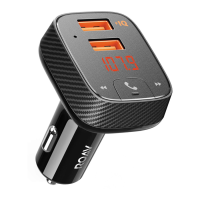
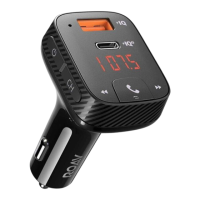
The Roav Smart Car Charger F2 is a versatile in-car accessory designed to enhance your driving experience with a range of smart features. This device primarily functions as a car charger, but it also integrates hands-free calling, music streaming, and a car locator, all controllable via a companion mobile application.

At its core, the Roav Smart Car Charger F2 serves as a power hub for your portable devices. It features dual USB charging ports, allowing you to charge two devices simultaneously. One of these ports is equipped with PowerIQ technology, ensuring quick and efficient charging for compatible devices. The other USB port can also function as a USB flash drive port, enabling you to play music directly from a flash drive. This dual functionality makes it convenient for both powering your gadgets and enjoying your favorite audio content on the go. The charger is designed to be plugged into your vehicle's cigarette lighter socket, making it easy to integrate into most cars.

Beyond charging, the Roav Smart Car Charger F2 excels in its audio and communication capabilities. It acts as an FM transmitter, allowing you to stream music from your smartphone directly to your car's audio system. To use this feature, you simply tune your car's FM radio to an unoccupied frequency (one with white noise) and then match the transmitting frequency of the Roav charger to that same frequency. This process is initiated by pressing and holding the multifunction button on the charger until the FM frequency flashes, then adjusting it with the forward and backward buttons until it matches your car radio. This seamless integration means you can enjoy your phone's music library through your car's speakers without the need for complex wiring or dedicated car audio upgrades. Additionally, the device includes an AUX line out, providing an alternative method to connect to your car's audio system using a 3.5 mm AUX cable (not provided). This can be particularly useful for reducing echo and cabin noise during calls, offering a clearer audio experience.

Hands-free calling is another significant feature of the Roav Smart Car Charger F2, prioritizing safety and convenience while driving. Once successfully paired with your smartphone via Bluetooth, you can answer, end, or reject calls directly through the charger. The device includes a built-in microphone, allowing for clear communication without needing to pick up your phone. To answer or end a call, a simple press of the multifunction button suffices, while rejecting a call requires pressing and holding the button for one second. This functionality ensures that you can stay connected while keeping your hands on the wheel and your attention on the road, aligning with important safety guidelines.

The Roav Smart Car Charger F2 is designed to be user-friendly, with an LED display that provides essential information at a glance. The display shows the current status, such as whether Bluetooth is connected, if a flash drive is detected, or the active FM frequency. It also indicates incoming calls and whether you are in a hands-free call or a call through your smartphone. Voice prompts guide you through the initial setup, such as "waiting to pair" and "successfully paired," making the Bluetooth connection process straightforward.

A key aspect of the Roav Smart Car Charger F2's functionality is its integration with the Roav Charger App. This companion application, available on both the App Store and Google Play, significantly enhances the device's capabilities. Through the app, you can easily set FM frequencies, locate your car (a highly convenient feature for finding your vehicle in large parking lots), upgrade the device's software, and access more information about the smart car charger. The app provides a centralized control point for managing the charger's various functions, offering a more intuitive and feature-rich experience.

Maintenance of the Roav Smart Car Charger F2 is simple and straightforward, focusing on keeping the device clean and protected. It is recommended to use a clean, soft cloth for cleaning and to avoid using any corrosive cleaner or oil, which could damage the device. The charger is designed to be robust, but users are advised not to drop, puncture, or disassemble it to prevent damage and ensure the warranty remains valid. It is also important to protect the device from extreme conditions; it should not be exposed to dripping or splashing liquids, long periods of direct sunlight, or open flames, as these can cause damage or even explosion. Furthermore, avoiding strong magnetic fields is recommended to maintain optimal performance. Adhering to these simple maintenance guidelines will help ensure the longevity and reliable operation of your Roav Smart Car Charger F2.

In summary, the Roav Smart Car Charger F2 is a comprehensive in-car solution that combines essential charging capabilities with advanced audio streaming, hands-free communication, and smart features accessible via a dedicated app. Its design prioritizes ease of use and safety, making it a valuable addition to any vehicle.

Roav F2 Specifications

General IconGeneral
Bluetooth Version4.2
Bluetooth Range10 meters
MicroSD Card SupportYes
Supported Audio FormatsMP3, WMA, WAV, FLAC
OutputAUX
ModelF2
TypeBluetooth FM Transmitter
PortsUSB, AUX, MicroSD
Output per Port5V/2.4A (Max)
Input Voltage12V

Related product manuals