BEACON BLUETOOTH SPEAKER - OPERATING INSTRUCTIONS
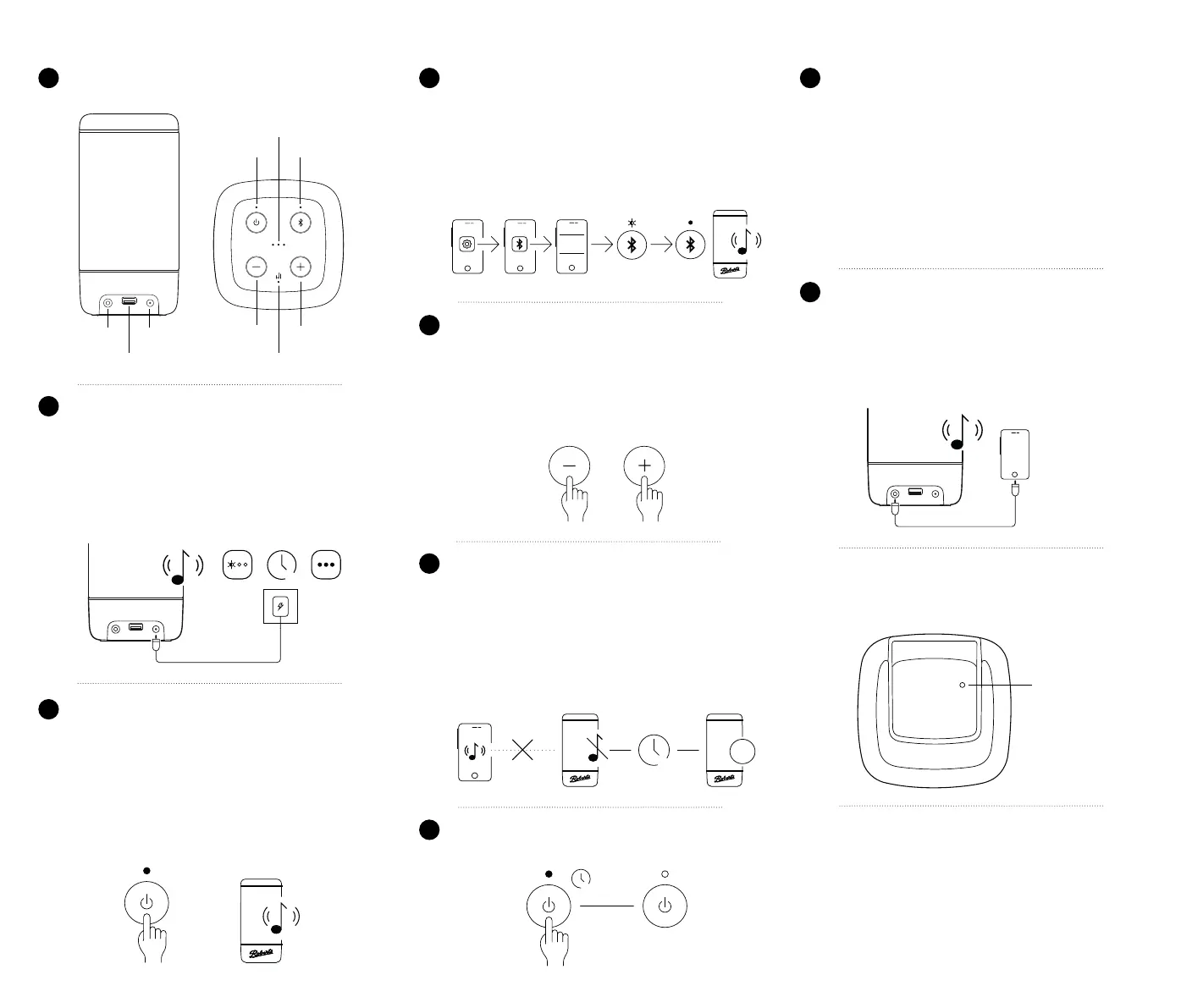
PLUG IN AND CHARGE
Connect the mains adaptor to the speaker and plug into a suitable
mains outlet.
• The battery indicator LEDs will indicate that the battery is being
charged.
• When charging is completed the LEDs will stop ashing. The
speaker is ready for use away from the mains supply if needed.
• The speaker may also be used whilst charging.
3h
2
Battery status
ON / OFF Bluetooth
Volume Down Volume Up
Equalizer (330 only)
Aux In DC In
USB (330 only)
CONTROLS AND PORTS
Be sure to read the safety instructions overleaf before proceeding.
1
POWER ON
To switch on the speaker, press and release the ON/OFF button
(short press).
• The power indicator will light, a tone will conrm power on, and
the Bluetooth LED will ash.
• The rst time the speaker is used the Bluetooth LED will continue
to ash.
• If previously used and paired it will attempt to connect to the
previously paired device - see also step 8.
3
If audio stops
15 min
OFF
2 sec
POWER OFF
To turn off the speaker, give a long press on the ON/OFF button.
7
CONNECT TO BLUETOOTH
Use Bluetooth settings on your phone / tablet / etc to connect
to the speaker.
• The Bluetooth name is Beacon 310, 320, or 330 in line with
the model of your speaker.
• When connected there is an acknowledgement tone and the
Bluetooth LED will stop ashing and remain on.
• Play audio content from your connected device as you wish.
VOLUME CONTROL
Control the volume using the speaker or the connected device.
• Control the volume using the Volume Up or Down buttons
on the speaker. You can press and hold the buttons to more
rapidly change the volume.
• The speaker will ash the battery status LEDs to indicate
maximum or minimum volume level is reached.
POWER SAVING
Automatic standby feature.
• If the audio from your connected device stops then the speaker
will shut down automatically to save power.
• After 10 minutes without audio it will start to ash the power
LED.
• After a further 5 minutes without audio it will turn off.
• If audio resumes during this time the power saving timer will
be cancelled.
4
5
6
BEACON
Headphone socket
on device
Aux in
BLUETOOTH RECONNECTION
When the speaker is turned on it will attempt to reconnect to the
last used device.
• If the speaker cannot connect it becomes discoverable and
you may connect another device.
• Alternatively, even when the speaker is already connected, a
long press on the Bluetooth button will disconnect the current
device and make the speaker discoverable so that a new device
may connect.
• Beacon 330 only - A short press on the Bluetooth button will
cause the speaker to reconnect to previously paired devices
if they are within range (up to 10 devices in total).
AUXILIARY INPUT
A non-Bluetooth device may be plugged into the speaker using a
3.5mm stereo jack plug (socket at bottom rear).
• Pushing the plug into the socket automatically switches the
speaker to Auxiliary input mode and the Bluetooth LED will
change from Blue to White.
• Removing the 3.5mm plug will revert to Bluetooth operation.
BATTERY LIFE AND CHARGE TIME
• Beacon 310 / 320 - 12 hours
• Beacon 330 - 15 hours
• These gures are only approximate and are very dependent
on playback volume, battery age, temperature and charge
output usage (Beacon 330).
• Battery charge time - approximately 3 hours (Beacon 330
may take longer).
Reset button
insert a paper clip
RESETTING THE SPEAKER
To reset your speaker use a paper clip to push the reset switch
through the pin hole located underneath the speaker.
Continued overleaf...
8
9


 To Previous Page
 Loading...



