32
Setting the date format
7KHGDWHIRUPDWGLVSOD\HGRQ\RXUFORFNUDGLRFDQEHDGMXVWHG7KHUHDUH
four options available including an off setting.
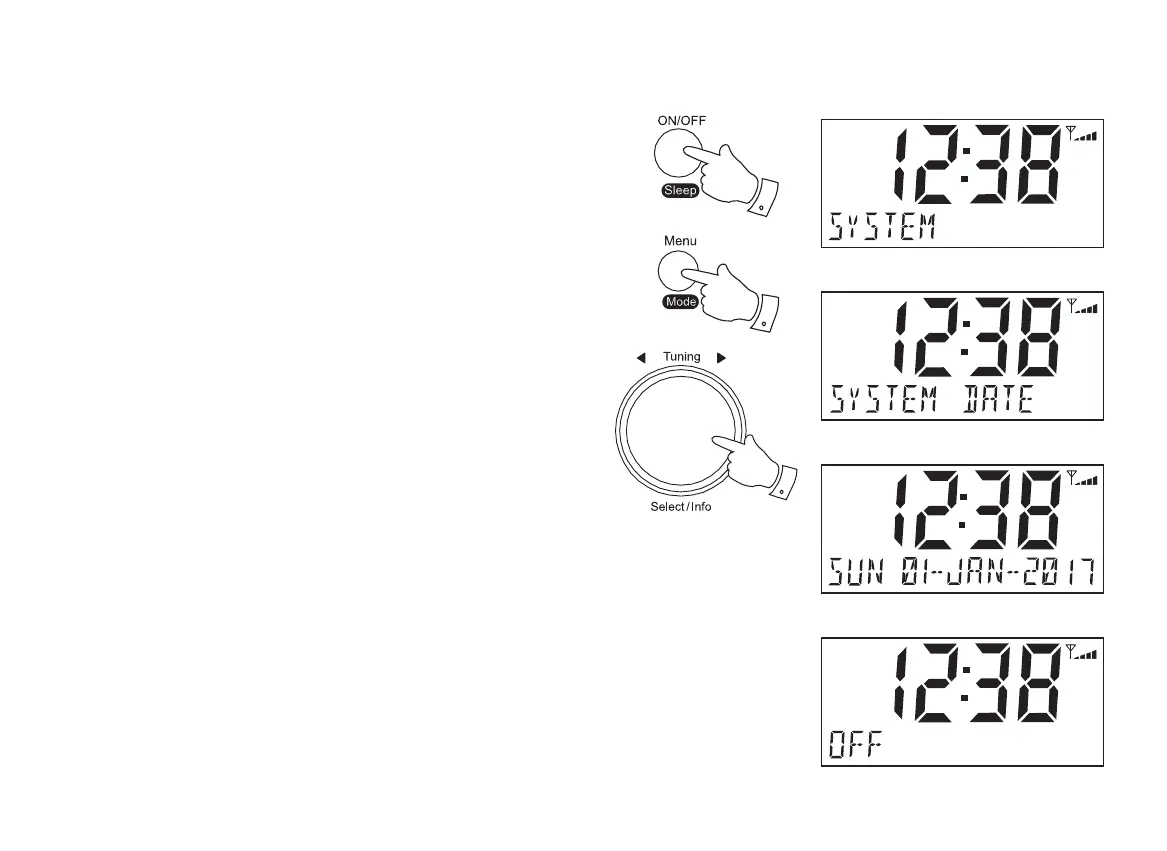
1. Press and release the On/Off button to switch on the clock radio.
2. Press and release the Menu/Mode button. The menu will show on the
GLVSOD\
,IXVLQJ'$%RU)0PRGHVURWDWHWKHTuning/Select control until 'SYSTEM'
DSSHDUVRQWKHGLVSOD\3UHVVDQGUHOHDVHWKHTuning/Select control.
4. Rotate the Tuning/Select control until 'DATE'DSSHDUVRQ WKH GLVSOD\
Press and release the Tuning/Select control.
5. Rotate the Tuning/Select FRQWUROWRFKRRVHDGDWHIRUPDWRSWLRQ,I\RX
set the date format to 'OFF'WKHGDWHZLOOQRWVKRZRQWKHGLVSOD\
The options available are:
681-$1
681'$<
2))
3UHVVDQGUHOHDVHWKHTuning/Select FRQWUROWRFRQ¿UP\RXUFKRLFH
7KHFORFNUDGLRZLOOUHWXUQWRWKHSUHYLRXVPHQXGLVSOD\
DAB
DAB
1
2
DAB


 To Next Page