Operating Instructions
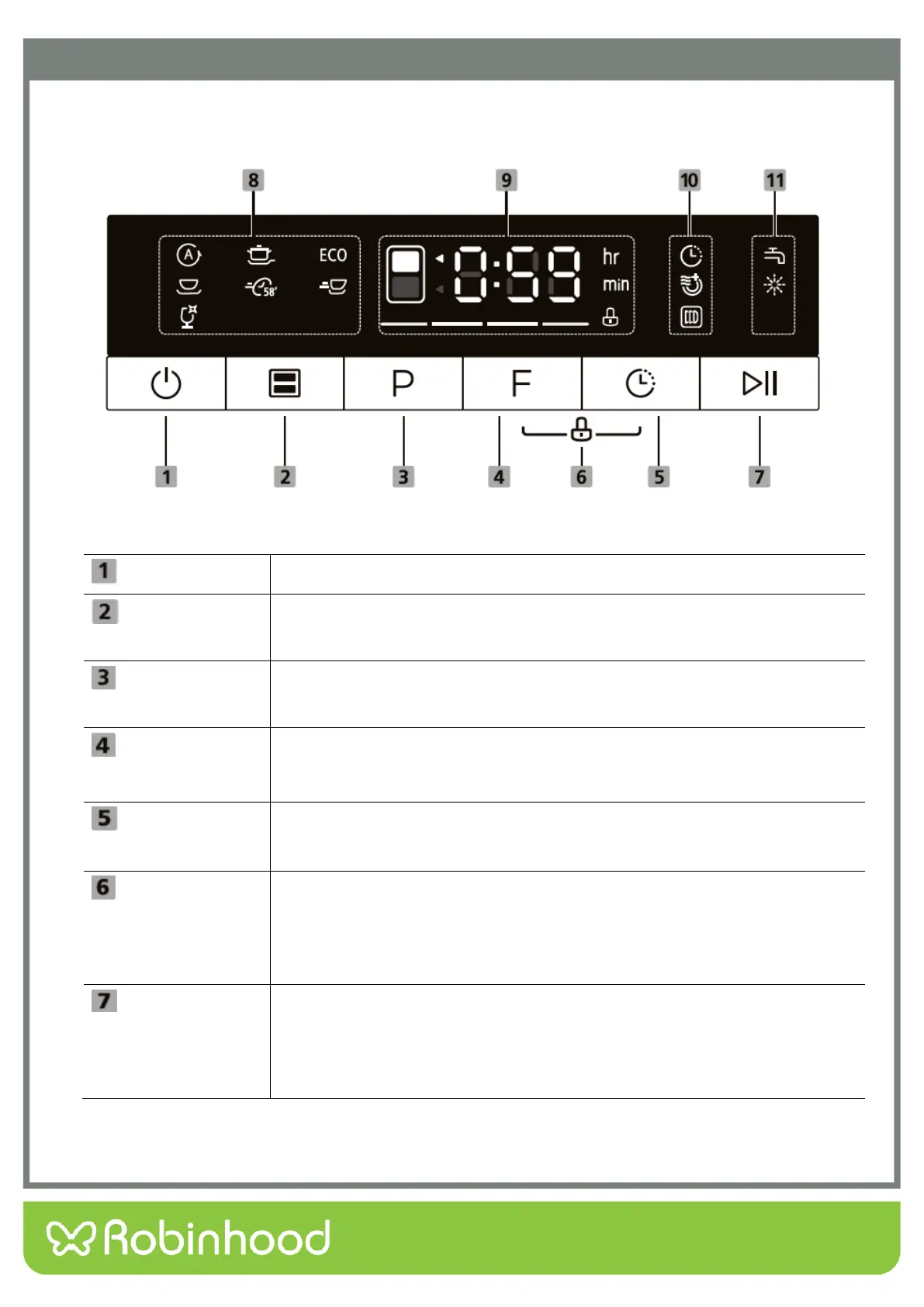
Control Panel
Operation (Button)
Press this button to turn on your dishwasher, the screen will light up.
Press the button to select either upper drawer or lower drawer loaded, the
corresponding indicator will light up.
Press this button to select the appropriate washing program, the selected
program indicator will light up.
Press the button to select an option, corresponding indicator will be lit.
Press and hold the Option button for 3 seconds in standby mode to run the
Dry & Fresh option immediately.
Press the button to increase the delay start time. Delay a cycle for up to 24
hours in one-hour increments. After setting the delay time, press the
Start/Pause button to start.
This option allows you to lock the buttons on the control panel, so children
cannot accidently start the dishwasher by pressing the buttons on the panel.
Only the Power button and Drawer selector button remain active.
To lock or unlock the buttons on the control panel, press and hold the
Option button+ Delay button for 3 seconds simultaneously.
To start the selected washing program or pause it when the dishwasher is
operating.
When the dishwasher is running, if you need to open the drawer, please
press the “Start/Pause” button first and wait a few seconds, then open the
door slowly.


 To Next Page