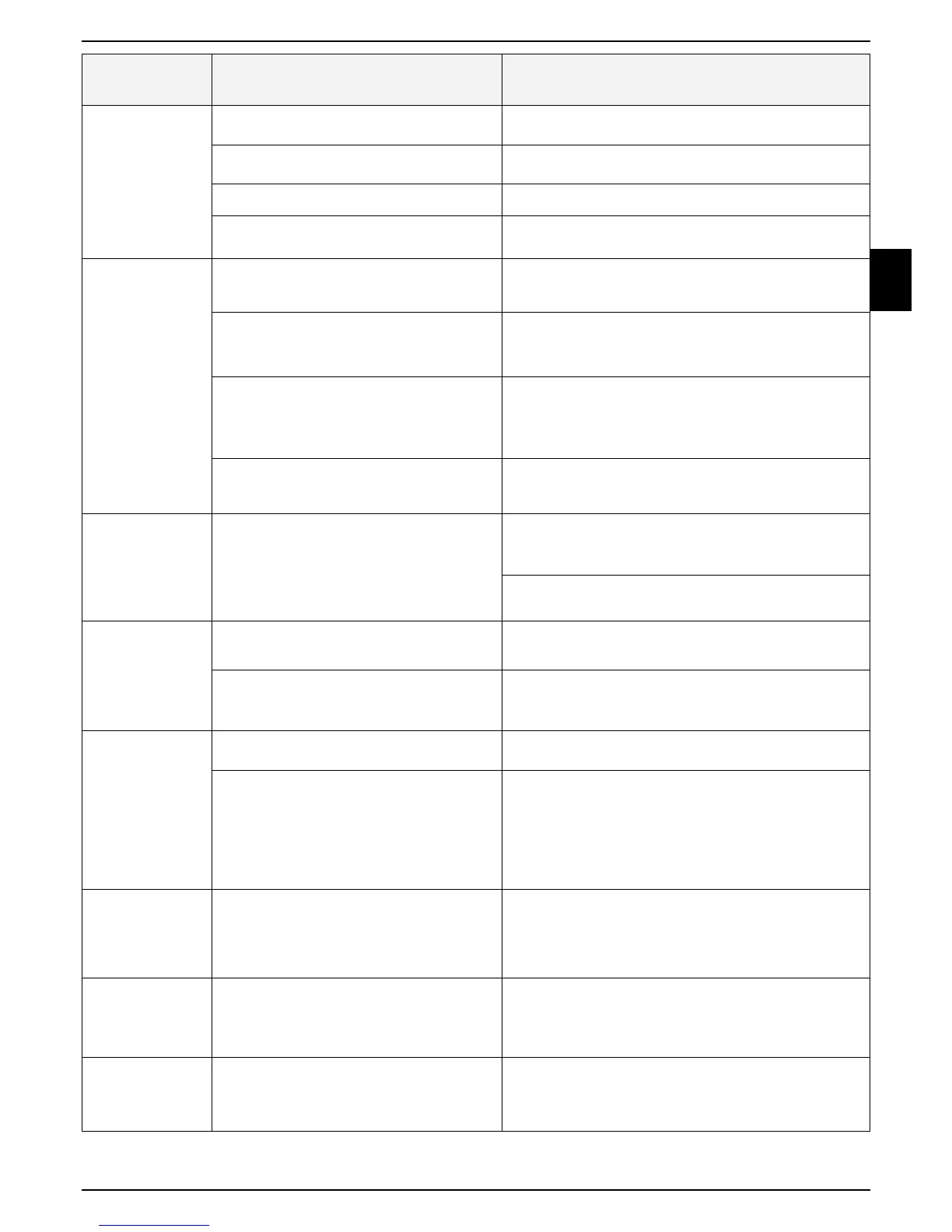
Problem
Encountered
Probable Cause/Event Corrective/User Action
Mower does not
dock properly and
sometimes miss
the Base Station
contacts
- Height differences between the lawn and the
Base Station surface.
- Fill some ground to flat the lawn with the Base Station to
allow smooth entrance to the station.
- Wire underneath the Base Station is not tight
and placed in the middle of the Station.
- Confirm the wire underneath the Base Station is straight
tighten and centered below the Base Station.
- Base Station is setup on a side slope. - Move the Base Station to a relatively level ground.
- A base station is placed too close to the
corner of the lawn
- Move the Base Station within 3 meters from a corner.
Uneven mowing
results
- Robomow does not complete mowing at the
min. time, due to inactive time during the
Mowing Cycle.
- Minimize the Inactive Time windows to allow Robomow
to complete the Mowing Cycle faster and to achieve even
mowing result.
- Grass is growing very fast.
- If it is the fast growing season - reduce the time between
mowing cycles (refer to Section 4.3.2 Increase /
Decrease Operations).
- Lawn shape is complicated shape, Narrow
Passages, obstacle and islands).
- In complicated lawn the mower takes more time on the
lawn to achieve better mowing results.
Increase the Intensity (refer to Section 4.3.2.1 Increase /
Decrease Operations).
- The mowed area is smaller than the actual
lawn area.
- Increase the zone area (refer to Section 4.3.3 Edit an
existing Zone).
Robomow
operates at the
wrong time.
- The Inactive Time data (days and Hours) is
incorrect.
- Verify that the time in the mower is set correctly.
- Set the time (refer to Section 4.4.4 Time and Date).
- Reset the Inactive Time (refer to Section 4.3.1 Set
Inactive Operating Time(s)).
Cut wire indicator
is flashing on
Power Box
- Cable is disconnected or damaged between
Power Box and the Base Station.
- Confirm cable is plugged in and wire leads are firmly
attached.
- Perimeter Wire is cut.
- Walk along Perimeter Wire.
Look for cuts or breaks in the wire.
Repair with Robomow wire splice connectors.
Poor connection
indicator is
flashing on Power
Box
- Poor connections - Check and repair all loose/poor or corroded connections.
- Twisted cables, or a screw terminal,
insulated with insulation tape is not a
satisfactory splice.
Soil moisture causes the conductors to
oxidize and after a while. This results in
broken circuit.
- Use the connectors supplied in the box. They are
waterproof and give a reliable electrical connection.
Robomow
is noisy and
vibrates
- Damaged or unbalanced blade
- Check if the lawn is free from branches, stones or other
objects that can damage the blade before operating the
Robomow.
- Replace the blade
LCD display
is in a foreign
language.
- The language setting was changed or not
correctly set.
- Press the CANCEL + DOWN buttons for more than 3
seconds. This is a shortcut to the Language menu.
Change the language.
Mowing or
charging times
are shorter than
usual.
- This behavior is normal at low temperatures
(below 15 ºC (59 ºF)).
- No action is required.



 To Next Page