RESTRICTED SLEW ZONE MONITORING
MAN-1111 Rev H ©Copyright 2015 LSI-Robway Pty Ltd Page 136
Boom Angle Limits
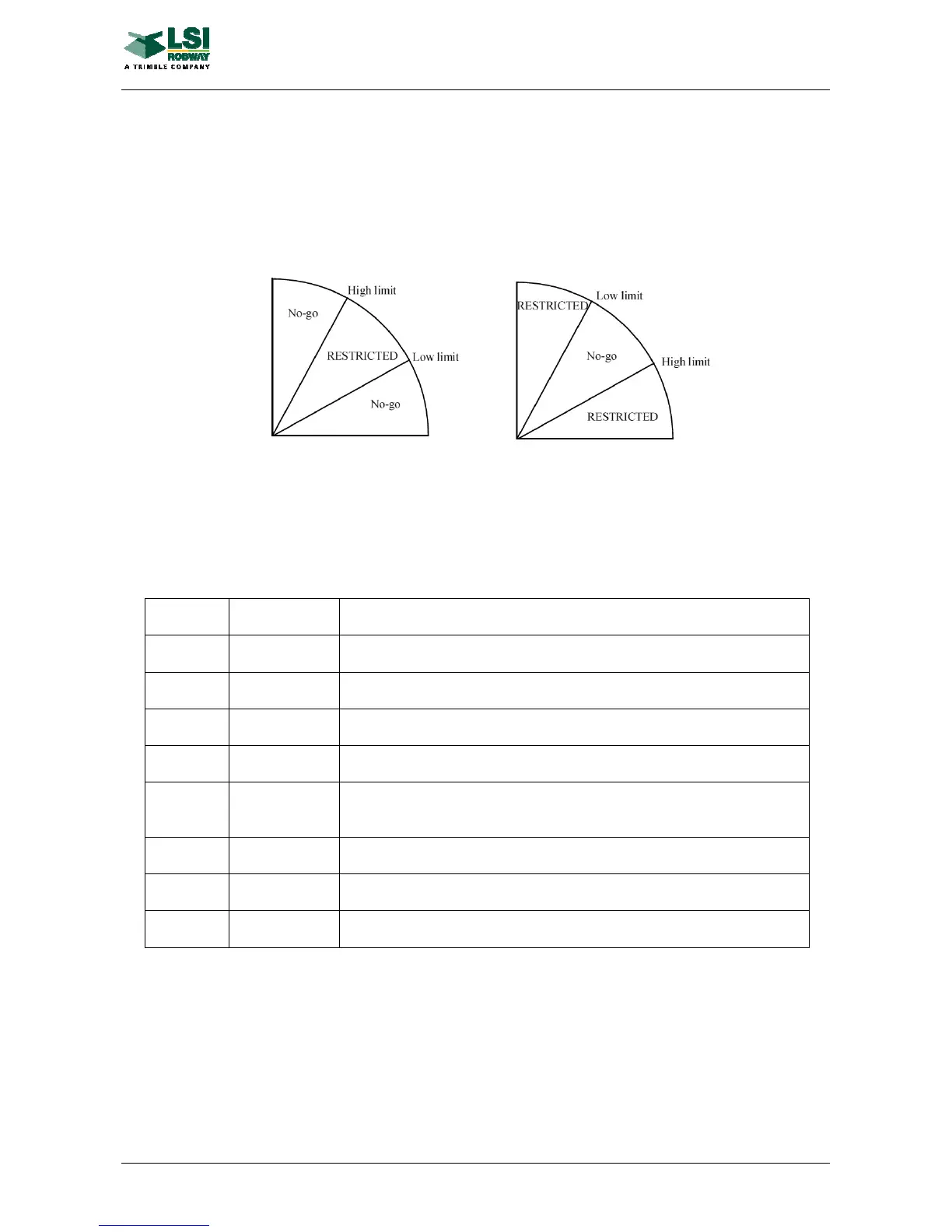
An unsafe zone is fully defined only if boom angle limits are set in it. High and low angle
limits are used. When a new restricted zone is added, both limits are set to 90.0 degrees
(boom vertical). That makes the whole zone a "no-go" area. Boom angle limits can be
changed by executing a respective command from the menu items of the RSZ setup mode
(see also "Setting Zones" below). The "no-go" section of the unsafe zone is limited by High
Angle Limit from below and by Low Angle Limit from above. The drawing below explains the
idea and shows two possible cases of setting for an unsafe zone:
Setting Zones
In order to set slew zones the operator will need to enter the RSZ setup mode. If the over-
ride key switch is concurrently switched on, the Permanent Set will be active, otherwise the
Temporary (Operator's) Set will be active. The operator can browse through the menu items
list by pressing the UP or DOWN arrow key.
The menu items on RSZ setup mode are as follows:
Set an unsafe zone left boundary
"Set R"
Set right Set an unsafe zone right boundary
"Lo Ang"
Low angle Set the low boom angle limit for the current unsafe zone
Set the high boom angle limit for the current unsafe zone
Change the zone status from "safe" to "unsafe" and vice versa
"CIrAII" Clear all Remove all the zones and sets one safe zone 360 degree wide (start
0 deg)
Split an unsafe zone into two unsafe zones
Merge an unsafe zone to the adjacent unsafe zone to the left
"Unite R"
Unite right Merge an unsafe zone to the adjacent unsafe zone to the right



 To Next Page