
 Need help?
Do you have a question about the ROCAM CR1018 and is the answer not in the manual?
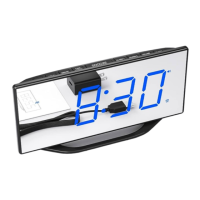
This document describes the FROCAM CR1018 Mirror Alarm Clock with USB Charger, a device designed to enhance your sleep environment.
The CR1018 is primarily a digital alarm clock with a mirror finish display. It features dual alarm settings, adjustable display brightness, and a USB charging port for external devices. It also includes a backup battery to maintain time and alarm settings during power outages.
TIME 12H/24H button once. The display will show "12:00" and start flashing.HOUR button to adjust the hour.MIN button to adjust the minute.TIME 12H/24H button or SNOOZE button to save the set time. Alternatively, waiting for 10 seconds will automatically confirm the setting.TIME 12H/24H button to switch between 12-hour and 24-hour formats.The device supports two independent alarms (Alarm 1 and Alarm 2), with the setting process being identical for both.
ALARM 1 button (or ALARM 2 button for the second alarm). The corresponding alarm indicator (1 or 2) will light up, and the display will show "6:30" (default) and start flickering.HOUR button to adjust the alarm hour.MIN button to adjust the alarm minute.ALARM 1 button (or ALARM 2 button) or SNOOZE button to save the alarm time. Waiting for 10 seconds will also automatically confirm the setting.To adjust the alarm ring volume, repeatedly press the VOLUME DST button. There are 7 levels, cycling through 04 (default), 05, 06, 07, 06, 05, 04, 03, 02, 01, and 02.
SNOOZE button to temporarily turn off the alarm for 9 minutes. The alarm will ring again after 9 minutes.ALARM OFF button to turn off the alarm for 24 hours. The alarm indicator (1 or 2) will remain on, indicating the alarm is still activated and will ring again after 24 hours.ALARM OFF button to permanently turn off both Alarm 1 and Alarm 2. The corresponding indicators (1 and 2) will turn off.ALARM 1 button to permanently turn off Alarm 1, or hold down the ALARM 2 button to permanently turn off Alarm 2. The respective indicator will turn off.ALARM OFF or ALARM 1 to permanently turn it off. If Alarm 2 is sounding, hold down ALARM OFF or ALARM 2 to permanently turn it off.Repeatedly press the DIMMER button to adjust the display brightness. There are 8 levels, cycling through 04 (default), 05, 06, 07, 06, 05, 04, 03, 02, 01, OFF, 01, and 02.
DIMMER button will directly turn off the display.VOLUME DST button to switch on the DST function. The DST indicator will turn on.VOLUME DST button again to turn off the DST function. The DST indicator will turn off.The device features two USB output jacks (18) that allow you to charge your phone or tablet simultaneously. Simply plug your charging cable into the USB port. The maximum charging current is 1 Ampere.
 General
| Brand | ROCAM |
|---|---|
| Model | CR1018 |
| Category | Battery Charger |
| Language | English |

 To Next Page