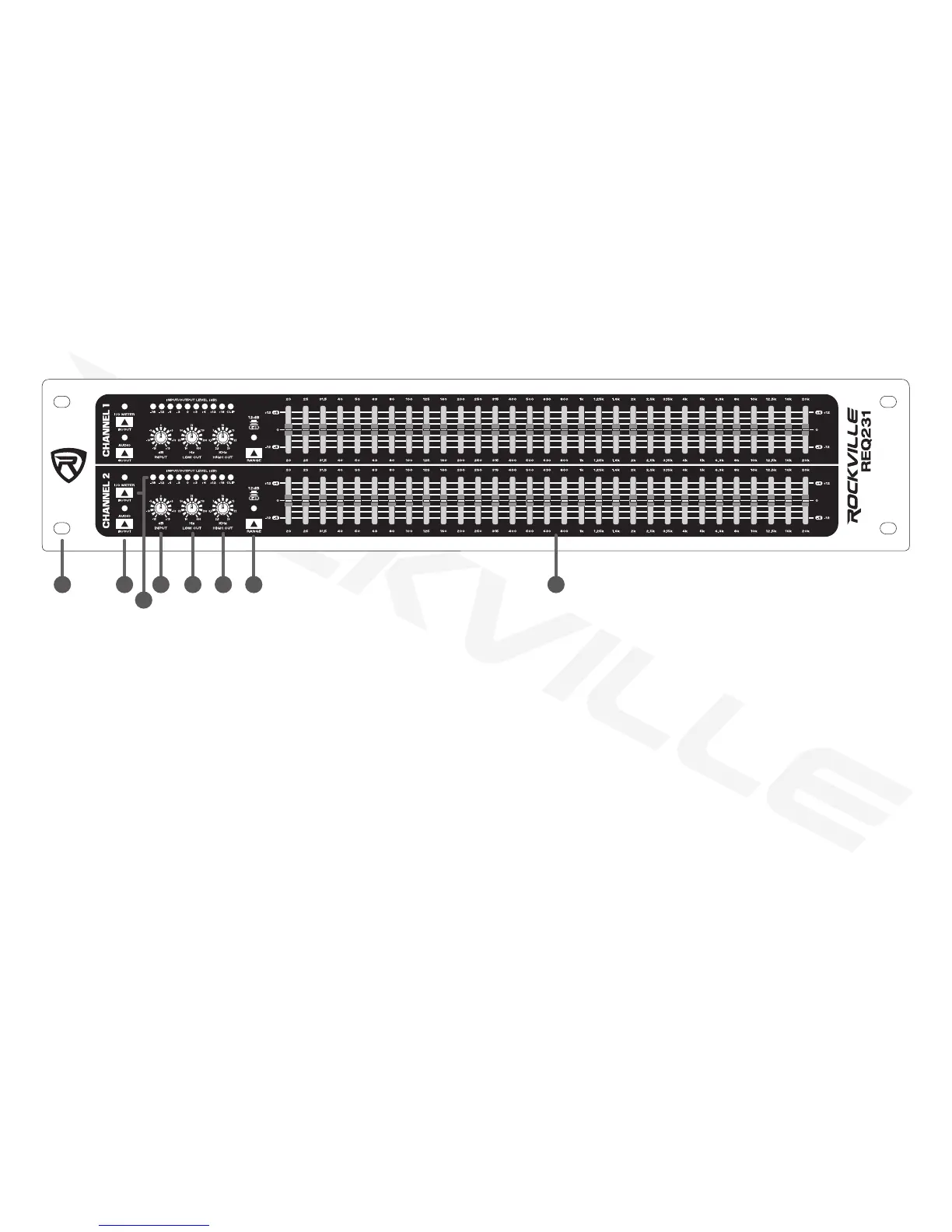
1. Rack ears: allows for unit rack mount using four attaching screws and washers (not included).
2. Audio In/Out switch: enables/disables the corresponding EQ section. Uthe Audio In/Out switch to compare directs to
processed signals.
3. I/O Meter In/Out switch & LED Meter: use to toggle the LED meter to display input or putput levels. When the switch is
pressed in, meter will display output levels. The LED meter monitors the signal level to warn you of distortion. The red CLIP
LED lights up at +12dB (3dB below clipping).
4. Input level control: adjusts the input level ±15dB.
5. Low-Cut control: determines low end cut-off frequency (10Hz – 400Hz with a 18dB per octave roll-off).
6. High-Cut control: determines high end cut-off frequency (2.5KHz – 30KHz with a 18dB per octave roll-off).
7. Range switch: allows you to switch between maximum boost/cut in each frequency from ±12dB to ±6dB (switch pressed).
8. Equalization sliders: cut or boost corresponding frequencies by ±12dB or ±6dB (see item 7).
Functions
3
1 2 4 5 6 7 8


 To Next Page