35
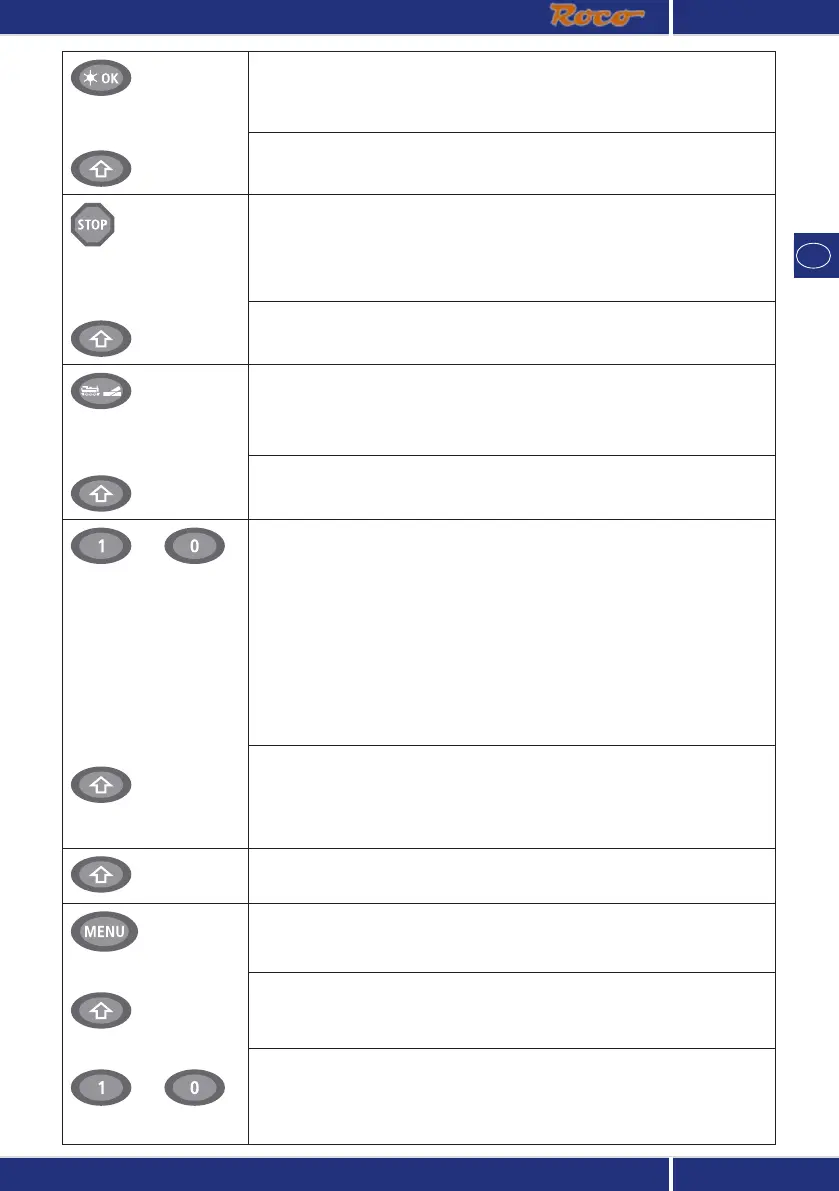
Light / OK key
– in combination with —
Shift key
– Switch the light on or off (in drive mode)
– Confirm inputs (in turnout mode and in the menus)
– Call up desired menu level or menu items
In locomotive address mode:
– Select another locomotive by directly inputting an locomotive address
Stop key
– in combination with
—
Shift key
In drive mode:
– Emergency stop on entire system
In menu mode:
– Return from the respective menu level
In drive mode:
– Selective emergency stop for the locomotive selected and displayed
Locomotive / turnout key
– in combination with
—
Shift key
– Switch between locomotive and turnout mode
– Switch between library and locomotive address mode
…
Function keys
– in combination with —
Shift key
In drive mode:
– Switch the locomotive functions F1 – F10 on or off directly. The locomotive
functions F11 – F20 are switched using keys 1 – 10 together with the shift
key. The activated locomotive functions can be seen on the display screen.
In menu mode:
– Input a locomotive name (alphanumerical) in the library
– Fast access to the menu items out of the menu level
In turnout mode:
– Input turnout number directly
– Switch locomotive functions F11 – F20 on or off. You can check the acti-
vated functions by pressing the “shift” key.
In turnout mode:
– Call up to 10 saved turnouts (turnout shortcut keys)
Shift key
In drive mode:
– Check the activated functions F11 – F20
menu key
– in combination with
—
Shift key
– in combination with —
…
Function keys
– Switch to menu mode (press and hold for approximately 5 seconds)
– Return directly from all menu levels to locomotive / turnout mode
– Switch to menu mode
– Return directly from all menu levels to locomotive / turnout mode
In library or locomotive address mode:
– Quick-program CVs 1 – 5 and 8 (“MENU“ key must be pressed first)



 To Next Page