34
Moving objects on the home screen
Change wallpaper
You can change the background image on your home
screen or lock screen. Use your own photos, images
that came on your phone, or images from an online
category.
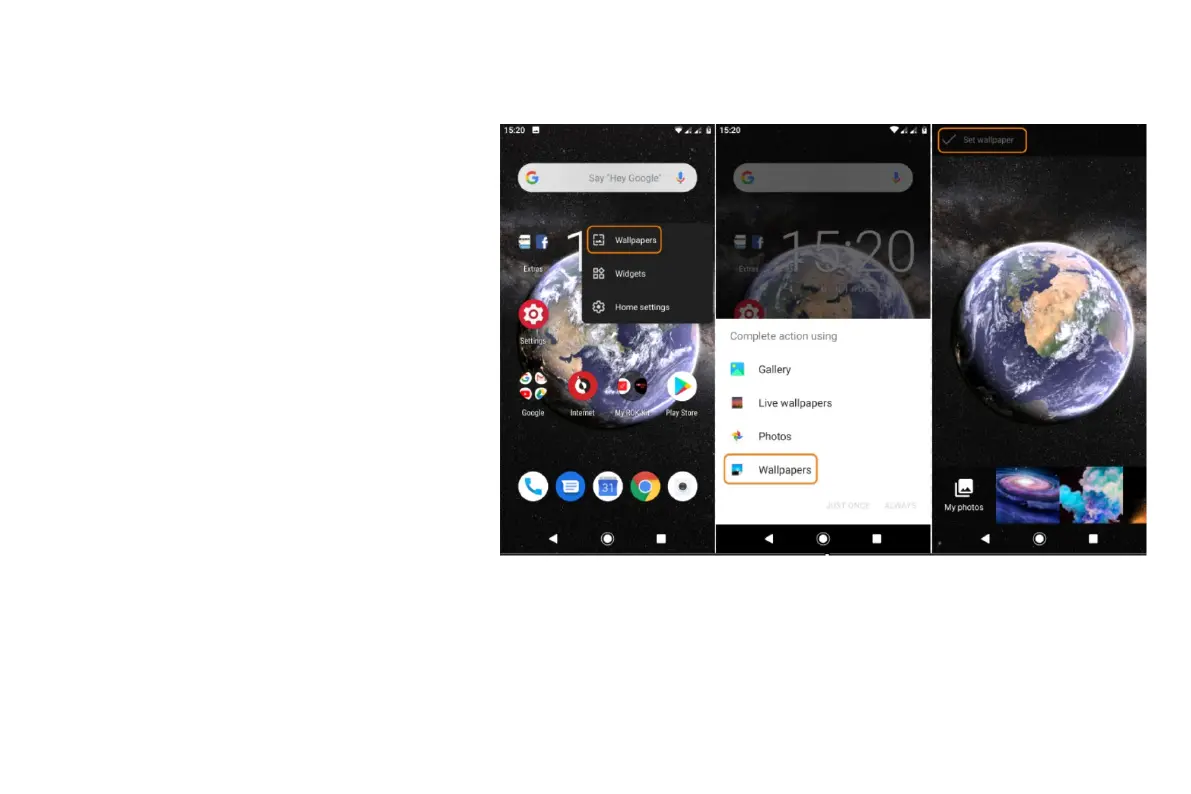
1. Open the Wallpapers app.
Or, touch & hold a blank area on your home screen,
then touch WALLPAPERS.
2. Do one of the following:
To set a single wallpaper, select a photo or wallpaper.
To see a new wallpaper each day, open a category
and touch Daily wallpaper >Continue.
3. Touch Set wallpaper.
4. Select whether you want to use the wallpaper
on your home screen, lock screen, or both.
Customize your Favorites tray
The Favorites tray at the bottom of the home screen gives you one-touch access to your most- used applications. You can customize these app


 To Next Page
 Loading...