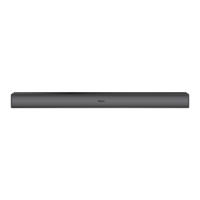
Need help?
Do you have a question about the Roku Smart Soundbar and is the answer not in the manual?
Ensure your television is ready for the setup process.
You will need your Wi-Fi network name and password.
A device is required for activating the soundbar.
Connect the soundbar to a wall outlet using the included power cable.
Connect the soundbar to the TV's HDMI ARC port using the included cable.
Use your TV remote to select the HDMI input used for connection.
Slide open the remote cover and insert Duracell batteries, negative end first.
Complete the guided setup process on your TV screen for activation.
CEC allows device commands to be sent over the same HDMI Cable.
ARC sends audio from your TV to the soundbar using the HDMI Cable.
Guidance on enabling TV's HDMI-CEC and ARC settings via menus.
Account needed for streaming, channels, subscriptions, and payment methods.
Saving a payment method simplifies rentals, purchases, and free trials.
Adjust volume leveling, speech clarity, and night mode for better audio.
Press and hold the voice button to issue commands to your soundbar.
Follow on-screen instructions after pressing the pairing button for 5 seconds.
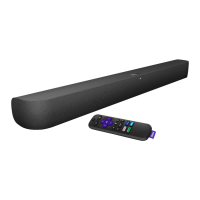
The Roku Smart Soundbar is a versatile home entertainment device designed to deliver exceptional sound and powerful streaming capabilities. It integrates a soundbar with Roku's renowned streaming platform, offering a comprehensive solution for enhancing both audio and visual experiences in your living room.
The primary function of the Roku Smart Soundbar is to provide high-quality audio for your television while simultaneously offering access to a vast library of streaming content. As a soundbar, it significantly upgrades your TV's built-in speakers, delivering clearer dialogue, richer bass, and a more immersive soundstage for movies, TV shows, and music. Its smart capabilities, powered by the Roku operating system, allow you to stream from popular services like Netflix, Hulu, Disney+, and many more, directly through the device without needing an additional streaming stick or box.
The soundbar connects to your TV primarily via an HDMI-ARC (Audio Return Channel) port, which allows for a single cable connection for both audio and control signals. This simplifies setup and reduces cable clutter. If your TV lacks an HDMI-ARC port, an optical cable can be used in conjunction with the HDMI cable for audio, ensuring compatibility with a wider range of televisions.
The included Roku remote control is central to operating the Smart Soundbar and your TV. It's a universal remote that can control your TV's power and volume, eliminating the need for multiple remotes. The remote features dedicated buttons for TV power, volume control, mute, instant replay, and options, along with channel shortcuts for quick access to favorite streaming services. A notable feature is the voice control button, which allows users to issue commands such as "Play classic rock," "Set volume to 30," or "Launch The Roku Channel," making navigation and content discovery more intuitive.
The Roku Smart Soundbar also supports Bluetooth connectivity, enabling you to stream music directly from your smartphone or other Bluetooth-enabled devices. This transforms the soundbar into a powerful wireless speaker for your audio collection.
For those seeking an even more profound audio experience, the Roku Smart Soundbar is easily expandable. It can be paired wirelessly with a Roku Wireless Subwoofer (sold separately) to deliver deeper, richer bass, creating a more cinematic and impactful sound.
Setting up the Roku Smart Soundbar is designed to be straightforward. After connecting the soundbar to power and to your TV's HDMI-ARC port (or using an optical cable if ARC is unavailable), you insert the included AAA Duracell batteries into the remote. The remote is designed to pair automatically with the soundbar. Once powered on and connected, you'll follow on-screen instructions to activate the soundbar, link it to a Roku account, and connect it to your wireless network. During this process, you may need to enable HDMI-CEC and ARC settings on your TV, which are crucial for optimal performance and control. Roku provides guidance on how to do this, acknowledging that different TV manufacturers may use varying terminology for these settings.
The Roku operating system is known for its user-friendly interface, making it easy to navigate through streaming channels, search for content, and manage settings. The home screen presents a grid of installed channels, and a search function allows you to find movies, shows, and actors across multiple streaming services.
The soundbar offers several audio enhancement features to customize your listening experience:
Voice commands, activated by pressing and holding the voice button on the remote, provide a hands-free way to control playback, adjust volume, and launch specific channels or content. This adds a layer of convenience and accessibility to the user experience.
Pairing a Bluetooth device is also simple, typically requiring you to press a dedicated button on the remote for a few seconds and then following on-screen instructions to connect your device.
The Roku Smart Soundbar is designed for minimal maintenance. The primary "maintenance" involves keeping the software updated, which Roku devices typically handle automatically when connected to the internet. These updates often bring new features, performance improvements, and security enhancements.
Physical maintenance is limited to keeping the device clean. Wiping the exterior with a soft, dry cloth is usually sufficient to remove dust. Avoid using harsh chemicals or abrasive materials that could damage the finish. Ensure that the soundbar's vents (if any) are not obstructed to allow for proper airflow and prevent overheating.
Battery replacement for the remote control is a simple task, requiring two AAA batteries. The manual clearly illustrates how to slide open the battery cover and insert the new batteries, ensuring the negative (-) ends are inserted first.
Roku emphasizes the importance of activating the Smart Soundbar through a Roku account, which is necessary for downloading channels, managing subscriptions, and accessing the Roku Channel Store. They also provide a crucial warning against scams, stating that Roku does not charge for activation support. This highlights a commitment to user security and awareness.
For any issues or questions, Roku provides extensive online support resources, including video tutorials, wireless help, and a blog with tips and tricks. Specific help pages are available for remote pairing issues, HDMI-CEC/ARC setup, and account management, ensuring users have access to comprehensive assistance. The device is built to be a reliable and long-lasting component of a home entertainment system, with its robust software platform and user-friendly design minimizing the need for frequent troubleshooting or complex upkeep.
 General
| Audio Channels | 2.0 |
|---|---|
| Weight | 5.5 lbs |
| Audio | Dolby Audio |
| Connectivity | HDMI ARC, Optical, Bluetooth |
| Voice Assistant | Amazon Alexa, Google Assistant |
| Streaming | Yes (Roku OS) |
| Wireless Technology | Wi-Fi, Bluetooth |
| Streaming Channels | Access to Roku Channel Store |
| Voice Remote | Yes |

 To Next Page