3. Enjoy your Roku Touch
tabletop remote!
1. Prepare to pair
• Turn on your Roku TV™.
• Using your existing remote, press
and hold for 5 seconds to get
to the pairing menu.
• Select Remote.
2. Set it up
• Insert the batteries into your
Roku Touch.
• Press and hold the pair button
for 5 seconds.
• The TV will automatically begin
pairing.
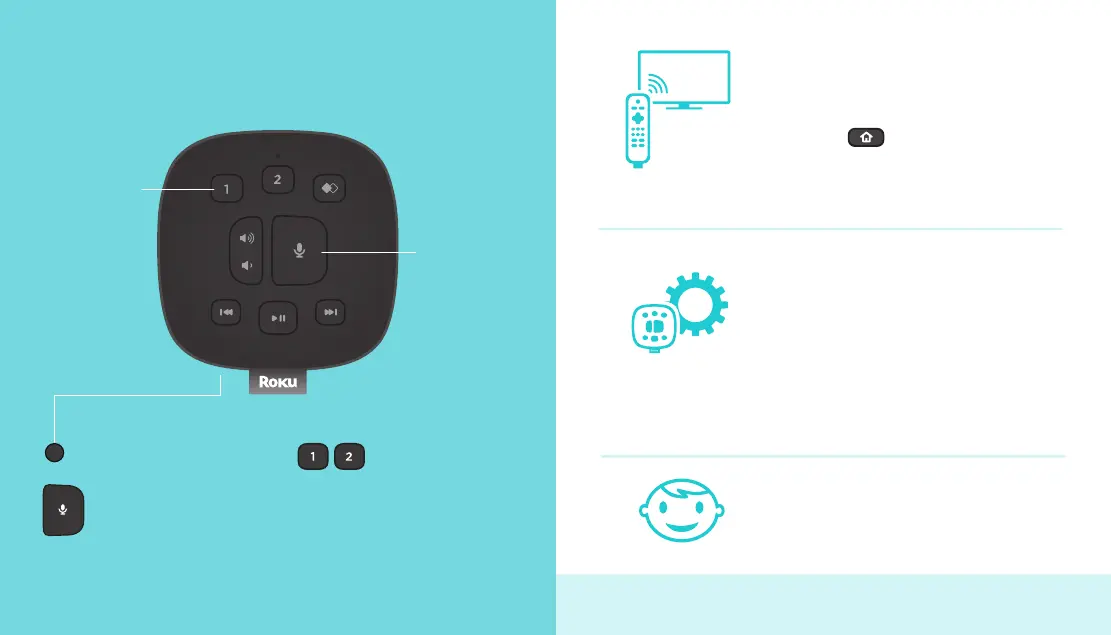
Microphone
button
Pair (under battery cover)
Pair - Press to pair to your
Roku device.
Top view
Meet your new Roku Touch
Microphone button - Press
and hold while saying a
command.
Programmable presets
To set: Give a command using the
microphone button. Then, press and
hold a preset button until you hear
a tone.
To use a saved command: Press the
button once.
Pairing to a Roku player? Visit go.roku.com/rt to learn more.
Programmable
presets



 To Next Page