18
OPERATION
How to Connect the GK-2A
* To prevent malfunction and/or damage to speakers or other devices, always turn down the volume, and turn
off the power on all devices before making any connections.
* Once the connections have been completed, turn on power to your various devices in the order specified. By
turning on devices in the wrong order, you risk causing malfunction and/or damage to speakers and other
devices.
1.
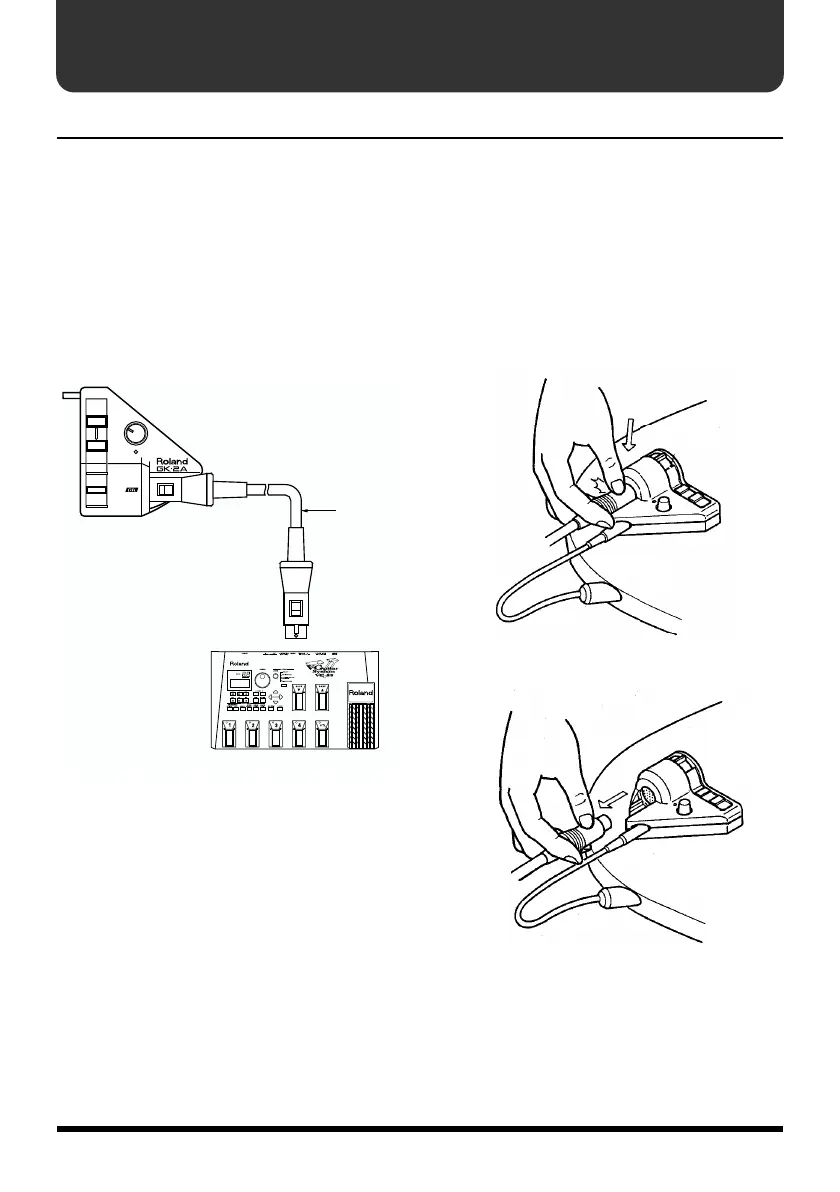
Make sure that the [GR] is switched off.
Then connect the [GR] to the GK-2A using
the C-13A/B cable.
fig. 15
* Connect the GK-2 socket on the [GR] to that on
the GK-2A.
* Use only a C-13A/B cable. Use of any other cable
could result in damage or malfunction.
* The C-13A/B is a locking cable that cannot be
disconnected unless it is first unlocked.
fig.02-1
fig.02-2
SYNTH VOL
DOWN/S1
UP/S2
MIX
GUITAR
SYNTH
C-13A/B
VG-88
GK IN



 To Next Page
 Loading...