To Next PageTo Next Page
 Need help?
Do you have a question about the Roland Micro Composer MC-80 and is the answer not in the manual?
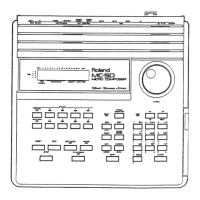
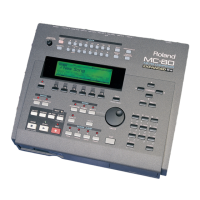
The Roland MC-80 Micro Composer is a sophisticated standalone MIDI sequencer designed for professional music production, offering a comprehensive suite of tools for composing, arranging, and real-time performance. Building upon the legacy of the successful MC-50mkII, the MC-80 integrates advanced features typically found in computer-based sequencers, providing a powerful and intuitive workflow for musicians.
The MC-80 serves as a central hub for MIDI-based music creation, allowing users to record, edit, and arrange musical ideas with precision and flexibility. Its core function is to sequence MIDI data across 16 independent tracks, enabling the creation of complex and multi-layered compositions. The device supports a high resolution of 480 TPQN (Timing Parts Per Quarter Note), which translates to an exceptionally accurate and nuanced feel in recorded performances, capturing the subtle timing variations that contribute to a natural musical expression.
A key feature of the MC-80 is its ability to integrate with the optional VE-GSPro Voice Expansion Board. When installed, this board transforms the MC-80 into a fully independent workstation, significantly expanding its sonic palette. The VE-GSPro provides access to over 1,000 high-quality GS sounds and a robust suite of powerful effects, emulating the diverse tones found in Roland's acclaimed SC-55, SC-88, and SC-88Pro modules. This expansion allows users to create rich and varied arrangements without the need for external sound modules, making the MC-80 a self-contained production environment.
The MC-80 is fully compatible with MIDI Machine Control (MMC) and MIDI Time Code (MTC), ensuring seamless synchronization and integration with other MIDI-enabled devices in a studio setup. With two independent MIDI Outs, the sequencer can control up to 32 independent parts and, with the VE-GSPro board, manage 64 voices of polyphony, facilitating intricate orchestrations and dense musical textures.
The MC-80 is designed for intuitive operation, featuring a large backlit LCD that simplifies song selection and sequencing tasks. Navigation is primarily handled through CURSOR buttons and a VALUE dial, allowing for quick adjustments and parameter changes.
Recording MIDI tracks is a straightforward process. Users can select a track, set desired values for tempo, count-in, recording mode, and quantize, and then begin recording. The advanced Quantize function offers precise control over timing correction, allowing musicians to refine their performances while maintaining a natural feel.
The MC-80 excels in real-time performance and arrangement. The MARK and JUMP buttons are dedicated to facilitating quick, on-the-fly arrangement changes during practice or live performances. This allows users to instantly navigate between different sections of a song, creating dynamic and interactive musical experiences.
One of the most innovative features is Realtime Phrase Sequencing (RPS). This function allows users to assign different sections of a song (e.g., verse, chorus, solo) to individual keys on a MIDI keyboard. By triggering these keys in real-time, musicians can experiment with various arrangements, creating spontaneous and evolving performances. This capability is particularly useful for live improvisation and for quickly sketching out different structural ideas.
The built-in Arpeggiator function enhances creative possibilities by allowing users to generate complex arpeggio patterns simply by holding down a chord on their MIDI keyboard. This feature offers various styles, providing instant inspiration and adding dynamic movement to compositions.
The MC-80 offers multiple storage options to accommodate diverse workflow needs. It includes an internal floppy drive for convenient data storage and retrieval. For larger projects and increased storage capacity, the device supports external hard drives or ZIP® drives via an optional SCSI port, ensuring that musicians have ample space for their creative work.
The MC-80 provides flexible connectivity for external MIDI devices. With two MIDI Outs and two MIDI Ins, users can easily connect MIDI keyboards, sound modules, and other controllers. This dual-port configuration allows for complex MIDI routing, enabling the control of multiple instruments and the integration into existing studio setups.
For hands-free control during performance, the MC-80 includes assignable footswitch options. Functions such as Mark/Jump, Play/Stop, and Fade Out can be assigned to a footswitch, allowing musicians to maintain focus on their instrument while controlling the sequencer.
When the VE-GSPro is installed, selecting tones is an extensive process. The MC-80 provides 1117 tones and 42 rhythm kits, emulating the SC-55, SC-88, and SC-88Pro modules. Users must first select a tone map (e.g., 88 PRO, 88 MAP, 55 MAP) and load the song into internal memory before selecting individual tones. This structured approach ensures compatibility and optimal performance with the emulated sound modules.
While the manual does not explicitly detail maintenance features, the design of the MC-80 suggests a focus on reliability and ease of use. The inclusion of an internal floppy drive implies a standard method for data backup and transfer, which is a crucial aspect of maintaining project integrity. The option for external SCSI drives further enhances data management, allowing users to employ more robust and higher-capacity storage solutions. The modular nature of the VE-GSPro expansion board indicates that components can be added or potentially serviced independently, contributing to the longevity and adaptability of the device. The robust construction typical of Roland products also suggests a durable instrument designed for sustained use in various environments.
 General
| Brand | Roland |
|---|---|
| Model | Micro Composer MC-80 |
| Category | Recording Equipment |
| Language | English |