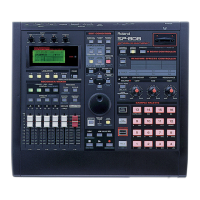
SP-808: Pad Response Options
The sample pads can be triggered in three different ways, Gate, Trigger and Drum. These different
options work as follows:
GATE:
Press and hold the pad -> Starts playing sound.
Release pad -> Stops playing sound.
TRIGGER:
Press the pad -> Starts playing sound.
Release pad -> Keeps on playing.
Press pad again -> Stops playing.
DRUM:
Press the pad -> Starts playing sound (Stops automatically when the sample reaches the end
point).
Use the following procedure to select the Pad Response:
1. Press the pad with the sample to be set up.
2. Press SAMPLE/BANK.
3. Check to make sure that "Set System Param?" is selected.
4. Press ENTER/YES and make sure that "PadPlay" is selected.
5. Use the VALUE dial to select "GATE," "TRIGGER," or "DRUM."
6. Press PLAY to return to the basic screen.
SP-808: Reversing Sample Playback
Create Reversal is a function that plays a sample from its end-point to its start-point, reversing
playback. Use the following procedure to create a sample reverse playback:
1. Press SAMPLE/BANK.
2. Press CURSOR UP/DOWN to select "Create Reversal?" and press ENTER/YES.
3. Use the CURSOR buttons to highlight the "Source" Bank.
4. Use the CURSOR buttons and the VALUE dial to select a "Source" pad bank and "Source" sample.
5. Use the CURSOR buttons to highlight the "To" Bank.
6. Use the CURSOR buttons and the VALUE dial to select a "To" pad bank and "To" sample.
Note: "Source" refers to the sample that you want to reverse. "To" refers to an empty bank and
pad where the reversed sample will be stored.
7. Press ENTER/YES to display "Now Working . . ."
8. When finished, press PLAY to return to the basic screens.
9. Access the bank and pad previously selected in the "To" screen to confirm the results.



 To Next Page
 Loading...