2-3 Creating Printing Data
Basic Approach for Creating Printing Data
When Using Metallic Silver Ink
You can create the printing data according to the two methods below.
Specify the spot color so as to use only the metallic silver ink.
Apply the spot color named "RDG_MetallicSilver" to the areas you want to print using the metallic silver ink.
Use the exclusive metallic color special colors library.
From the exclusive metallic color special colors library, select the metallic color to be used which is the
combination color of CMYK LcLmLk ink and metallic silver ink.
When Using White Ink
Specify the spot color named "RDG_WHITE" to the areas you want to print using the white ink.
Creating Data for Printing
Create the data for printing using the metallic silver ink or the white ink.
The program used to create the printing data is Adobe Illustrator CS6, in this section. For detailed information
on drawing methods and how to work with palettes, refer to the documentation or online help for Adobe
Illustrator CS6. If you are using another version of Adobe Illustrator, operations may be somewhat dierent
from those explained here.
1.
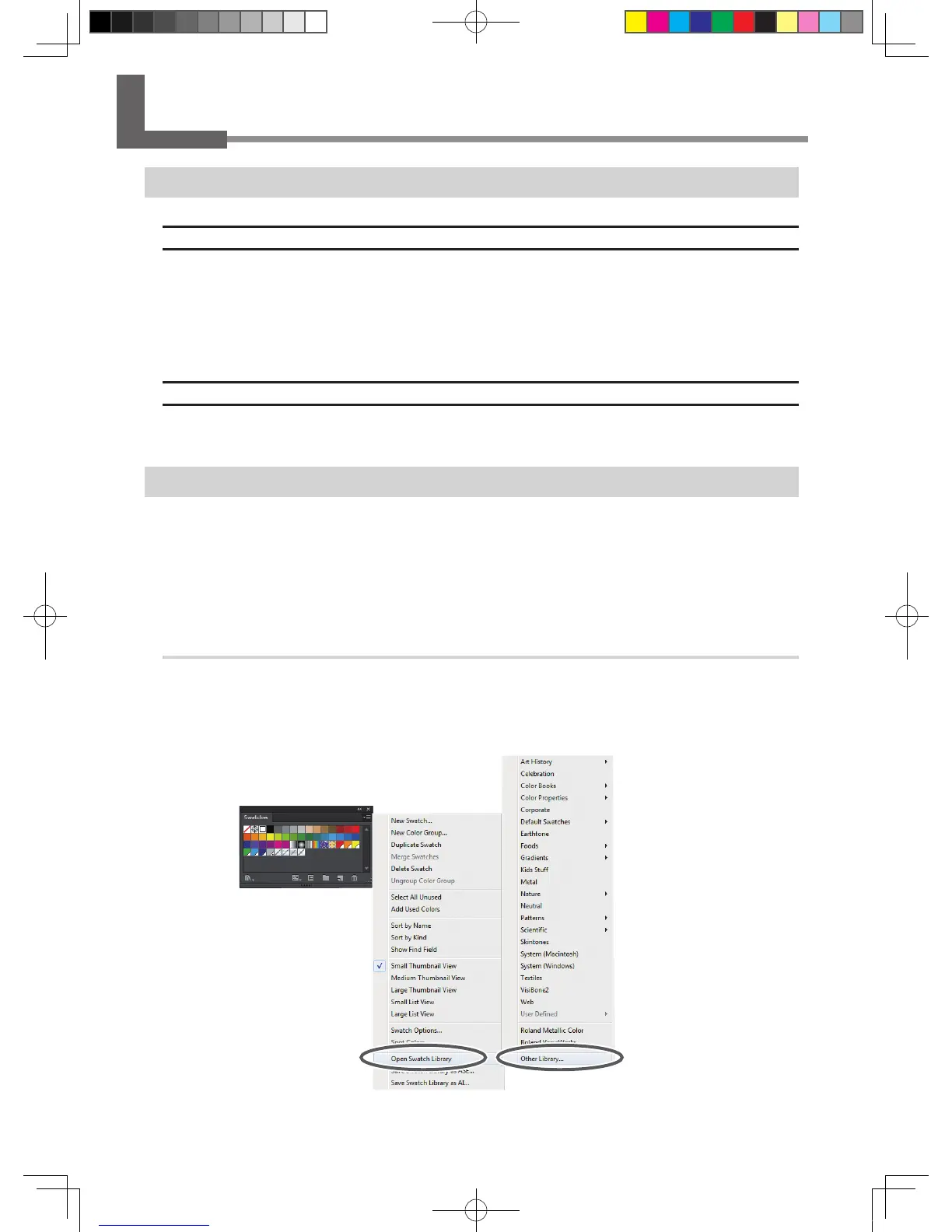
Open the exclusive swatch library.
At the swatch palette menu, select [Open Swatch Library], then [Other Libraries].
The "Open" window appears.
The swatch palette is displayed by going to the menu, selecting [Window], and then selecting [Swatch].
VS-640i_USE2_EN_R1.indb 12 2013/07/23 19:00:24



 To Next Page
 Loading...