EasyManua.ls Logo

ROLLEIFLEX SL 2000F - OPERATIONAL INSTRUCTIONS (BRIEF)

ROLLEIFLEX SL 2000F
68 pages
Print Icon
To Previous Page IconTo Previous Page
Loading...
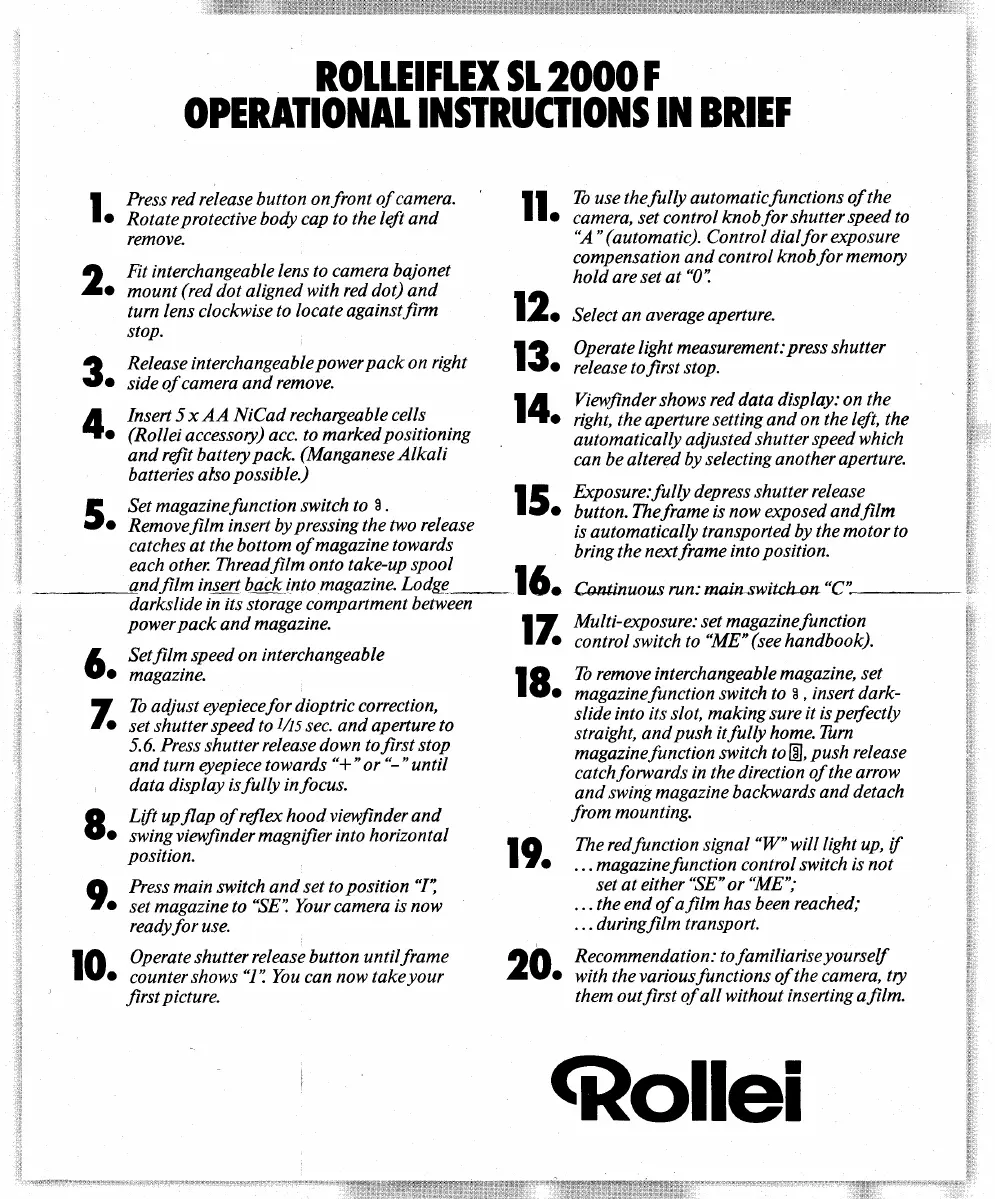
ROllErrlEX 51
2000
1
OPERAIIONA1
I
]I$RUCIIOI{S IN BRIET
I
hess red release button
onfront
of camera.
l.
Rotateprotective
body cap
to the left and
remove.
q
Fil interchangeable
lens
to camera baionet
Zo
mount
(red
dot aligned
with red dot) and
turn
lens clockwise
to locate againstfirm
stop.
2
Release
interchangeable
power
pack
on
right
Jo
side
of camera and
remove.
n
Insert 5 x
AA NiCad
rechargeable cells
rlo
(Rollei
accessory)
acc.
to marked
positioning
and
refit battery
pack.
(Manganese
Alkali
batteries also
possib
le.)
E
Set
magazinefunction
switch to
8
.
Jo
RemoveJilm insert
by
pressing
the two
release
catches
at the bottom
of magazine
towards
each other
Threadfilm
onto take-up spool
andJilm
in;ert bstkinto
magazine.
Lodge-
16.
eontinuous
run: meiaswikhannc'-
darkslide in its storage
compartment
between
power
pack
and
magazine.
Setjilm speed
on interchangeable
magazine.
Tb adjust
qtepiecefor
dioptric correction,
set
shutter speed to
l/ts
sec.
and aperture to
5.6.
Press shutter
release down tofirst stop
and turn
qtepiece
towards
"*"
or
"-"
until
data display
isfully infocus.
O
Lift upflap of
rqflex hoodviewfinder and
lUo
swingviewJinder
magnifier
into horizontal
position.
O
hess main switch and set
to
position
"I",
ua
set magazine to
"SE".
Your camera
is now
readyfor
use.
10.
?:;#::
:x#:q',' 7:; ::{:#r::i!ffi:
20
.
Iif ;nr ::i,::;:
tr
#{:r! ;f;:;:
!#,7f{,,
i7.
lf
To use thefully automaticfunctions
of the
I lo
camera, set control
knobfor shutter
speed
to
"A"
(anttomatic).
Control
dialfor exposure
compensation
and contro
I knob
for
memory
hold are
set at
"0".
12. Select an
average aperture.
l2
Operate
light measurement:
press
shutter
r9o
release tofirst stop.
l 4.
r;ff if:;;!ii:::!,
l:y,x:;'"!fl
il i#," 0,
automatically
adjusted shutter
speed which
can be altered
by selecting another
aperture.
I E
Exposure:fully
depress
shutter
release
lUo
button.Theframe
is
now exposed andfilm
is automatically
transported
by the motor
to
bringthe
nextframe
into
position.
17
Multi-exposure: set
magazinefunction
lf
o
control switch
to
"ME"
(see
handbook).
I
8.
T,
;;r,?;:
fr:;::l;IT;
l:l"#:?;',hfr
i'j,o
slide into
its slot, making sure
it is
pedectly
straight, and
push
itfully home.Turn
magazinefunction switch
to@,
push
release
catchforwards
in the direction
of the arrow
and
swing magazine backwards
and detach
frommounting.
lO
The redfunction signal
"W"
will
ligltt up, tf
I lo
.. . magazinefunction
control switch
is not
set at either
"SE"
or'ME";
.
. .
the
end of afilm has been
reached;
. . . duringfilm transport.
them
outJirst of all without
inserting afilm.
(Rollei
Jirst
picture.

Related product manuals