EasyManua.ls Logo

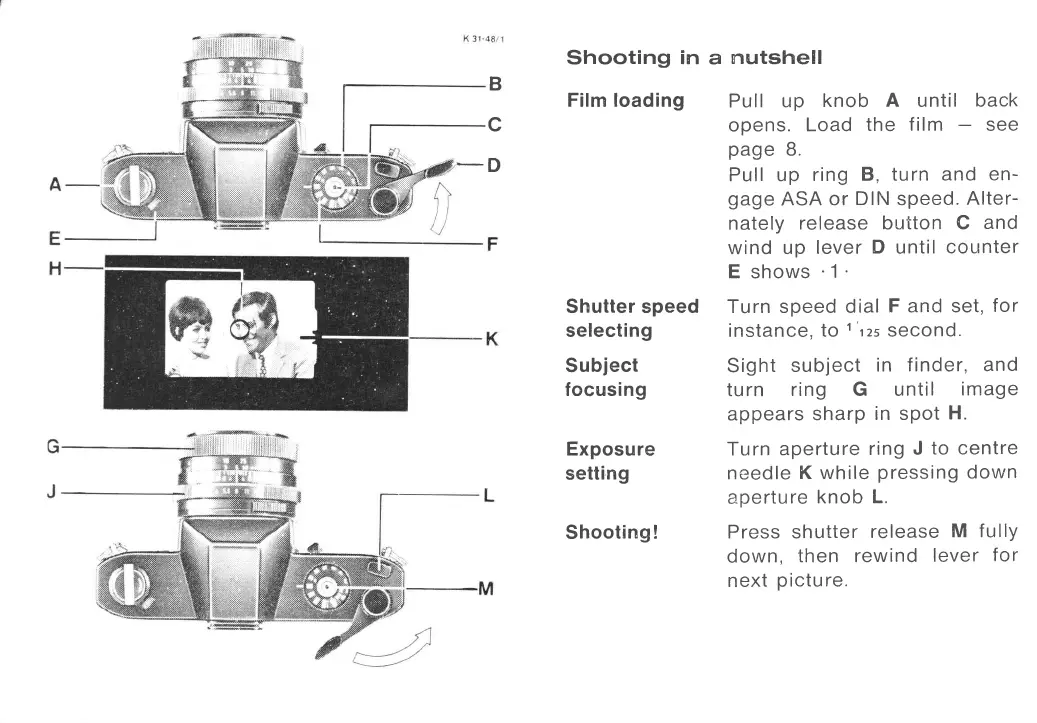
ROLLEIFLEX SL35 - Shooting in a nutshell; Film loading; Shutter speed selecting; Subject focusing

ROLLEIFLEX SL35
50 pages
Print Icon
To Next Page IconTo Next Page
To Previous Page IconTo Previous Page
Loading...
B
c
Shooting
in
Film loading
Shutter speed
selecting
Subject
focusing
Exposure
setting
Shooting
!
a
nq,ttshell
Pull up
knob
A
until
back
opens.
Load
the
f ilm
see
page
8.
Pu |
|
u
p
ring
B, tu rn
and en-
gage
ASA
or DIN speed.
Alter-
nately
release button
C
and
wind up
lever
D
until
counter
E
shows
'1
Turn speed dial
F and set,
for
instance,
to
1'tzs
second.
Sight
subject
in finder,
and
turn
ring G until
image
appears
sharp
in
spot
H.
Turn
aperture
ring
J
to centre
needle
K while
pressing
down
aperture
knob
L.
Press shutter
release
M fullY
down,
then rewind
lever
for
n ext
p
ictu re.
-D
www.orphancameras.com

Related product manuals