EasyManua.ls Logo

ROLLEIFLEX SLX - Photography, Settings, and Removal

Default Icon
16 pages
Print Icon
To Next Page IconTo Next Page
To Previous Page IconTo Previous Page
Loading...
Polaroid-
Adapter
I
t
Remove
protective
cover 4lrom
film
pack
5
w,thouttouching
the
black
paper
leader
6
in
film
gate
7
-
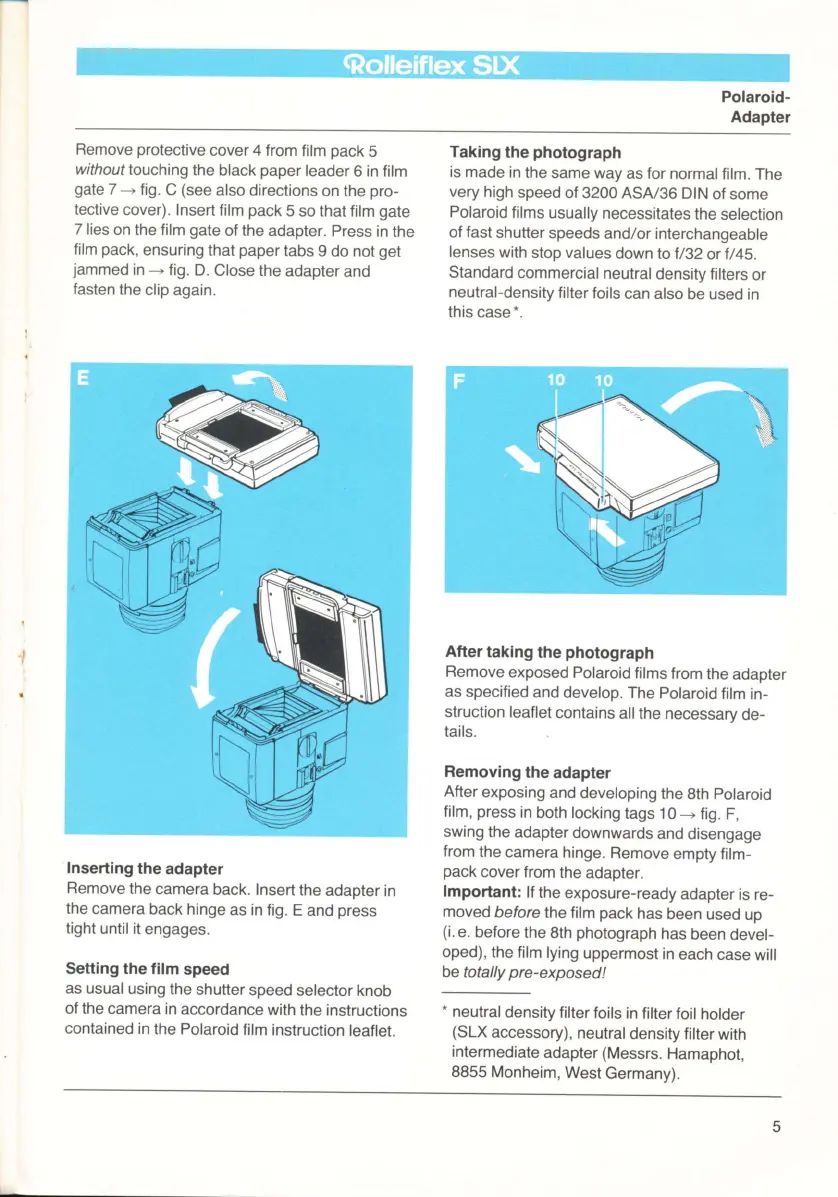
fig. C
(see
also
directions
on the
pro-
tective
cover). Insert
film
pack
5
so that film
gate
7 lies
on the
film
gate
of the
adapter. Press
in the
film
pack,
ensuring
that
paper
tabs
g
do not
get
jammed
in
+
fig.
D. Close
the adapter
and
fasten
the
clip again.
Inserting
the
adapter
Remove
the
camera
back. Insert
the
adapter
in
the
camera
back hinge
as in fig.
E and
press
tight until it
engages.
Setting the film
speed
as usual
using the
shutter
speed
selector
knob
of the
camera in
accordance
with the instructions
contained
in the Polaroid
film instruction
leaflet.
Taking
the
photograph
is made
in the
same way
as for normal
film.
The
very
high
speed
of 3200 ASA/36
DIN
of some
Polaroid
films
usually
necessitates
the
selection
of
fast
shutter
speeds
and/or interchangeable
lenses with
stop values
down lo t/32
or t/45.
Standard
commercial
neutral
density
filters
or
neutral-density
filter
foils
can
also be used
in
this
case*.
After
taking
the
photograph
Remove
exposed Polaroid
films
from
the
adapter
as specified
and
develop.
The Polaroid
film
in-
struction
leaflet
contains
all the
necessary
de-
tails.
Removing
the
adapter
After
exposing
and
developing
the
8th Polaroid
film,
press
in
both locking
tags 10
+
fig.
F,
swing
the
adapter
downwards
and
disengage
from
the
camera
hinge.
Remove
empty film-
pack
cover from
the
adapter.
lmportant:
lf the
exposure-ready
adapter
is re-
moved
before the film
pack
has
been
used up
(i.
e. before
the
8th
photograph
has
been
devel-
oped),
the film lying
uppermost
in
each
case will
be
total
ly
p
re
-
ex
posed
!
.
neutral
density filter
foils
in filter foil
holder
(SLX
accessory),
neutral
density filter
with
intermediate
adapter
(Messrs.
Hamaphot,
8855 Monheim,
West
Germany).
www.butkus.us

Related product manuals