11
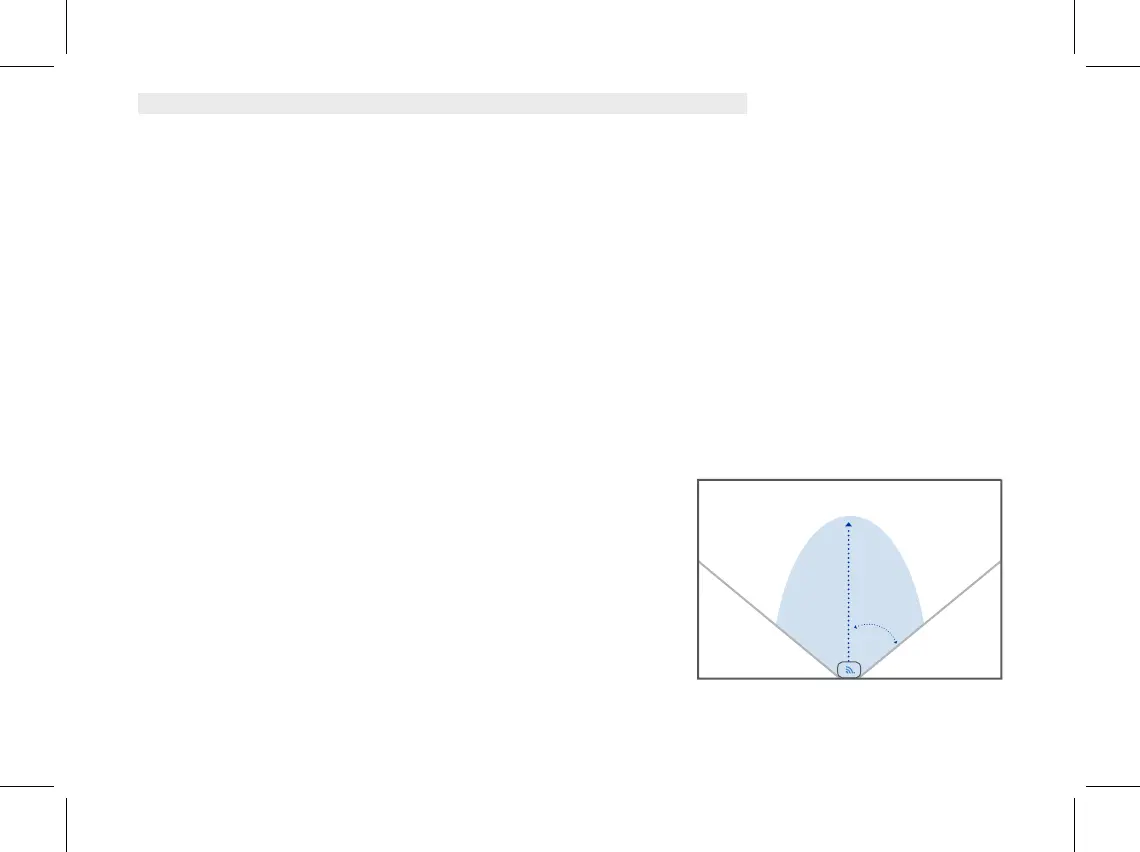
18 feet
45°
6 feet
• If the sensor does not blink green, please insert a paper clip into the hole labeled “Pairing” on the
back of the sensor near the battery door. Press and hold this button for 2 seconds. You will hear
audio confirmation from your SmartBase (“Motion sensor connected”) and receive a notification
that your sensor is connected. The Motion sensor will also appear in your app.
Placement
The ideal placement for the Motion Sensor is a central location in your home such as a wall pointed
towards the main hallway or a stairway that is a main traffic area.
• Locate a spot on the wall that is appx 6-8 feet above the floor and avoid placing the sensor near heating
or AC vents.
• Do not place the sensor facing a window as birds or cars passing by can trigger the sensor.
• If you have a pet, avoid placing in front of their favorite seats to perch on.
You should mount your motion sensor on the wall with the
included mounting plate. This plate can be attached to the
wall by adhesive tape or the two screws which are
included in your kit (a corner mounting bracket is also
available by contacting our customer care team).
Name Your Motion Sensor
Your motion sensor should appear in the app with a
default name. If you would like to change this name, go to
the app and tap on the motion sensor tile and select “Change Name.” Then select an appropriate
location name or create a custom name for your motion sensor and tap “Save.”


 To Next Page
 Loading...