DC -I N
U S B
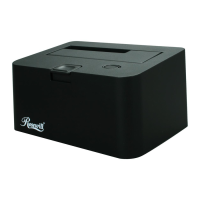
HDD Docking RX-DU100/RX-DUS100
USER’S Manual
Thank you for purchasing a quality Rosewill Product.
Please register your product at : www.rosewill.com
for complete warranty information and future support for your product.
HDD Docking RX-DU100/RX-DUS100 USER’S Manual HDD Docking RX-DU100/RX-DUS100 USER’S Manual
Hardware Installation
Top
1
2
4
3
1. Push button to release HDD from docking
2. For 2.5” HDD
3. For 3.5” HDD
4. Power and Access LED
Back
Power Switch
DC Jack
USB port to PC host
HDD Docking RX-DU100/RX-DUS100
Specification
• Size : 2.5” & 3.5”
• Internal Interface : SATA
• External Interface : USB 2.0
• Dimensions :
130(L) X 94(W) X 68(H) mm
Features
• Plug and play
• Support up to 2TB HDD
• Supports transfer rates up to 480 Mbps
with USB 2.0
• Hot-Swap capability for rapid multi HDDs
• LED indicator for power on and HDD access
Specification
• Size : 2.5” & 3.5”
• Internal Interface : SATA
• External Interface : USB 2.0 & eSATA
• Dimensions :
130(L) X 94(W) X 68(H) mm
Features
• Plug and play
• Support up to 2TB HDD
• Supports transfer rates up to 480 Mbps
with USB 2.0
• Supports transfer rates up to 3 Gbps
with eSATA
• Hot-Swap capability for rapid multi HDDs
• LED indicator for power on and HDD access
RX-DU100
RX-DUS100
Package Contents
Package Contents
• HDD Docking
• USB Cable
• Power Adapter
• HDD Docking
• USB Cable
• eSATA Cable
• Power Adapter
RX-DU100
RX-DUS100
D C - I N
U S B e S ATA
Power Switch
eSATA port to PC host
DC Jack
USB port to PC host
HDD Docking RX-DU100/RX-DUS100 USER’S Manual HDD Docking RX-DU100/RX-DUS100 USER’S Manual


 To Next Page
 Loading...