EasyManua.ls Logo

Rossmax HS200 - User Manual

Rossmax HS200
2 pages
Print Icon
To Next Page IconTo Next Page
Loading...
Caution: Control Solution is for in vitro use only. It is not to be swallowed or injected. The use of the
Control Solution is recommended to verify proper system performance and should not be considered
as a substitution of actual capillary whole blood testing for blood glucose level.
Materials Required
1. Glucose Meter
2. Test Strip
3. Control Solution
Note: Please make sure you are using the same model of Control Solution, Test Strip and
Glucose Meter.
Test Procedure
Note: Make sure the solution is at room temperature15°C to 35°C (59°F to 95°F) prior to testing.
Preparation
Make sure that you have set the Glucose Meter in the Control Solution test “ “ mode, so the result
will be stored in the memory and not be incorporated into the average. Please read the User Manual of
your Rossmax HS200 Blood Glucose Monitoring System.
Testing
Intended Use
The Control Solution is a desired aqueous glucose solution with small amounts of non-reactive
ingredients and food coloring for verifying the accuracy of the entire Rossmax HS200 Blood Glucose
Monitoring System. The control solutions are used to check the performance of the Rossmax HS200
meter, test strips, and your testing technique.
When To Perform a Control Solution Test
1. You get your meter for the first time before testing your blood test.
2. You open a new vial of test strips.
3. You want to check the meter and strips.
4. You suspect that the meter or test strips are not working properly.
5. Your blood glucose test results are not consistent with how you feel.
6. You think your test result does not accurate.
7. You dropped your meter.
8. Whenever your healthcare professional recommends it.
Control Solution Contents
Each Control Solution is provided as a buffered, stabilized, aqueous solution of desired D(+)-glucose
containing a preservative and other non-reactive ingredients. The solutions are formulated to react
equivalently to a whole blood sample containing approximate 50, 130 or 350 mg/dL glucose
concentrations. Actual lot-specific ranges are printed on the Test Strip bottle label.
Control Solution
Level 1
Level 2
Level 3
mg/dL
50
130
350
mmol/L
2.8
7.2
19.4
Control Solution Package Insert
HS200
1. Insert a Rossmax HS200 Blood Glucose Test Strip into the test port. The meter will be automatically
turned ON. When test strip is inserted, a beep will sound if the buzzer is turned on and the system
checking will appear followed by a flashing “ ” icon.
Question and Answer IconNeed help?

Do you have a question about the Rossmax HS200 and is the answer not in the manual?

Overview

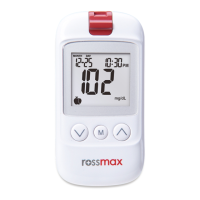
The Rossmax HS200 is a blood glucose monitoring system designed to help users accurately measure their blood glucose levels. The system includes a glucose meter, test strips, and control solutions, all working together to provide reliable results.

Function Description

The primary function of the Rossmax HS200 is to measure glucose concentrations in blood samples. It utilizes test strips that react with the glucose in the blood, and the meter then interprets this reaction to display a numerical glucose level. The system is intended for in vitro diagnostic use, meaning it is used for testing outside the body.

The control solution component of the system is an aqueous glucose solution containing non-reactive ingredients and food coloring. Its purpose is to verify the accuracy of the entire Rossmax HS200 Blood Glucose Monitoring System, including the meter, test strips, and the user's testing technique. There are three levels of control solution, formulated to react equivalently to whole blood samples with approximate glucose concentrations of 50 mg/dL (2.8 mmol/L), 130 mg/dL (7.2 mmol/L), and 350 mg/dL (19.4 mmol/L). The actual lot-specific ranges for these solutions are printed on the Test Strip bottle label.

Usage Features

The Rossmax HS200 is designed for ease of use, with several features to guide the user through the testing process:

  • Automatic On/Off: The meter automatically turns ON when a Rossmax HS200 Blood Glucose Test Strip is inserted into the test port. A beep will sound if the buzzer is enabled, and a system check will appear, followed by a flashing blood drop icon, indicating it's ready for a sample.
  • Control Solution Test Mode: The meter has a dedicated control solution test mode. To activate this, the user presses and holds the "M" button for 2 seconds. A "C" icon will appear on the display, signifying that the meter is in control solution test mode. This ensures that control solution results are stored separately in the memory and are not included in the average blood glucose readings. Pressing the "M" button again for 2 seconds will switch the meter back to the normal testing mode.
  • Sample Application: For control solution testing, the user gently shakes the control solution bottle, discards the first drop, and then squeezes a small drop onto a clean, non-absorbent surface (e.g., wax paper). It is crucial not to apply the control solution directly from the bottle to the test strip to prevent contamination. The tip of the test strip is then introduced to the droplet, which is automatically drawn into the strip. The meter will beep when sufficient solution has been drawn, and then a countdown will begin before the result is displayed.
  • Result Comparison: After a control solution test, the user compares the displayed result with the control solution range printed on the Test Strip vial. The result should fall within this specified range. If the result is out of range, the test should be repeated.
  • Error Indicators: The system provides guidance if a test result is out of range. Potential causes include incorrect testing steps, control solution temperature outside the recommended range (15°C to 35°C or 59°F to 95°F), expired or contaminated control solution (or opened for over 3 months), expired or contaminated test strips, or a meter malfunction. If problems persist, the user is advised to contact their local distributor or service center.

Maintenance Features

Proper maintenance and storage are essential for the accurate and reliable operation of the Rossmax HS200 system:

  • Control Solution Storage: Control solutions should be stored at room temperature and not refrigerated. Users must refer to the expiration date for stability. The solution should not be used after its expiration date or more than 3 months after opening.
  • System Verification: Control solution tests are a key maintenance feature to ensure the system's accuracy. These tests should be performed in several situations:
    • When using the meter for the first time.
    • When opening a new vial of test strips.
    • To check the meter and strips.
    • If the meter or test strips are suspected of not working properly.
    • If blood glucose test results are inconsistent with how the user feels.
    • If a test result is suspected to be inaccurate.
    • After dropping the meter.
    • Whenever a healthcare professional recommends it.
  • Temperature Considerations: It is important to ensure that the control solution is at room temperature (15°C to 35°C or 59°F to 95°F) prior to testing, as temperature can affect the accuracy of the results.
  • Contamination Prevention: Users are explicitly cautioned not to apply control solution directly from the bottle to the test strip, as this can contaminate the solution and decrease its concentration. Always place a drop on a clean, non-absorbent surface first.
  • Component Compatibility: For accurate results, users must ensure they are using the same model of Control Solution, Test Strip, and Glucose Meter.
  • Package Integrity: The system includes a symbol indicating "Do not use if package is damaged," emphasizing the importance of checking the product's packaging upon receipt.

The Rossmax HS200 is designed to be a user-friendly and reliable tool for managing blood glucose levels, with clear instructions and features to help maintain its accuracy over time.

Rossmax HS200 Specifications

General IconGeneral
Device TypeBlood Glucose Meter
ModelHS200
DisplayLCD
Sample TypeWhole blood
Power SourceBattery
Measurement Range20-600 mg/dL
Operating Conditions10-40°C, 20-80% RH