HUE, SATURATION, INTENSITY
H
S
I
S
F
X
S
E
T
GEL
S
CC
T
FL
S
H
SPECIAL EFFECTS
SYSTEM
SETTINGS
FILTER
MENU
COLOUR
TEMPERATURE
( KELVIN )
FLASH
MENU
HOME MENU
From the home menu, select from 5 operating modes; CCT (Continuous light, Kelvin 3000-
10,000K), HSI (Hue, Saturation, Intensity) for 16.7M RGB Colours, GELS for 2500 digital
lters and sampled ‘source match’ effects, FLASH for RGB HSS ash (ash in any CCT, HSI
or lter colour). System settings, such as language, display and factory reset, can also be
adjusted by the ‘SET’ page. On start up, the light will automatically recall your last used
settings and on each of the 5 operating mode pages. (e.g. CCT, HSI).
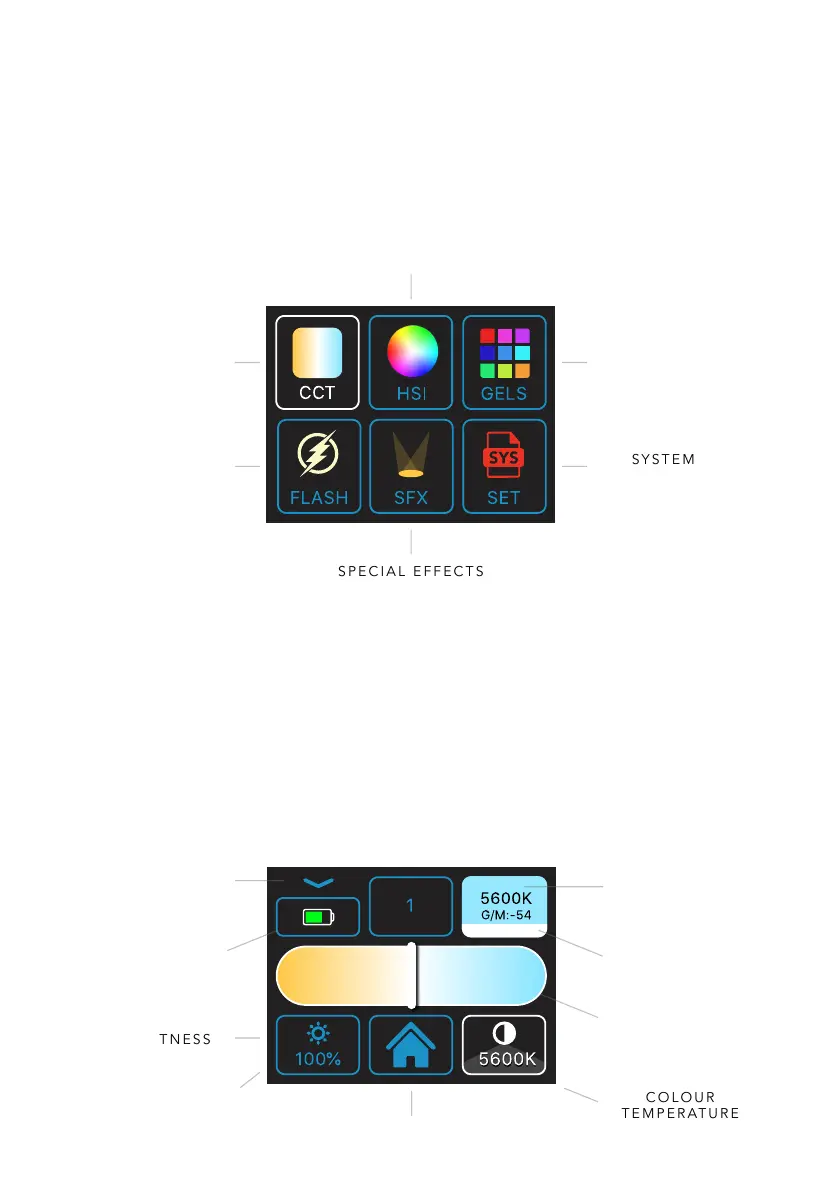
CCT MENU
Using the touchscreen slider or right-hand knob for ne adjustments, adjust Kelvin from
3000-10,000K to your desired setting, (typically 5600K). For maximum peak output
brightness, set the light to 4600 Kelvin where both warm and cool LEDs are on full power.
Use the left-hand knob to adjust brightness or tap the bottom-left brightness icon to use
the on-screen slider that appears. To save your current settings, long press on one of the
numbered presets, (across the top) and a prompt to save will appear. To recall, short tap on
a preset, (indicated by a thick blue line at bottom of preset box). Swipe right across preset
bar to reveal additional presets.
5600
K
100
%
HOME
BATTERY
LEVEL
BRIGHTNESS
COLOUR
TEMPERATURE
/GREEN MAGENTA
TAP TO SWITCH
USER PRESETS
(LONG PRESS TO SAVE)
COLOUR TEMP.
SLIDER
SAVED PRESET
INDICATOR
(TAP TO RECALL)
DIFFUSION*
(TOUCH TO SELECT)
*AEOS 2 ONLY, ENABLED WHEN
SMARTSOFT BOX IS CONNECTED
ACCESS
KELVIN PRESETS
(TOUCH TO REVEAL)


 To Next Page
 Loading...