Ready to go with what you can rely on!
Aurora A7 User Manual
RovyVon V1
Charging
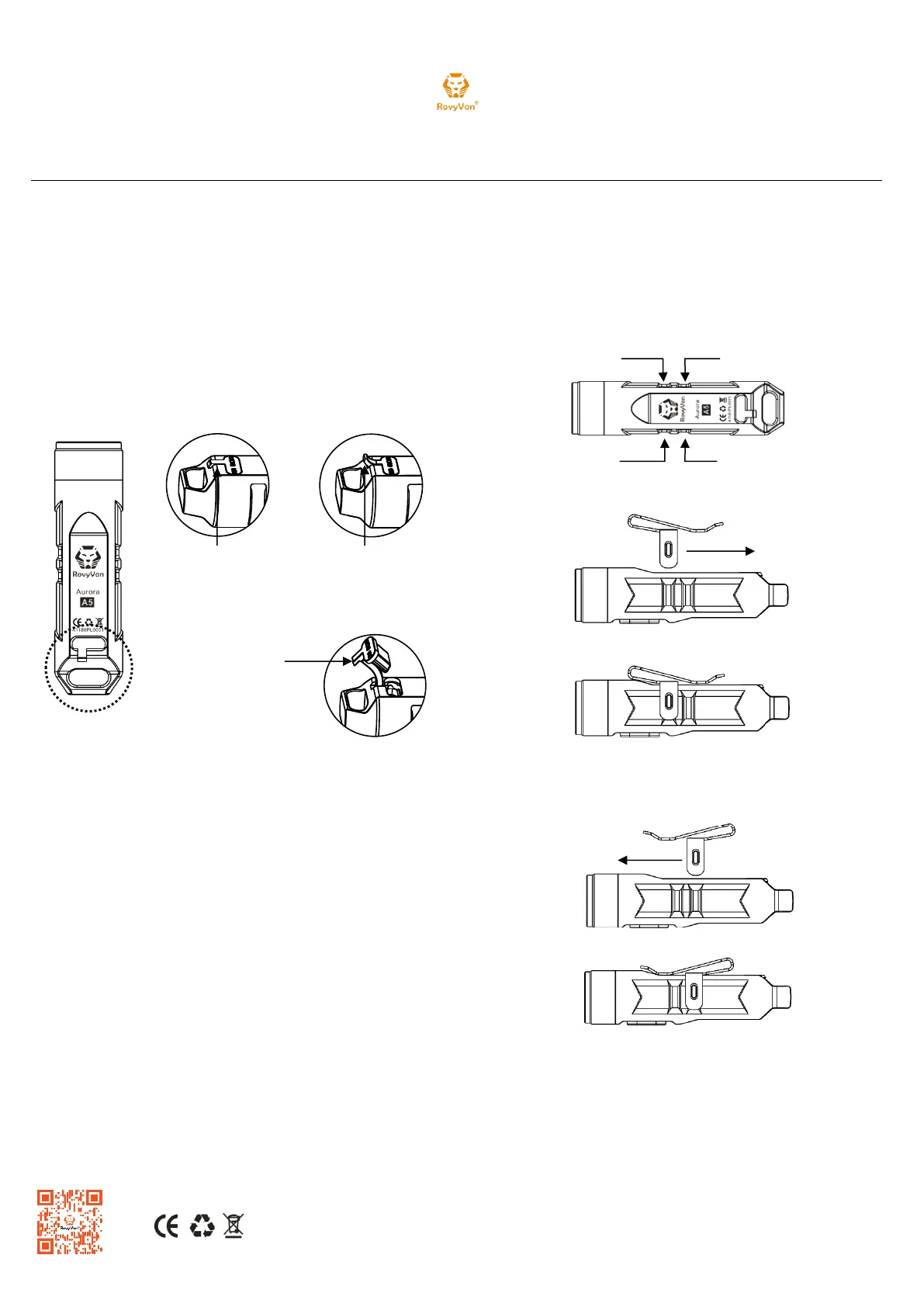
Open the Micro USB cover and connect a cable to charge as shown
in the diagram below
Charging indicator: Red is charging, Blue is fully charged
Charging time: 45 minutes (350 mA / 5V)
When the battery voltage is lower than 2.6V, the indicator will be
constantly on reminding to charge the light
When the battery voltage is lower than 2.4V the light will stop working
How to open the Micro USB cover
Battery Replacement
The battery can only be replaced by a professional technician.
Warning!
Do not look directly into the light when it is switched on.
Do not point the light at human or animal eyes.
Do not permit children to use the flashlight unsupervised.
Warranty Service
Two year international warranty.
After the free maintenance period has expired, the maintenance service will
charge for material expense only, free of labor expenses.
RUNFREE EQUIPMENT TECHNOLOGY (HONG KONG) CO., LTD
Website: www.rovyvon.com
E-mail: info@rovyvon.com
Address: UNIT 04, 7/F, BRIGHT WAY TOWER, NO.33 MONG KOK ROAD,
KOWLOON, HONG KONG.


 To Previous Page
 Loading...