If a device with the RoWrite App is paired before you write or sketch, you can edit
in real time. If a device was not paired before starting you can edit after Pages are
sent to the App.
To choose a Color press the Color circle.
To select a writing instrument press on an image. You can also change stroke
thickness and opacity.
48025 Fremont Boulevard, Fremont, CA 94538
(866) 397-0080 www.royole.com www.royole.com/support
©2018 Royole Corporation. The Royole logo, Royole, and RoWrite are registered trademarks of Royole Corporation. All rights reserved. ©2017
Google LLC All rights reserved. App Store is a registered trademarks of Apple Inc. Google Play is a trademark of Google LLC. The Bluetooth
®
word mark is a registered trademark owned by the Bluetooth SIG, Inc. Other trademarks and trade names are those of their respective owners.
+
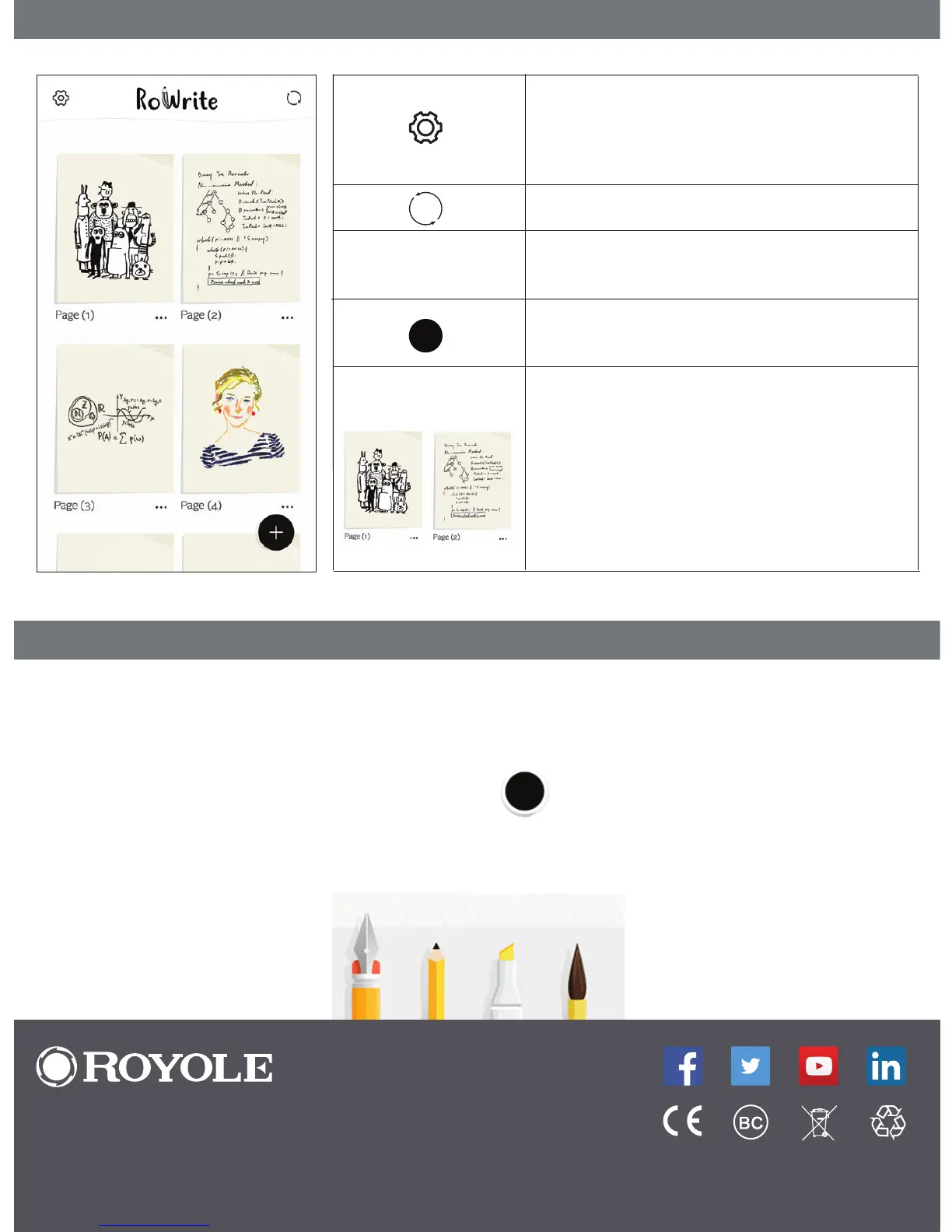
Set Prole, Pair a Device, See Battery Level,
Check App Version, Set Writing Instrument
Defaults, Watch Tutorials, Provide
Feedback, Shop On Royole Website
Sync Pages - Like RoWrite Button A
Rename, Share/Export, and Delete the
Page
Create New Page - Like RoWrite
Button B
Digitized copies of RoWrite notes
or sketches
Press and hold a Page image to merge,
move, and delete Pages.
Press a Page image to open it and then
edit, share/export, or delete.
Page Thumbnails
Editing With RoWrite App
...
Highlighter


 To Next Page