TITLE
REMOTE TECHNOLOGIES INC.
SHAKOPEE, MN 55379
0.93”
(23.62mm)
1.02” (25.9mm)
3.83” (97.28mm)
1.78” (45.2mm)
2.85” (72.39mm)
1.30” (33.02mm)
2.61” (66.29mm)
0.776”
(19.7mm)
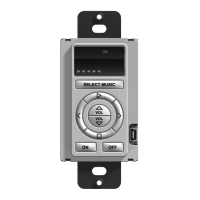
KX-1 Dimensions
0.715”
(18.15mm)
SELECT MUSIC
ON
OFF
PLAY
STOP
PREV
PAUSE
MUTE
NEXT
3.83” (97.28mm)
1.30” (33.02mm)
2.61” (66.29mm)
SELECT MUSIC
ON
OFF
PLAY
STOP
PREV
PAUSE
MUTE
NEXT
1.78” (45.2mm)
2.85” (72.39mm)
DRAWING NO.
REV ECO
REVISION RECORD
DESCRIPTION
DRFT
DATE
DATE
DATE
DATE
DFTG
CHKD
MFG
APPVL
TITLE
SIZE
DOCUMENT NO.
DO NOT SCALE DRAWING
DET LISTS
YES
NO
SHT OF
REV
DATE
MODEL
THIS IS AN UNPUBLISHED WORK CONTAINING REMOTE
TECHNOLOGIES INC. CONFIDENTIAL AND PROPRIETARY
INFORMATION. DISCLOSURE, USE OR REPRODUCTION
WITHOUT THE WRITTEN AUTHORIZATION OF REMOTE
TECHNOLOGIES INC. IS STRICTLY PROHIBITED.
PART NO.
REMOTE TECHNOLOGIES INC.
SHAKOPEE, MN 55379
01 ----- 10/08/2014 PRELIMINARY RELEASE DRF
KX-1-REAR-ARTWORK
02
1 1
KX-1_TOTAL . ASSEM
SCALE 1.000
KX1 AUDIO DISTRIBUTION KEYPAD
ETHERNET
WWW.RTICORP.COM
MASTER/SLAVE PORT CONTROL PORT
02 ----- 12/18/2014 ADD C-TICK NO. DRF
DRAWING NO.
REV ECO
REVISION RECORD
DESCRIPTION
DRFT
DATE
DATE
DATE
DATE
DFTG
CHKD
MFG
APPVL
TITLE
SIZE
DOCUMENT NO.
DO NOT SCALE DRAWING
DET LISTS
YES
NO
SHT OF
REV
DATE
MODEL
THIS IS AN UNPUBLISHED WORK CONTAINING REMOTE
TECHNOLOGIES INC. CONFIDENTIAL AND PROPRIETARY
INFORMATION. DISCLOSURE, USE OR REPRODUCTION
WITHOUT THE WRITTEN AUTHORIZATION OF REMOTE
TECHNOLOGIES INC. IS STRICTLY PROHIBITED.
PART NO.
REMOTE TECHNOLOGIES INC.
SHAKOPEE, MN 55379
01 ----- 10/08/2014 PRELIMINARY RELEASE DRF
KX-1-REAR-ARTWORK
02
1 1
KX-1_TOTAL . ASSEM
SCALE 1.000
KX1 AUDIO DISTRIBUTION KEYPAD
ETHERNET
WWW.RTICORP.COM
MASTER/SLAVE PORT CONTROL PORT
02 ----- 12/18/2014 ADD C-TICK NO. DRF
SELECT MUSIC
ON
OFF
PLAY
STOP
PREV
PAUSE
MUTE
NEXT
SELECT MUSIC
ON
OFF
PLAY
STOP
PREV
PAUSE
MUTE
NEXT
1.3 MM MINIMUM
SPACING BETWEEN
ALL LEGEND EDGES
AND ALL KEY EDGES
The KX1 is designed for ush-mount installations in walls or cabinets in a
standard single-gang electrical box or mud-ring.
MOUNTING HEIGHT: The recommended mounting height for the KX1 is
between 54 inches (1.37m) and 60 inches (1.52m) from the bottom of the
faceplate.
WALL PLATE: The KX1 is compatible with Decora
®
type wall plates.
The KX1 is turned-on by applying power to it and will enter an idle/screensaver
mode after a programmed time of inactivity. After entering idle mode, the KX1 is
activated by touching any button. RTI provides two power supply solutions which
are sold separately:
1) CB-8 Connecting Block: Wire a Cat-5 cable from the KX1 Control Port to
the RTI CB-8 Connecting Block (see diagram).
OR
2) Power Supply: Connect a power supply (+9VDC to +16VDC, .5A ) to the
“Ground” and “9-16VDC” pins of the Control Port (see diagram).
NOTE: The KX1 should NOT be powered directly from an RTI control processor.
It’s Under Control
®
CONNECTIONS
CONTROL PORT
The Control Port on the KX1 uses a Cat-5 cable with RJ-45 termination. When
used in conjunction with an RTI control processor (e.g. RTI XP-6) and an RTI
connecting block (e.g. RTI CB-8), this port serves as the power source for the
KX1 in addition to infrared and RS-485 communication (see diagram for pinout).
ETHERNET PORT
The KX1 Ethernet Port is designed for connection to an Ethernet network (LAN)
via Cat-5 cabling with RJ-45 termination. Communication between the KX1
and the RTI control processor takes place over the network, providing control
and feedback. In addition, the Integration Designer programming data le and
rmware updates may also take place over the Ethernet network.
MASTER/SLAVE PORT - DO NOT USE
This port is for future use.
USB PORT
The KX1 USB port (located on the front of the unit beneath the wall plate) is
used to update rmware and the programming data le using a USB A to Mini B
cable.
POWERING THE KX1
MOUNTING
KX1 (Rear View)
RESET
ETHERNET
EXPANSION
PORT 1 PORT 2 PORT 3
PORT 4
PORT 5
PORT 6
+
+ +
+ +
+
USB
RTI COM
POWER
STATUS
RS-232
POWER / IR
+12VDC TRIGGER
+3-24VDC SENSE
RELAYS (+30VDC, 5A MAX)
IR OUTPUT LEVEL
1
2
Model XP-6
Advanced Control Processor
RTI XP-6
Silkscreen Graphics
May 27, 2010
Scale 1:1
CB-8 Connecting Block
XP-6 Control Processor
DIMENSIONS
PROGRAMMING
THE KX1 INTERFACE
The KX1 display and buttons are programmed using the RTI Integration
Designer
®
Programming Software.* Normally each music source in the audio
system will be given it’s own “page” with the appropriate commands assigned to
the buttons, while the display will be programmed with text and graphics related
to the device being controlled.
*NOTE: Integration Designer is available to authorized RTI dealers only.
UPDATING FIRMWARE
It is highly recommended that this and all RTI products have the latest rmware
installed. The rmware can be found in the Dealer section of the RTI website
(www.rticorp.com). Install the rmware by running the rmware update le from
a PC using a USB cable (USB A to Mini B) or via the Ethernet network (LAN)
using the “Update Firmware” command in Integration Designer.
UPDATING SOFTWARE
RTI’s Integration Designer data les can be downloaded to the KX1 using a
USB cable (USB A to Mini B), or via the Ethernet network (LAN). If the KX1 is
hard-wired to a LAN and the router has DHCP enabled, the initial data le can be
downloaded over Ethernet.
KX1 REFERENCE
KX1 WIRING CONFIGURATION
Pin 8
Pin 7
Pin 6
Pin 5
Pin 4
Pin 3
Pin 2
Pin 1
Ground
Ground
Infrared
+9 to +16 VDC
+9 to +16 VDC
Infrared
RS-485-
RS-485+
Cat-5 Cable
Programmable
Function Buttons
USB
Programming Port
(Mini B)
Wall plate
Threaded Holes (2)
Electrical Box
Mounting Holes (2)
KX1 Front
Display
Ambient Light
Sensor
Master/Slave Port
DO NOT CONNECT
Control Port
(Cat-5 Cable/
RJ-45 Jack)
Control Port Pin-Out
Front Rear
Cat-5 Cable
KX1
1.2” In-Wall Audio Distribution Keypad
Source Select
Button
TITLE
REMOTE TECHNOLOGIES INC.
SHAKOPEE, MN 55379
0.93”
(23.62mm)
1.02” (25.9mm)
3.83” (97.28mm)
1.78” (45.2mm)
2.85” (72.39mm)
1.30” (33.02mm)
2.61” (66.29mm)
SELECT MUSIC
ON
OFF
PLAY
STOP
PREV
PAUSE
MUTE
NEXT
3.83” (97.28mm)
1.30” (33.02mm)
2.61” (66.29mm)
SELECT MUSIC
ON
OFF
PLAY
STOP
PREV
PAUSE
MUTE
NEXT
1.78” (45.2mm)
2.85” (72.39mm)
The KX1 has local settings that can be adjusted directly through the control
panel. Please note that changes made directly in the KX1 control panel will be
overwritten by changes made in Integration Designer the next time a system le
is downloaded into the unit.
ACCESSING THE CONTROL PANEL
To display the Control Panel, you can press and hold the “OFF” button while
applying power to the KX1. You can also assign a “Control Panel” page link to a
button in the Integration Designer programming.
ADJUSTABLE SETTINGS
• Backlight Level • Time Out • Sound • Network Information
CONTROL PANEL
Backlit Volume
Level Bar
USB Port
(USB A to Mini B)
Ethernet
Status LED
Ethernet Port
(Cat-5 Cable/
RJ-45 Jack)
Ethernet Port
(Cat-5 Cable/
RJ-45 Jack)
Ethernet
Router/Switch
Master/Slave Port
DO NOT CONNECT
AV Receiver
Distributed
Audio System
Media Player/
Server
Cat-5 Cable


 To Previous Page
 Loading...