MOUNTING
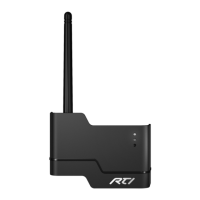
The ZM-24 can be mounted on a shelf, wall, or cabinet. See below for recommended positioning. To extend the coverage
area, additional ZM-24 modules may be installed 50-100 feet (15-30m) away from another ZM-24 module.
IMPORTANT INSTALLATION NOTES:
The power supply that comes with the ZM-24 should only be used to power the ZM-24 when it is being used as a
“repeater”. Do not plug the power supply into a ZM-24 that is wired directly to a control processor.
Some RTI Control Processors may require a ZM-24 module for two-way Zigbee
®
communication. Check corresponding
reference guides for compatibility and connection instructions.
No Ethernet networking components (routers, hubs, switches) should be used for extending wiring from control
processor to ZM-24.
ZM-24 modules should be placed at least 3 feet (1m) from electronic components and at least 8 feet (2.5m) from
2.4GHz wireless access points or cordless phone systems.
If additional ZM-24 modules are used to extend range, a slow down in network performance may occur.
Installation & Operation
It’s Under Control
®
Product Contents
Contents within the box include the following items:
• One (1) ZM-24 2.4 GHz Transceiver Module
• One (1) ZM-24 mounting bracket
• Two (2) 6 - 32 x 3 inch athead mounting screws
• One (1) Foldable antenna
• One (1) 6 ft. (2m) Cat 5 cable with RJ45 ends
• One (1) Reference guide
• One (1) Power supply, 12V 1A
ZM-24
2.4GHz Zigbee
®
Transceiver Module
50 ft. - 100 ft.
(15m - 30m)
3 ft. (1m)
Minimum
4 ft. (1.2m)
Minimum
Equipment Rack
4 ft. (1.2m)
Minimum
Wireless
Access Point
8 ft. (2.5m)
Minimum
INSTALLATION
The ZM-24 connected to an RTI control processor will become the “coordinator” module and no additional programming is
required. Additional ZM-24 modules may be used in “repeater” mode, creating a bi-directional network to extend wireless
coverage. ZM-24 modules used in “repeater” mode must be programmed using a ZB-Pro Professional 2.4GHz Network
Management Tool.
Programming a ZM-24 for “repeater” mode:
Plug in and attach the ZM-24 power supply.
Open the Integration Designer programming software and system le.
Open the “Communications” menu and click on “Congure ZM-24 Wireless Repeater”.
Follow the steps of the ZM-24 update wizard.
PROGRAMMING NOTES:
Please refer to the ZB-Pro operation guide for instructions on its use.
ZM-24 must be within 10 feet (3m) of a ZB-Pro for an update to occur.
The ZM-24 update process requires the programming button to be pressed.
Programming
Installations with more than one processor must have ZM-24 modules plugged into each processor. As long as the ZM-24
modules are within communication range of each other, a wireless network will be established. Additional ZM-24 modules
may be used in “repeater” mode to extend wireless coverage.
Connections
RS-232 (1)
POWER / IR
SENSE
IR / SERIAL / SENSE
EXPANSION +12VDC, 1A
MULTI-PURPOSE I/O PORTS
RS-232 (2)
ETHERNET
RS-232 (3)
TRIGGERS
RELAYS
RTI COM
POWER
1
2
3
1
2
3
1 2
3
GND
INPUT
HIGH OUT
A
B
A
B
A
B
4
1 2 3
5
6
+12VDC
3-24VDC 12V,100mA MAX 3A@30VDC MAX
GND
GND
RTI Remote
Control
Television Receiver
Lighting
XP-6s Control Processor
Wireless Zigbee
®
Communication
RS-232 (1)
POWER / IR
SENSE
IR / SERIAL / SENSE
EXPANSION +12VDC, 1A
MULTI-PURPOSE I/O PORTS
RS-232 (2)
ETHERNET
RS-232 (3)
TRIGGERS
RELAYS
RTI COM
POWER
1
2
3
1
2
3
1 2
3
GND
INPUT
HIGH OUT
A
B
A
B
A
B
4
1 2 3
5
6
+12VDC
3-24VDC 12V,100mA MAX 3A@30VDC MAX
GND
GND
XP-6s Control Processor
Shades
HVAC
ZM-24
Power
Supply
Power
Supply
Programming
Button
Status Light
(Red)
Activity Light
(Green)
Antenna
RTI Com
Port
ZM-24 REFERENCE


 To Previous Page
 Loading...