EasyManua.ls Logo

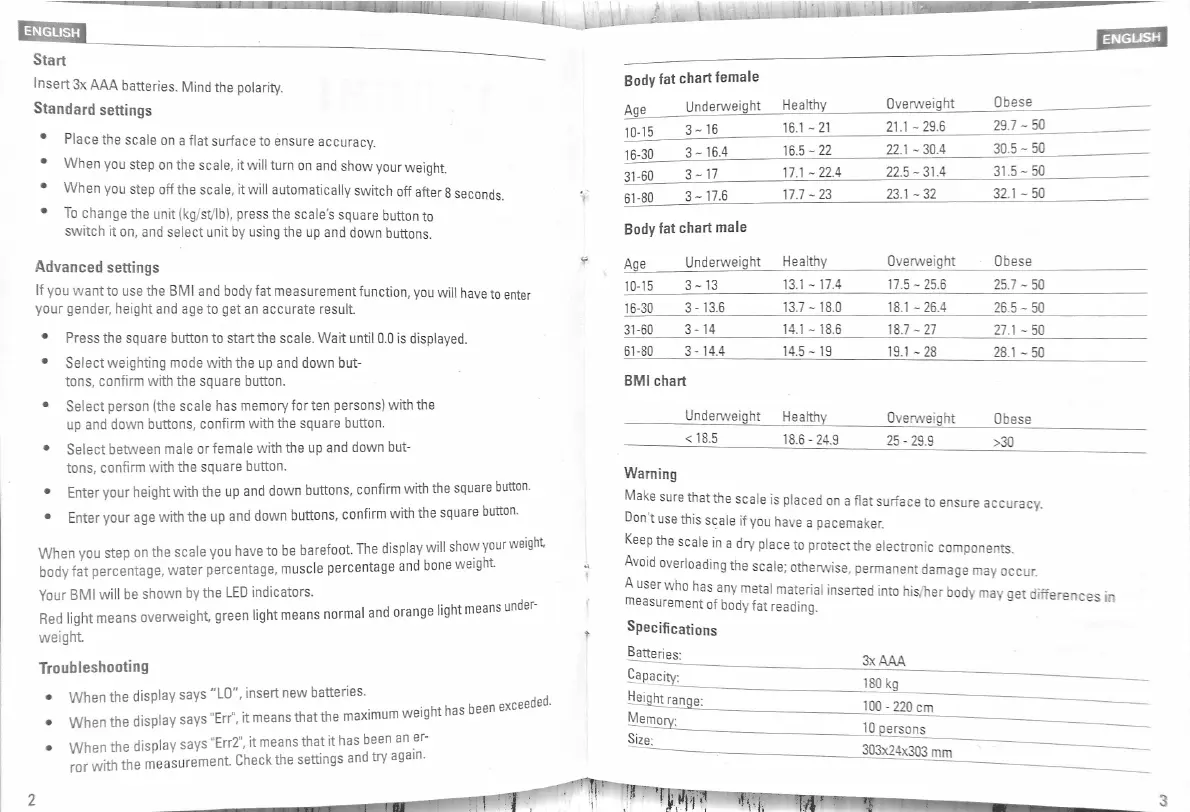
Rubicson 48430 - Getting Started and Standard Settings; Advanced Measurement Functions; Understanding Scale Indicators and Results; Troubleshooting and Error Messages

Default Icon
4 pages
Print Icon
To Next Page IconTo Next Page
To Previous Page IconTo Previous Page
Loading...
ENGLISH
ENGUSH
Start
Insert
3
x
AAA
batteries
.
Mind
the
polarity
.
Standard
settings
Place
the
scale
on
a
flat
surface
to
ensure
accuracy
.
When
you
step
on
the
scale
,
it
will
turn
on
and
show
your
weight
.
When
you
step
off
the
scale
,
it
will
automatically
switch
off
after
8
seconds
To
change
the
unit
(
kg
/
st
/
lb
)
,
press
the
scales
square
button
to
switch
it
on
,
and
select
unit
by
using
the
up
and
down
buttons
.
Body
fat
chartfemale
Underweight
Healthy
Obese
Overweight
Age
29.7
-
50
21.1
-
29.6
16.1
-
21
3
-
16
10
-
15
30.5
-
50
22.1
-
30.4
16.5
-
22
3
-
16.4
16
-
30
31.5
-
50
22.5
-
31.4
17.1
-
22.4
31
-
60
3
-
17
32.1
-
50
23.1
-
32
17.7
-
23
61
-
80
3
-
17.6
Body
fat
chart
male
Overweight
Obese
Underweight
Healthy
Age
Advanced
settings
lf
you
want
to
use
the
BMI
and
body
fat
measurement
function
,
you
will
have
to
enter
your
gender
,
height
and
age
to
get
an
accurate
result
13.1
-
17.4
17.5
-
25.6
25.7
-
50
10
-
15
3
-
13
13.7
-
18.0
16
-
30
3
-
13.6
18.1
-
26.4
26.5
-
50
14.1
-
18.6
31
-
60
3
-
14
18.7
-
27
27.1
-
50
Press
the
square
button
to
start
the
scale
.
Wait
until
0.0
is
displayed
.
Select
weighting
mode
with
the
up
and
down
but
-
tons
,
confirm
with
the
square
button
.
Select
person
(
the
scale
has
memoryforten
persons
)
with
the
up
and
down
buttons
,
confirm
with
the
square
button
.
61
-
80
3
-
14.4
14.5
-
19
19.1
-
28
28.1
-
50
BMI
chart
Underweight
Healthy
Overweight
Obese
<
18.5
18.6
-
24.9
25
-
29.9
>
30
Select
between
male
or
female
with
the
up
and
down
but
-
tons
,
confirm
with
the
square
button
.
Enter
your
height
with
the
up
and
down
buttons
,
confirm
with
the
square
button
.
Enter
your
age
with
the
up
and
down
buttons
,
confirm
with
the
square
button
.
When
you
step
on
the
scale
you
have
to
be
barefoot
.
The
display
will
show
your
weight
body
fat
percentage
,
water
percentage
,
muscle
percentage
and
bone
weight
.
Your
BMI
will
be
shown
by
the
LED
indicators
.
overweight
,
green
light
means
normal
and
orange
light
means
unde
Warning
Make
sure
thatthe
scale
is
placed
on
a
flat
surface
to
ensure
accuracy
.
Don
t
use
this
scale
if
you
have
a
pacemaker
.
Keep
the
scale
in
a
dry
place
to
protectthe
electronic
components
.
Avoid
overloading
the
scale
;
otherwise
.
permanent
damage
may
occur
.
*
*
-
*
*
"
"
Specifications
Batteries
:
Dapacity
^
Heiqhtrange
:
Red
light
means
weight
Troubleshooting
*
3
x
AAA
180
kg
When
the
display
says
"
LO
"
,
insert
new
batteries
.
Erru
,
it
means
that
the
maximum
weight
has
been
exc
eeded
.
100
-
220
cm
10
persons
303
x
24
x
303
mm
When
the
display
says
.
When
the
display
says
Err
2
,
it
means
that
it
has
been
an
er
-
ror
with
the
measurement
Check
the
settings
and
try
again
.
Size
T
;
r
ipffj
t i
'
4
2
3

Related product manuals