6
7
ENGLISH ENGLISH
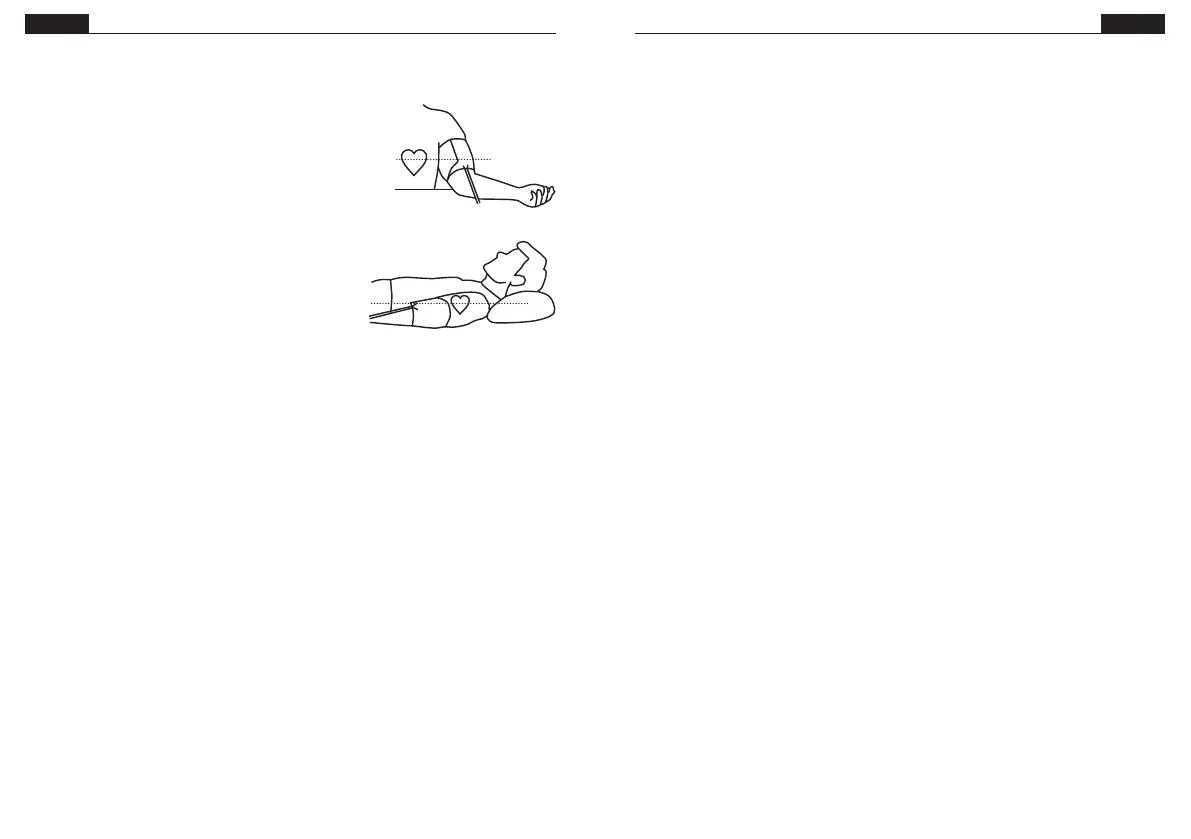
Measuring
Sitting
Sit down with your feet to the oor. Rest your arm
and hand against a surface, e.g. a table, and let the
air tube run along your arm. The cuff should be at the
same height as your heart.
Lying down
Lie down on your back. Hold your arm along your body
with your palm turned up. The cuff should be at the
same height as your heart.
Measuring
Always measure on the same arm.
1. Press START.
2. The display soon shows the chosen
memorybank (U1 - U4). Press MEM
to switch. Each memory bank can
contain 30 measurements.
3. The blood pressure monitor seeks
zero pressure before it starts to inate
the cuff. The cuff is then deated
and the measurement is made.
4. The monitor calculates blood pressure
and pulse and displays the result. If an
irregular heartbeat is discovered, the
heart symbol is also displayed. The
measurement is saved to the memory bank.
The blood pressure monitor shuts down automatically
if no button has been pressed for one minute. Press
START to manually shut down the monitor during or
after the measurement.
Memory function
The blood pressure monitor is equipped with four memory banks, U1- U4. Each bank
can store up to 30 measurements each.
Choose memory group
From the time mode, press START. The display will show all symbols as a test. After
this it will show the current memory group (1-4). Press MEM to navigate between
the four groups. Press START to conrm the chosen group or wait ve seconds. Press
START or don't press any buttons for 60 seconds to return to the time mode.
Show saved measurements
Press MEM while in standby mode to show saved measurements. The current
memory bank will blink and the amount of measurements will be displayed.
Keep pressing START to navigate between the four memory groups and pressing
MEM to conrm. The meter will show the average value of the latest saved
measurements taken between 05 - 09 the last seven days for the current memory
bank. If no results are stored within this timespan the display will show zeros. Press
MEM again to show the average value of the latest saved measurements taken
between 18 - 20 the last seven days for the current memory bank. If no results are
stored within this timespan the display will show zeros. Press MEM once more to
show the most recent result, blood pressure and pulse will be displayed individually
and eventual warning symbols. You can keep pressing MEM to browse through the
next separate result. Press the START button to turn the display off or wait a minute
without pressing any buttons.
Delete saved measurements
While watching measurements as described above, press and hold MEM for three
seconds to delete all measurements.
New measurements will replace the oldest measurements if the memory bank already
contains 120 measurements.


 To Next Page
 Loading...