This document outlines the features and usage instructions for a pair of wireless earphones, likely a model named "Ryght DYPLO 2," along with their charging case.
Function Description
The device consists of two wireless earphones and a portable charging case. The earphones are designed for audio playback and hands-free communication, connecting wirelessly to a source device (e.g., a smartphone) via Bluetooth. The charging case serves to store and recharge the earphones, extending their battery life.
Important Technical Specifications
Charging:
- Charging Case Input: Maximum 5VDC - 0.5A.
- Charging Time (Case): Approximately 3 hours for a full charge.
- Charging Time (Earphones in Case): Approximately 2 hours for a full charge, indicated by a solid light on the earphones and 100% battery icon on the case.
Battery Life & Indicators:
- Earphones: When charging in the case, a blinking light indicates charging, while a solid light indicates a full charge. A battery icon with 100% indicates full charge.
- Case: A blinking light on the case indicates it is charging. A solid light and 100% battery icon indicate a full charge. A blinking light on the case when earphones are inserted indicates the case is charging the earphones.
Usage Features
1. Charging:
- Charging the Earphones: Place the earphones into the charging case. The earphones will begin charging automatically. A blinking light on the earphones indicates charging, and a solid light indicates a full charge. The case itself will show a blinking light when charging the earphones.
- Charging the Case: Connect the charging case to a power source using a USB cable. A blinking light on the case indicates it is charging, and a solid light with a 100% battery icon indicates a full charge.
2. Pairing (Bluetooth Connection):
- Initial Pairing:
- Ensure Bluetooth is enabled on your smartphone.
- Remove both earphones from the charging case. They will automatically enter pairing mode (indicated by blinking lights).
- On your smartphone, search for Bluetooth devices and select "Ryght DYPLO 2" from the list.
- Once connected, a confirmation sound will be heard, and the earphones will be ready for use.
3. Controls:
The earphones feature multi-function buttons (likely touch-sensitive or physical buttons) on both the left (L) and right (R) earbuds, allowing control over music playback, calls, and voice assistant activation.
-
Music Playback Controls:
- Play/Pause: Press 1x on either L or R earphone.
- Next Track: Press 2x on the R earphone.
- Previous Track: Press 2x on the L earphone.
- Volume Up: Press 3x on the R earphone.
- Volume Down: Press 3x on the L earphone.
-
Call Controls:
- Answer/End Call: Press 1x on either L or R earphone.
- Reject Call: Press 2sec on either L or R earphone.
- Voice Assistant: Press 3x on either L or R earphone.
-
Power On/Off:
- Method 1 (Manual):
- Power On: Press and hold the button on both L and R earphones for 3 seconds.
- Power Off: Press and hold the button on both L and R earphones for 4 seconds.
- Method 2 (Using Case):
- Power On: Remove earphones from the charging case.
- Power Off: Place earphones back into the charging case.
Maintenance Features
1. Resetting the Device (Factory Reset):
This procedure can be useful for resolving connectivity issues or preparing the earphones for a new user.
After the reset, the earphones will be in their default state, and you will need to repeat the pairing process (Section 2) to connect them to your device again.
Important Warning
Hearing Safety:
Listening to music at high volume levels for prolonged periods can lead to permanent hearing defects. It is strongly advised to use the earphones at moderate volume levels to protect your hearing.

 Need help?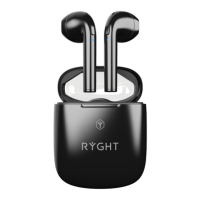

 To Next Page
 General